XHawk
What is XHawk?
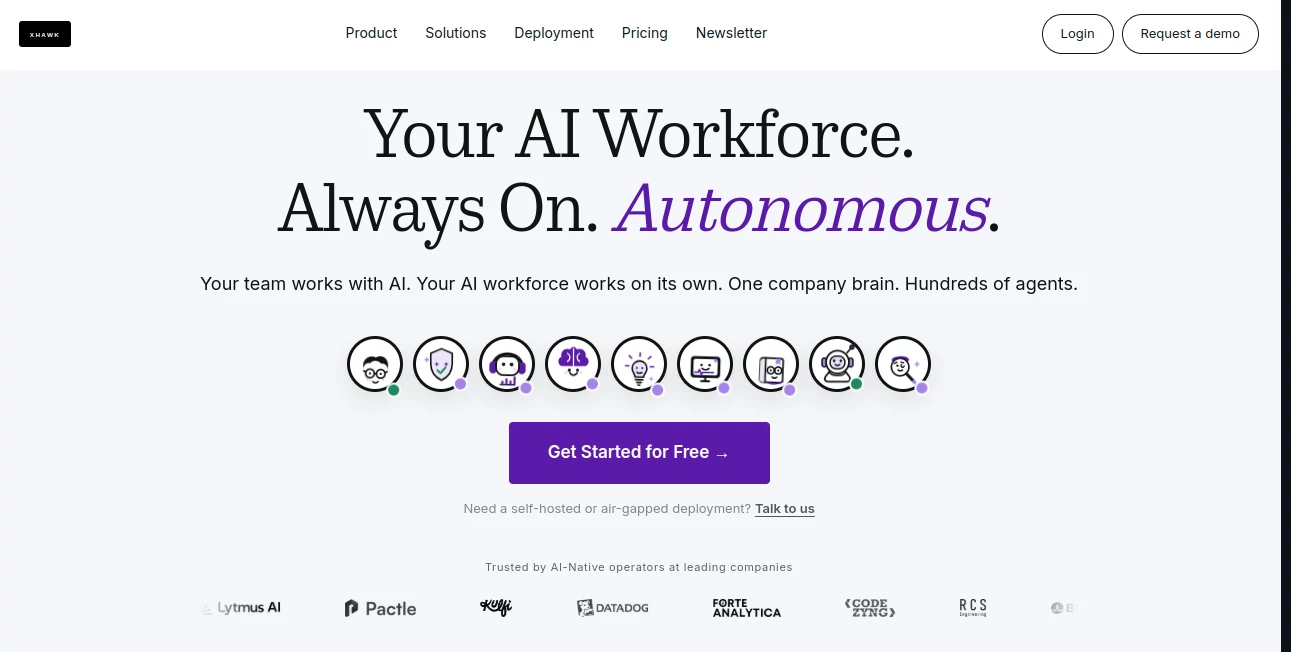
XHawk is built for companies that want AI to do more than answer prompts. It brings together a workforce of specialized AI agents that can plan, research, analyze data, write and review code, handle documentation, verify work, and support day-to-day operations. Instead of relying on one assistant for every task, teams can assign different jobs to agents designed for specific responsibilities.
The platform is particularly interesting for engineering and product teams because agents can continue working after the human team has stepped away. Tasks can be triggered by schedules, GitHub events, CI failures, Slack activity, webhooks, or work items on a Kanban board. This makes it possible to turn repetitive processes into ongoing workflows rather than another list of tasks waiting for someone to complete.
At the center of the platform is a shared company knowledge layer. Code, documents, tickets, pull requests, incidents, conversations, emails, and databases can provide context to the agents. In practical terms, this means an agent does not have to start every task from a blank page.
Key Features
- Autonomous AI agents: Specialized agents can handle planning, coding, research, data analysis, verification, security, documentation, and operational tasks.
- Multi-agent collaboration: Agents can call and coordinate with one another, allowing longer workflows to continue without constant human intervention.
- Shared company brain: Business and engineering context can be connected across code, documents, conversations, tickets, databases, and other sources.
- 24/7 background execution: Agents can work from events, schedules, or queued tasks instead of waiting for someone to type a prompt.
- Multi-model architecture: Different models can be selected for different jobs, including frontier, open-source, and private models.
- Workflow automation: Teams can create recurring processes such as reports, documentation updates, issue triage, testing, and other operational routines.
- Execution tracking: Agent decisions, actions, artifacts, and interactions can be traced and reviewed.
- 100+ integrations: The platform is designed to work across a broad range of applications and collaboration environments.
User Interface
The interface is designed around the idea of a shared workspace rather than a traditional chatbot window. Teams can interact with agents through connected tools such as Slack and Kanban workflows, while agents can also operate in the background.
This approach makes sense for professional teams. A developer might assign a repository task, a product manager could request competitive research, and a data analyst could ask for a recurring business report without switching between several unrelated AI applications.
The workflow also supports pre-built agents as well as custom behaviors. That gives teams a practical starting point while leaving room to adapt the system to internal processes.
Accuracy & Performance
Performance depends heavily on the model selected, the quality of the connected information, and the complexity of the task. The platform addresses this by giving agents access to shared organizational context instead of treating every request as an isolated conversation.
One useful feature is asynchronous batch execution. Teams can queue multiple jobs and let them run while people are offline. The company states that batch execution can reduce frontier model costs by up to 50%, which can make a noticeable difference when large numbers of tasks need to be processed.
Another advantage is traceability. Rather than simply receiving a final answer, teams can review what an agent did, which can be valuable when AI is involved in engineering, analysis, or operational work.
Capabilities
The range of capabilities goes well beyond coding assistance. There are agents for planning, implementation, code review, verification, research, data analysis, brainstorming, SRE work, documentation, and company knowledge.
For engineering teams, the platform can support workflows around repositories, pull requests, testing, debugging, documentation, and security checks. Product teams can use it for customer feedback synthesis, product specifications, competitive intelligence, and self-service analytics.
The data analysis capabilities are also worth highlighting. Users can ask questions about product metrics and business information in plain English, making it easier for non-technical team members to obtain useful insights without waiting for a manually prepared report.
The system can also preserve context between conversations and tasks. Over time, this creates a more useful knowledge base for both humans and agents, particularly in organizations where important decisions are spread across code repositories, documents, meetings, tickets, and chat conversations.
Security & Privacy
Security is an important part of the platform's architecture. Agents can operate inside isolated sandboxes, while organizations have control over what individual agents can access and use.
For companies with stricter infrastructure requirements, deployment options include managed cloud, hybrid deployment, and running the platform within an organization's own cloud environment. The cloud-premise option supports AWS, Google Cloud, and Azure, with the company's data remaining inside its own VPC.
Enterprise customers can also use private deployment, bring their own models, establish their own security boundaries, and use SSO or SAML authentication. These options make the platform more suitable for organizations that cannot simply send sensitive engineering or business information to a standard public AI service.
Use Cases
Software Development: Engineering teams can delegate implementation, debugging, testing, code reviews, documentation, and verification tasks to specialized agents. This is especially useful for repetitive work that normally consumes valuable developer time.
Project Management: Product and engineering leaders can use agents to break larger goals into weekly milestones, convert features into actionable tasks, monitor progress, and keep project context connected to actual development work.
Data Analysis: Business teams can ask questions about product metrics, customer information, and experiments using natural language. Recurring analytics reports can also be automated.
Research: Research agents can investigate topics, collect relevant information, and prepare findings for teams that need faster access to background knowledge.
Customer Feedback: Tickets, conversations, reviews, and other customer signals can be processed to identify recurring problems and product opportunities.
Operations: Scheduled reports, issue triage, documentation updates, monitoring tasks, and other repetitive workflows can run automatically in the background.
Pros and Cons
- Pros: Autonomous background agents, strong multi-agent workflows, shared organizational context, broad integrations, multi-model support, detailed execution tracking, flexible deployment options, and support for engineering, product, analytics, and operational teams.
- Cons: The platform is primarily aimed at organizations and AI-native teams, so casual users may find its architecture more sophisticated than they need. Getting the most value also requires connecting useful company data and designing workflows around real business processes.
Pricing Plans
The platform offers a free starting option with 500 credits during the first month. No credit card or sales call is required, and the free plan includes access to the full feature set with support for up to five users.
The Pro plan costs $20 per month and provides 1,000 credits. Credits are shared across the workspace, can roll over to the following month, and can be topped up when additional usage is required. Automatic top-ups can also be configured with a monthly spending limit.
Enterprise pricing is customized for organizations that need a private deployment. Enterprise features include running the platform in the company's own cloud, bringing private models, SSO/SAML authentication, dedicated solution support, and SLA guarantees.
How to Use It
Getting started is relatively straightforward. First, connect relevant code and data sources so the agents have access to the context they need. These sources can include repositories, documents, communication systems, databases, and other business information.
Next, choose the appropriate pre-built agents or configure custom behaviors for specific workflows. A development team, for example, could create a process around implementation, testing, review, and documentation.
After that, define triggers. Tasks can be launched through schedules, GitHub events, CI failures, Slack activity, webhooks, or Kanban work items. Once the workflow is running, agents can handle the mechanical parts while people remain responsible for decisions, approvals, and outcomes.
A useful approach is to begin with one repetitive workflow rather than attempting to automate an entire department at once. Once the results are reliable, additional agents and automations can be introduced gradually.
Comparison with Similar Tools
Traditional AI coding assistants are generally designed around an active developer who asks a question or requests a change. This platform takes a broader approach by treating AI as an operational workforce that can continue working when nobody is sitting at the keyboard.
Another major distinction is the use of multiple specialized agents. Instead of expecting one assistant to plan a feature, implement it, test it, review it, and document it, separate agents can participate in different stages of the same workflow.
The shared knowledge layer is another important difference. When engineering decisions, repository information, documentation, tickets, and conversations are connected, agents can work with organizational context rather than relying solely on the information included in an individual prompt.
This makes the platform better suited to teams looking for ongoing automation and coordinated AI work than users who simply want a conversational coding assistant.
Conclusion
For teams experimenting with AI beyond simple chat and autocomplete, this platform offers a much more ambitious model: AI agents that operate as part of the organization and continue working in the background.
Its combination of specialized agents, shared company knowledge, workflow automation, multi-model support, and detailed execution tracking makes it particularly compelling for software companies, engineering departments, product teams, and organizations with large amounts of repetitive operational work.
The strongest value comes when the platform is connected to real company data and given well-defined workflows. In that environment, it can move AI from an occasional productivity tool into a persistent layer of the team's daily operations.
Frequently Asked Questions (FAQ)
What is this platform designed for?
It is designed for organizations that want AI agents to perform ongoing work across software development, analytics, product management, research, documentation, and business operations.
Can multiple AI agents work together?
Yes. Agents can coordinate with one another and pass work between specialized roles, making it possible to build longer automated workflows.
Can agents work without a person constantly monitoring them?
Yes. Background agents can be triggered by schedules, events, webhooks, CI failures, and other signals. Teams can still review and control their actions through execution tracking and access controls.
Does it support different AI models?
Yes. The platform is designed around a multi-model approach, allowing different models to be used for different tasks and reducing dependence on a single model provider.
Is there a free plan?
Yes. The free option includes 500 credits for the first month, supports up to five users, and does not require a credit card.
Does it offer enterprise deployment?
Yes. Enterprise customers can choose private deployment, including running the platform in their own cloud environment, with options such as SSO/SAML, private models, dedicated support, and SLA guarantees.
Can it be used for project management?
Yes. Agents can help create roadmaps, break goals into actionable work, track progress, and connect planning with engineering execution.
Can it analyze business data?
Yes. AI data analysts can work with connected business information and answer questions about product metrics, customer insights, experiments, and other data using natural language.
Who is most likely to benefit from it?
Software companies, engineering teams, product organizations, founders, CTOs, VP-level technology leaders, and businesses looking to automate repetitive knowledge work are likely to get the most value from the platform.
AI Data Mining , AI Project Management , AI Code Assistant , AI Developer Tools .
These classifications represent its core capabilities and areas of application. For related tools, explore the linked categories above.

XHawk Alternatives Product

Ideavibes AI

Ptero

Velokey
Dedoctive

DDS Gub

Jujutsu Zero…

Ito AI

AutoChangelog
Layven