2Markdown
What is 2Markdown?
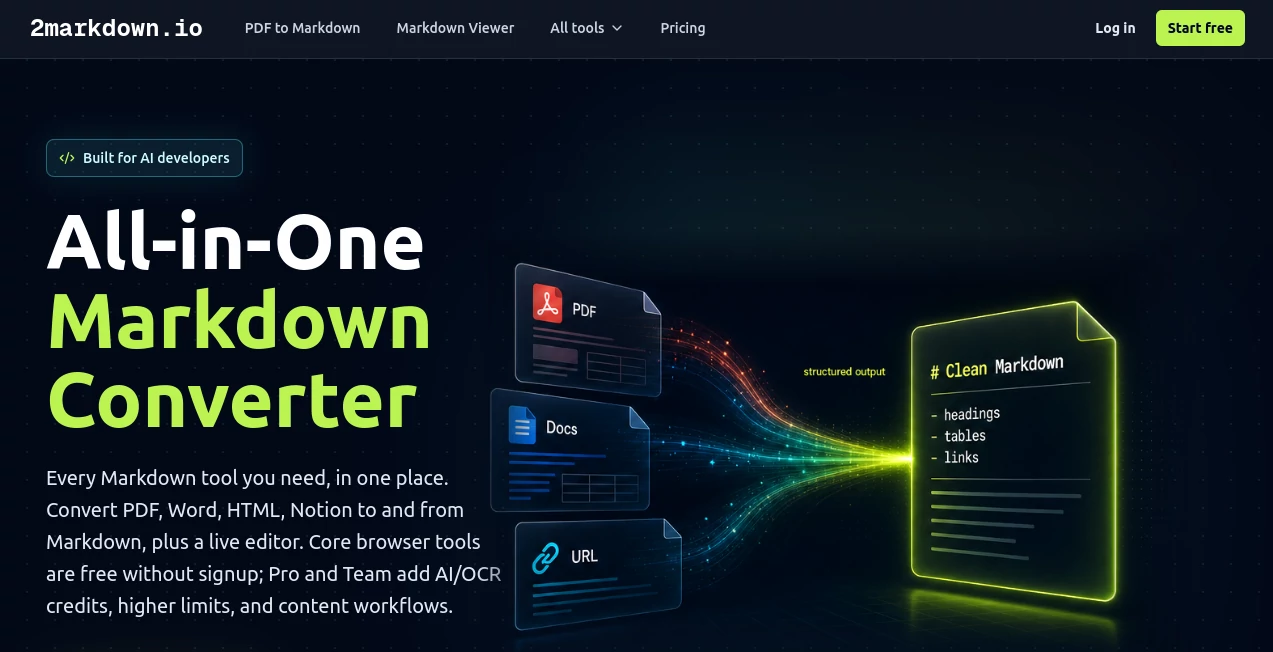
Working with documents from different sources often creates unnecessary formatting headaches. Whether the goal is preparing files for AI applications, migrating documentation, organizing research notes, or publishing technical content, converting everything into clean Markdown can save hours of manual editing.
This platform offers an impressive collection of browser-based conversion tools that transform PDFs, Word documents, HTML pages, spreadsheets, web pages, and many other formats into structured Markdown. The workflow feels straightforward, making it suitable for developers, technical writers, researchers, students, and content creators alike. Instead of forcing users to install complex software or learn command-line utilities, everything happens through a clean online interface with minimal effort. Most standard conversions run directly inside the browser, while advanced AI and OCR processing is available only when users explicitly choose it, giving them greater control over privacy and data handling. :contentReference[oaicite:0]{index=0}
Key Features
- Convert PDF files into editable Markdown
- Support for Word, HTML, EPUB, RTF, LaTeX, CSV, JSON, Excel, and more
- Convert web pages and public links into structured Markdown
- Built-in live Markdown viewer and editor
- Export Markdown to HTML, PDF, DOCX, Google Docs, Notion, and other formats
- Optional AI-powered OCR for scanned documents
- Browser-based processing for most standard conversions
- No software installation required
- Designed for AI workflows, documentation, and knowledge management
- Supports CommonMark and GitHub Flavored Markdown
User Interface
The interface is refreshingly simple. Users select a conversion tool, upload a document or paste content, and immediately enter a shared workspace where they can preview, edit, copy, or download the generated Markdown. Navigation is intuitive, and each converter follows the same consistent workflow, making it easy to switch between different document types without any learning curve.
Accuracy & Performance
The conversion engine preserves headings, paragraphs, lists, links, emphasis, and many common formatting elements with impressive consistency. Native documents are processed quickly inside the browser, while scanned files can optionally use AI-powered OCR to recover text from images. This combination provides reliable results for both everyday documents and more challenging files. :contentReference[oaicite:1]{index=1}
Capabilities
Beyond simple document conversion, the platform supports complete Markdown workflows. Users can preview rendered documents, edit content before exporting, migrate documentation into knowledge bases, prepare clean datasets for retrieval systems, organize research notes, and generate AI-friendly content that works well with modern language models. It is equally useful for technical documentation, note-taking systems, publishing pipelines, and collaborative writing projects.
Security & Privacy
Privacy is one of its strongest selling points. Most conversions happen locally inside the browser, meaning documents never leave the user's device. When advanced AI or OCR processing is needed for scanned files, users must explicitly approve the upload before any external processing occurs. According to the service documentation, converted files are not permanently stored, making it an excellent choice for confidential documents and sensitive business information. :contentReference[oaicite:2]{index=2}
Use Cases
- Preparing documents for ChatGPT, Claude, and other LLMs
- Building RAG knowledge bases
- Migrating documentation into Markdown-based systems
- Converting research papers into editable notes
- Publishing developer documentation
- Creating Obsidian knowledge vaults
- Moving content between Notion and Markdown
- Cleaning HTML exports from CMS platforms
- Converting tables into Markdown format
- Editing Markdown before publishing
Pros and Cons
Pros
- Large collection of conversion tools in one platform
- Fast browser-based processing
- No installation required
- Excellent privacy-first approach
- Live Markdown preview and editing
- Supports many document formats
- Useful for AI and documentation workflows
Cons
- Advanced OCR requires AI processing
- Some complex layouts may require manual adjustments
- Batch processing options are still limited
Pricing Plans
The core browser-based tools are available free without registration, making them ideal for occasional users. Paid Pro and Team plans introduce additional AI and OCR credits, higher usage limits, expanded workflows, team collaboration features, and an ad-free experience for professionals who work with large document collections regularly. :contentReference[oaicite:3]{index=3}
How to Use 2markdown
- Select the appropriate conversion tool.
- Upload a supported file or paste your content.
- Allow the converter to process the document.
- Review the generated Markdown inside the editor.
- Edit if necessary.
- Copy, download, or export the final result.
Comparison with Similar Tools
Many document converters focus on only one or two formats or require desktop software and complicated setup. This solution stands out by combining dozens of Markdown utilities inside a single browser-based workspace. The integrated editor, privacy-first design, optional AI processing, and broad support for modern documentation workflows make it particularly attractive for developers, researchers, technical writers, and AI professionals who frequently move information between different systems.
Conclusion
For anyone who works extensively with Markdown, documentation, or AI-ready content, this platform delivers an impressive balance of simplicity and power. Its broad format support, local-first privacy model, clean editing environment, and thoughtful workflow remove much of the friction normally associated with document conversion. Whether the task involves preparing training material for language models, organizing research, publishing technical documentation, or simply converting everyday files, it provides an efficient and dependable solution that easily earns a place in any modern productivity toolkit.
Frequently Asked Questions (FAQ)
Is the platform free to use?
Yes. Most browser-based conversion tools are available without creating an account, while advanced plans provide additional AI features and higher usage limits.
Does it support scanned PDF documents?
Yes. Optional AI-powered OCR can process scanned files that do not contain selectable text.
Are my files stored on remote servers?
Most standard conversions happen locally in your browser. AI processing only occurs after explicit user permission.
Can it help prepare documents for AI models?
Yes. Clean Markdown output is especially useful for prompt engineering, RAG pipelines, knowledge bases, and LLM workflows.
Which document formats are supported?
The platform supports PDFs, Word documents, HTML, CSV, JSON, Excel, EPUB, LaTeX, RTF, Notion content, Google Docs, web pages, and many additional formats.
AI Documents Assistant , AI PDF , AI Productivity Tools , AI Developer Tools .
These classifications represent its core capabilities and areas of application. For related tools, explore the linked categories above.

2Markdown Alternatives Product
CursiveKit

GPT Image 2 …
AltHunt

DDS Gub

Remove My Me…

Whisper Web

Hintder AI

Create Filla…

Video To Text