
GeminiMusic
What is GeminiMusic?
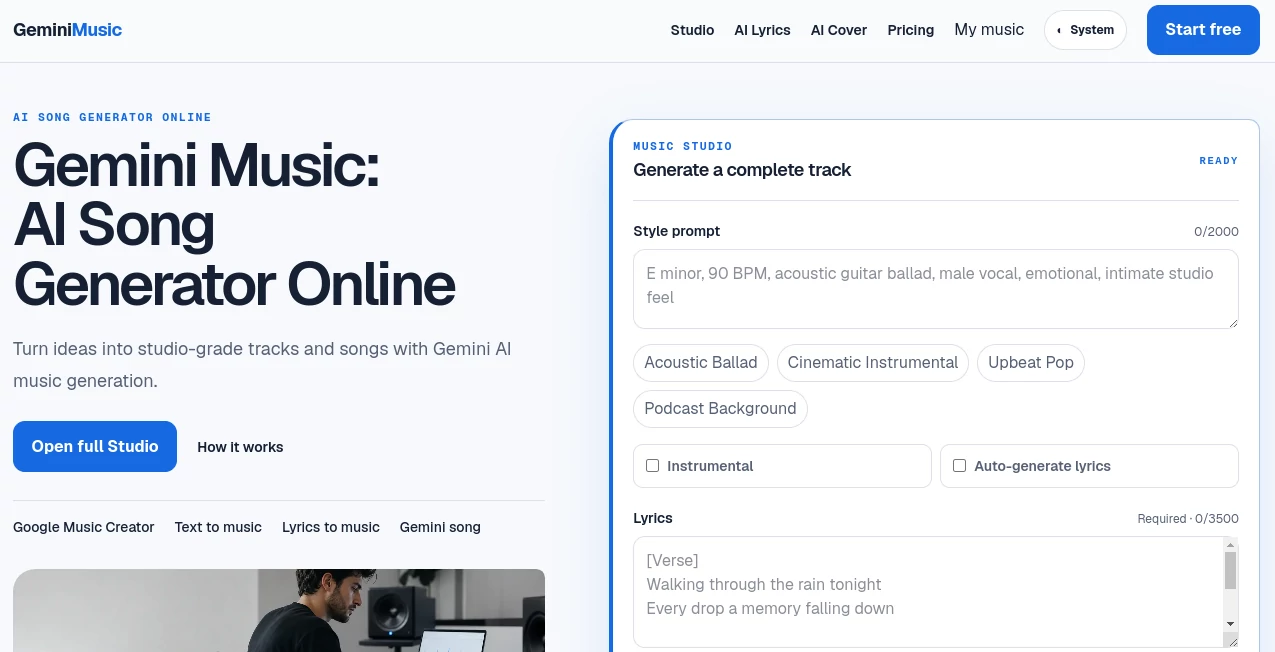
Gemini Music is an online AI music creation platform designed to turn a musical idea, written lyrics, or a simple description into a complete audio track. Instead of starting with an empty music project, creators can describe the sound they have in mind, choose between vocal and instrumental creation, adjust audio settings, and generate a track directly from a browser.
The platform is particularly interesting for people who want to experiment with songwriting, create background music for content, develop podcast audio, or quickly produce a musical concept before investing time in a traditional production workflow. A free option is available, allowing users to try one song every 24 hours without entering a payment card.
Key Features
- Generate complete songs from detailed music prompts.
- Create vocal tracks or instrumental music.
- Turn existing lyrics into music.
- Generate lyrics from a creative prompt when starting without finished words.
- Describe genre, mood, tempo, vocals, instruments, and production style.
- Choose output format, bitrate, and sample rate.
- Keep generated tracks in a persistent music history when signed in.
- Use the service from a phone, tablet, or desktop browser.
- Paid plans include commercial licensing and unrestricted usage rights.
User Interface
The interface takes a straightforward approach to music generation. The main studio puts the important controls in one place, including the style prompt, lyrics, song mode, and generation settings. Preset directions such as Acoustic Ballad, Cinematic Instrumental, Upbeat Pop, and Podcast Background can also help users get moving when they do not have a detailed prompt ready.
This is useful for beginners because there is no need to understand a traditional digital audio workstation before creating a first track. More experienced users can go further by describing specific musical details such as BPM, instrumentation, vocal character, mood, and production style.
Accuracy & Performance
For generative music, the quality of the result depends heavily on the direction provided by the user. The platform gives creators room to specify the musical context rather than relying entirely on a short generic prompt. This can make the generation process feel more intentional, especially when the desired mood, instruments, tempo, and intended use are clearly described.
Generation is handled online, so there is no music software to install. Once a track is generated, it can be played through the Studio or accessed later through the user's music history. The paid Studio plan also provides a priority generation queue for users who create music more frequently.
Capabilities
The platform covers several stages of a lightweight songwriting workflow. A creator can begin with an idea, add lyrics or generate them from a prompt, select vocal or instrumental mode, define the musical style, and then generate a complete track.
It can be useful for a surprisingly broad range of projects. A YouTube creator might need a soundtrack for a video, a podcaster could be looking for background music, while a songwriter may simply want to hear how an unfinished lyrical idea could sound as a finished composition. The ability to control bitrate, sample rate, and output format also gives creators more control over the final audio.
Security & Privacy
According to the platform's information, prompts, lyrics, generation settings, generation status, and result links are stored so signed-in users can access their music history. Users should therefore avoid entering sensitive, private, or confidential information into prompts or lyrics.
Private generations are available with the paid Creator and Studio plans, providing an additional option for users who do not want their generated work handled as part of a shared creation workflow.
Use Cases
- Songwriting: Turn lyrics and musical ideas into complete song concepts.
- Video creation: Develop original background music for videos and campaigns.
- Podcast production: Create music suited to podcast intros, transitions, and background sections.
- Music experimentation: Test different genres, moods, instruments, and vocal directions quickly.
- Creative sketches: Hear how an idea might sound before developing it through a traditional production process.
- Content campaigns: Build music concepts around a particular message, scene, or promotional idea.
Pros and Cons
Pros
- Simple browser-based music creation workflow.
- Supports both lyrics-to-music and instrumental generation.
- Detailed prompts can include genre, mood, tempo, vocals, instruments, and production style.
- Audio quality settings provide additional control over generated files.
- Free users can create one song every 24 hours.
- Paid plans provide commercial licensing and private generations.
- Generated tracks can remain accessible through account history.
Cons
- The free plan has a limited daily generation allowance.
- Commercial licensing is not included with the free plan.
- Users looking for detailed manual audio editing may still need a traditional music production application.
- Generation quality can vary depending on the clarity and specificity of the musical direction.
Pricing Plans
The platform offers a free tier as well as paid subscriptions for creators who need more generation capacity and additional rights. The Free plan provides 4 daily credits, equivalent to one song every 24 hours, along with 7-day cloud storage. It does not include commercial licensing, unrestricted usage rights, private generations, or a priority generation queue.
The Creator plan is designed for hobbyists and provides 100 monthly credits, equivalent to 25 songs. It includes commercial licensing, unrestricted usage rights, private generations, 90-day cloud storage, and monthly credit rollover. The annual billing price shown on the site is $7.49 per month, billed at $89.88 annually.
The Studio plan is aimed at heavier users and provides 400 monthly credits, equivalent to 100 songs. It adds priority generation, while also including commercial licensing, private generations, 180-day cloud storage, and unused credit rollover. The annual billing price shown on the site is $22.49 per month, billed at $269.88 annually.
How to Use It
- Open the online Music Studio and sign in if you want to keep your generated tracks in your account history.
- Describe the sound you want using the style prompt. Mention details such as genre, mood, tempo, vocals, instruments, or production style.
- Choose whether you want an instrumental track or a vocal song.
- Add your own lyrics or use the available option to generate lyrics from your idea.
- Adjust the desired audio format, bitrate, and sample rate.
- Start the generation process and wait for the track to finish.
- Play the result in the Studio and return to it later through your music history.
A useful approach is to be specific without turning the prompt into a long technical specification. For example, instead of asking for “happy music,” a creator could describe an upbeat pop track with bright guitars, energetic drums, a warm vocal performance, and a summer atmosphere. That extra context gives the generator a much clearer creative direction.
Comparison with Similar Tools
Many AI music platforms focus primarily on generating music from short text prompts. This platform takes a somewhat more structured approach by combining text direction, lyrics, song modes, and audio output controls inside a dedicated studio environment.
Another practical distinction is the combination of a free daily generation option with paid plans that include commercial licensing, private generations, credit rollover, and different storage periods. For someone who only needs occasional musical experiments, the free tier may be enough. Creators producing music regularly are more likely to benefit from the additional capacity and rights included in the paid plans.
It is also worth remembering that AI music generators are not replacements for every part of a professional recording workflow. Musicians who need detailed multitrack editing, mixing, mastering, or precise arrangement control may still want to move generated ideas into dedicated audio production software.
Conclusion
For creators who want to move from a musical thought to an actual audio track without building everything from scratch, this platform offers a practical starting point. Its combination of lyrics-to-music generation, instrumental creation, detailed style prompts, audio controls, and browser-based access makes the workflow approachable while still giving users meaningful creative direction.
The free daily option is especially useful for testing the experience before committing to a subscription, while the Creator and Studio plans make more sense for people who need regular production, private generations, commercial usage, and larger monthly credit allowances. Whether the goal is a song sketch, podcast background, video soundtrack, or a new creative experiment, it provides a convenient way to hear an idea rather than leaving it on the page.
Frequently Asked Questions (FAQ)
Can it create complete songs?
Yes. Users can generate vocal tracks or instrumental music by combining lyrics with a detailed description of the desired musical style.
Can I create instrumental music?
Yes. An instrumental mode is available for users who want music without a vocal performance.
Can I use my own lyrics?
Yes. Users can enter their own lyrics and combine them with a style prompt to guide the generated track.
Can lyrics be generated automatically?
Yes. The studio includes an option to generate lyrics from a creative prompt for users who have an idea but have not written the words yet.
Is there a free plan?
Yes. The Free plan provides one song every 24 hours, using four daily credits, and does not require a payment card to get started.
Does the free plan include commercial rights?
No. Commercial licensing and unrestricted usage rights are included with the paid Creator and Studio plans rather than the Free plan.
Can I keep my generated tracks?
Signed-in users can access completed tracks through their music history. Storage duration depends on the selected plan, ranging from 7 days on the Free plan to 180 days on the Studio plan.
Can I control the audio quality?
Yes. The studio allows users to choose the output format, bitrate, and sample rate for each generation.
Does it work on mobile devices?
Yes. The service is designed to work directly in a browser on phones, tablets, and desktop computers.
Is it suitable for professional creators?
It can be useful for professional creators who need fast song concepts, background music, campaign audio, or creative drafts. Users requiring detailed manual mixing and multitrack production may still want to combine it with a traditional digital audio workstation.
AI Text to Music , AI Music Generator .
These classifications represent its core capabilities and areas of application. For related tools, explore the linked categories above.

GeminiMusic Alternatives Product

LORY
Seed Audio

Lyria 3

Lyria.run

AISongsGener…

AudioVideoGe…

SongFromShort

MusicGPT AI

AI Song Maker