KidVoice
What is KidVoice?
Creating a convincing child voice for a story, animation, lesson, game, or short video can be surprisingly difficult. Finding the right voice actor takes time, recording sessions add production work, and keeping the same character voice consistent across multiple scenes is not always easy.
KidVoice offers a focused solution for creators who need natural-sounding child voices without building a traditional recording setup. The platform turns written scripts into youthful speech and brings together text-to-speech, voice cloning, browser preview, and audio downloads in one workspace.
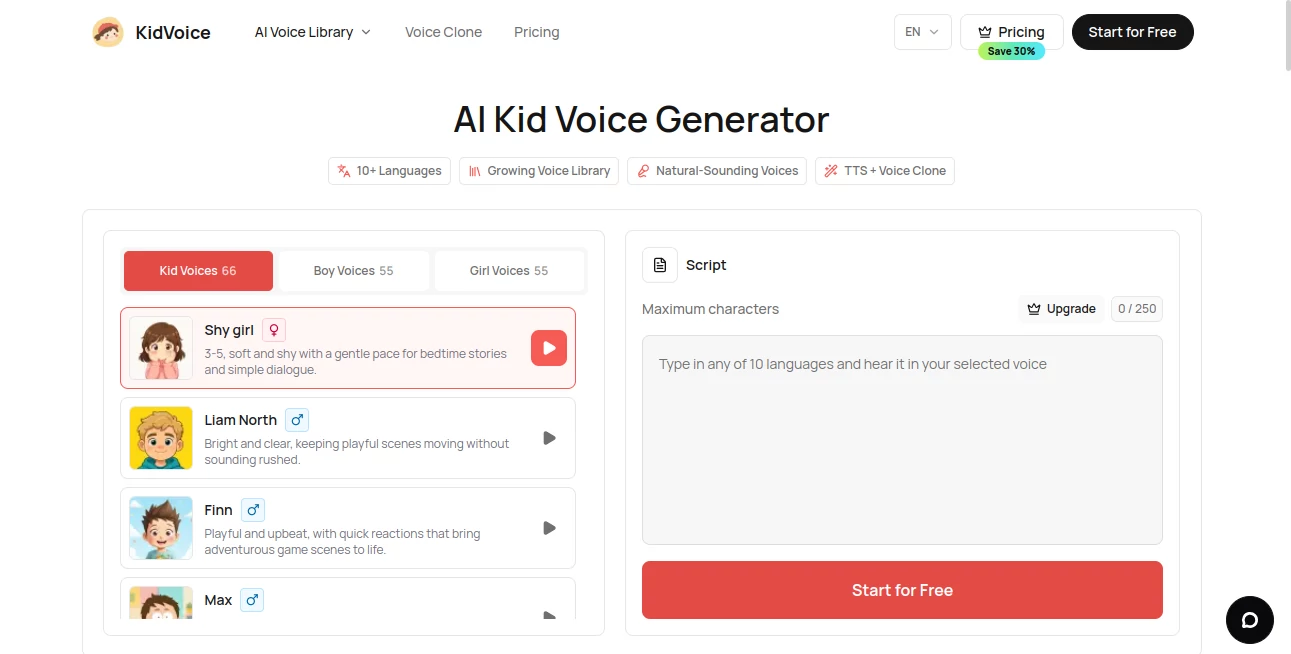
One of its strongest points is the range of available voices. The library currently includes 66 child voice styles, with options suited to storytelling, educational material, character development, social videos, and other creative projects. The service also supports 10 languages, including English, Chinese, Japanese, Korean, German, French, Russian, Portuguese, Spanish, and Italian.
For someone working on a quick character demo, for example, the workflow is refreshingly simple: choose a voice, type a few lines, generate the speech, listen to it, and download the result. There is no need to move between several separate tools just to produce a basic voiceover.
Key Features
- 66 AI-generated child voice styles
- Text-to-speech generation for child voices
- Voice cloning from permitted reference audio
- Support for 10 languages
- Browser-based audio preview
- Downloadable generated audio files
- Voice options for boys and girls
- Automatic language handling
- Regeneration when a result needs another take
- Free access with starter usage limits
- Commercial usage rights included with paid plans
User Interface
The interface is built around a straightforward generation workflow rather than a crowded collection of controls. Users can select a youthful voice, enter their script, generate the speech, listen to the result directly in the browser, and download the finished file.
This approach is particularly useful when speed matters. A creator testing several lines for an animated character can make multiple attempts without having to learn a complicated audio editor first. The browser preview also makes it easier to catch a pronunciation or pacing issue before using the recording in a larger project.
The voice cloning workflow follows a similarly simple structure. Users upload a permitted reference recording, enter the desired text, and generate speech guided by that reference. For best results, the service recommends clear audio with minimal background noise and consistent volume.
Accuracy & Performance
The platform focuses on youthful speech with clear pronunciation, friendly pacing, and expressive delivery. This makes it particularly suitable for scripts where the personality of the voice matters as much as the words themselves.
Performance will naturally vary depending on the script, selected voice, language, and reference recording used for cloning. Short dialogue lines and character phrases are especially convenient to test because users can quickly generate another version when the first take does not quite fit.
The voice cloning feature can also be useful when a preset voice does not match a particular creative direction. By providing a suitable reference recording with permission to use it, creators can guide the generated speech toward a specific vocal character.
Capabilities
The platform is more than a basic text-to-speech converter. Its combination of preset child voices and voice cloning makes it useful across several stages of content production.
For storytelling, creators can turn dialogue and narration into spoken performances. Educators can prepare voice-based learning material and language-practice content. Game developers can experiment with character dialogue before committing to professional voice recording. Video creators can also generate short voiceovers for explainers, social clips, and other visual content.
Multilingual support is another practical advantage. Content can be produced in English, Chinese, Japanese, Korean, German, French, Russian, Portuguese, Spanish, and Italian, making the same basic workflow useful for creators working with international audiences.
The system also supports regeneration, so users are not locked into their first result. Changing the script, selecting another voice, or generating the line again can help achieve a better fit for a particular scene.
Security & Privacy
Voice generation and voice cloning require responsible handling of recordings, particularly when a real person's voice is involved. The service states that reference voices used for cloning should be used with permission and prohibits deceptive or misleading voice cloning without the explicit consent of the person whose voice is being replicated.
The privacy policy explains that information such as names, usernames, phone numbers, email addresses, company information, and payment information may be collected when users register or purchase services. Payment processing is handled through third-party payment providers, while the platform states that it does not store credit card information on its own servers.
Users should also pay attention to the applicable terms before using generated material in a commercial project. Paid plans include commercial usage rights according to the pricing information, while the broader service terms contain additional restrictions regarding the use and distribution of service materials.
Use Cases
Storytelling and Bedtime Stories: Turn written stories and character dialogue into friendly child narration. This can be useful for independent storytellers, parents creating creative content, and publishers experimenting with audio formats.
Educational Content: Add youthful narration to lessons, language-learning exercises, classroom material, and educational videos. A childlike voice can make certain learning activities feel more conversational and engaging.
Games and Character Development: Game developers can test dialogue and character personalities before hiring voice actors. It is particularly useful during prototyping when dialogue may change frequently.
Animation: Animated projects often require numerous short character lines. Generating temporary or finished dialogue can speed up the process of testing scenes and character interactions.
YouTube and Short Videos: Creators can produce child-style voiceovers for Shorts, TikTok clips, explainers, and social media edits without arranging a separate recording session for every short piece of content.
Multilingual Projects: Creators targeting international audiences can experiment with child voices across multiple supported languages while keeping the generation workflow in one place.
Creative Prototyping: Writers and designers can use generated voices to hear how dialogue feels when spoken aloud. Sometimes a sentence that looks good on a page sounds completely different when performed, and quick voice generation makes that easier to evaluate.
Pros and Cons
- Pros: Large selection of child voice styles, multilingual support, simple browser workflow, voice cloning, audio downloads, browser preview, and a free plan for testing the service.
- Pros: Useful for stories, games, educational projects, videos, character prototypes, and short-form content.
- Pros: Paid plans include commercial usage rights.
- Cons: Free usage has relatively limited conversion and cloning allowances.
- Cons: Individual text transfers are limited in length depending on the selected plan.
- Cons: Voice cloning should only be performed with appropriate permission and suitable reference audio.
Pricing Plans
A free plan is available for users who want to test the voice generation workflow before subscribing. The free tier is listed at $0 and provides starter credits, limited voice conversions and voice clones, access to the available voice features, and unlimited audio downloads. The pricing page currently lists a maximum of 250 characters per transfer for the free tier.
The Premium plan is designed for users who need higher limits. Annual billing is listed at $5.50 per month, billed as $66 per year, with the page also displaying a $7.99 monthly reference price and a 30% saving for annual billing. The plan includes 1,000 monthly subscription credits, up to 200 voice conversions, up to 200 voice clones, and a maximum of 10,000 characters per transfer.
Both plans provide access to AI kid voices and voice cloning, while the paid plan is intended for heavier production workflows. The pricing page states that paid subscriptions include commercial usage rights for generated voices in commercial projects, videos, podcasts, and other media.
How to Use It
Start by selecting one of the available child voice styles. The library provides a variety of youthful voices, so it is worth testing a few options rather than choosing the first one that sounds suitable.
Next, enter the dialogue, narration, lesson, or character line you want to hear. The platform handles the supported languages automatically, which keeps the process straightforward when working with multilingual scripts.
Generate the speech and listen to the result directly in your browser. If the delivery does not fit the scene, try another voice, adjust the wording, or generate another take.
When the result is ready, download the audio file and add it to your video, game, presentation, story, or other project. For voice cloning, upload a clear reference recording that you are authorized to use before entering the script.
Comparison with Similar Tools
Many AI voice platforms are designed as broad text-to-speech systems covering everything from narration to business presentations. This platform takes a more focused direction by concentrating specifically on child voices.
That specialization can be an advantage for creators who repeatedly need youthful characters. Instead of searching through a large general-purpose voice library, users can start directly with child-oriented voices and then choose among different styles.
The combination of preset voices and cloning is also useful. Preset voices are convenient when speed and simplicity are the priority, while cloning provides another option when a particular vocal direction is required and the creator has permission to use the reference recording.
For a project that only needs occasional generic narration, a broader voice platform may offer more variety in adult and professional voices. For projects centered around child characters, stories, educational content, or youthful dialogue, the focused approach can make the selection process considerably easier.
Conclusion
Child voices have a surprisingly wide range of applications, from animated characters and game dialogue to educational videos and short-form social content. The challenge has traditionally been getting a suitable performance quickly without organizing a full recording session.
KidVoice addresses that problem with a focused workspace built around child speech. Its 66 voice styles, multilingual generation, voice cloning, browser preview, and downloadable results give creators a practical set of tools for turning scripts into usable audio.
The free plan also makes it possible to experiment before committing to a subscription. For anyone developing a story, game, lesson, animation, or video where a convincing youthful voice is an important part of the experience, it is a tool worth testing.
Frequently Asked Questions (FAQ)
Can I use the tool for free?
Yes. A free plan is available with starter credits and usage limits. It allows users to test child voice generation and download generated audio.
How many child voices are available?
The voice library currently includes 66 child voice styles designed for storytelling, learning content, characters, short videos, and other creative projects.
Does it support languages other than English?
Yes. Child voice generation is available in English, Chinese, Japanese, Korean, German, French, Russian, Portuguese, Spanish, and Italian.
Can I clone a voice?
Yes. Users can upload a reference audio clip and create speech guided by that recording. The reference voice must be one that the user is permitted to use.
Can I download the generated audio?
Yes. Generated results can be previewed in the browser and downloaded after the voice generation process is complete.
Can the generated voices be used commercially?
According to the current pricing information, paid plans include commercial usage rights for generated voices in commercial projects, videos, podcasts, and other media.
What type of audio works best for voice cloning?
A clear recording with minimal background noise, consistent volume, and natural speech is recommended. Using a reference voice without appropriate permission should be avoided.
Is there a limit on the length of the text?
Yes. Text limits depend on the plan. The free plan currently lists a maximum of 250 characters per transfer, while the Premium plan allows up to 10,000 characters per transfer.
AI Voice Cloning , AI Text to Speech , AI Speech Synthesis , AI Voice & Audio Editing .
These classifications represent its core capabilities and areas of application. For related tools, explore the linked categories above.

KidVoice Alternatives Product

AIMusicFlow

Gpt Realtime

ElevenLabs

Fine Voice

Flow Song
AI Describe …

Gandr
Seed Audio

Voice To Ins…