
Suno Music API | TTAPI
What is Suno Music API | TTAPI?
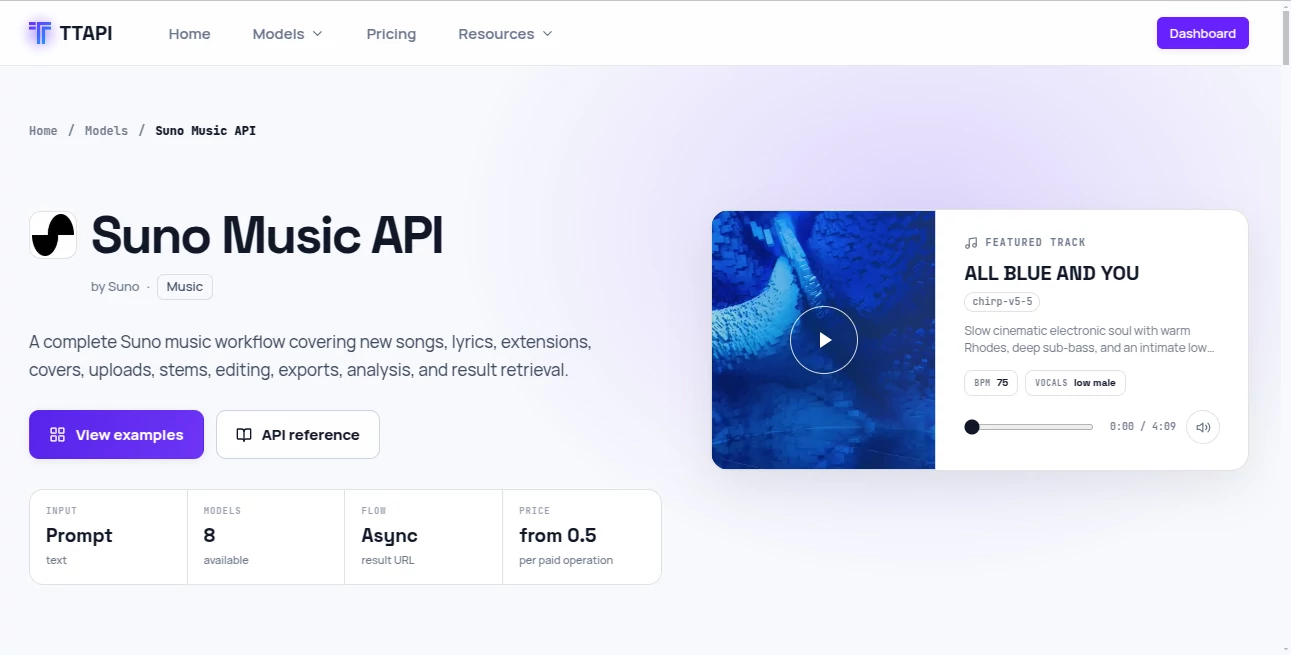
TTAPI brings a powerful music-generation workflow into a developer-friendly API, making it possible to add AI-generated music to applications without building a complicated audio-generation infrastructure from scratch. It supports everything from creating new songs and generating lyrics to extending tracks, producing covers, working with uploaded audio, separating stems, and exporting finished production assets.
What makes this particularly interesting for developers is the way the workflow fits into a broader AI infrastructure. Instead of maintaining separate integrations for different providers, teams can work with a consistent API approach while building applications that need generated music at scale.
For a developer building a video editor, content platform, music application, creative tool, or automated media pipeline, this can turn what would normally be a fairly involved integration into a much more manageable development task.
Key Features
- Generate complete songs from creative prompts or custom lyrics.
- Create instrumental tracks without vocals.
- Generate lyrics from a text-based creative brief.
- Extend existing music from a selected point.
- Create cover versions from existing audio.
- Upload audio for supported music continuation and editing workflows.
- Separate vocals and instrumental elements.
- Create complete multi-track stems for production workflows.
- Add generated vocals or instrumental layers to existing arrangements.
- Replace selected sections of a song.
- Remaster and reinterpret existing tracks.
- Create mashups and samples.
- Export music to formats such as WAV and MIDI where supported.
- Analyze BPM and retrieve completed generation results.
User Interface
The product experience is primarily designed around developers rather than casual music browsing. The model page presents examples, creative prompts, available operations, pricing information, request fields, and ready-to-use API examples in one place.
This layout is useful when evaluating an API because the practical details are immediately visible. A developer can see what the system accepts, understand the available operations, and move from experimentation toward implementation without having to search through unrelated documentation.
The workflow also uses asynchronous results, which is a sensible approach for music generation. Long-running jobs can be monitored and completed results can be retrieved when they are ready.
Accuracy & Performance
Music generation is less about numerical accuracy and more about how closely the resulting track follows the creative direction. The API provides several controls that can help developers shape the output, including genre and mood tags, negative tags, style weighting, creativity controls, source-audio weighting, vocal preferences, and duration settings.
For example, a developer can describe a slow electronic track with warm piano, atmospheric pads, a specific vocal character, and a particular tempo instead of relying on a vague one-line prompt. That level of control makes the workflow much more practical for applications where predictable musical direction matters.
Performance also benefits from asynchronous task handling and webhook support, allowing an application to receive completion notifications instead of repeatedly waiting for a generation request to finish.
Capabilities
The range of operations goes well beyond simple text-to-music generation. A project can begin with a creative prompt, generate a song, extend it, modify a section, separate vocals from instrumentation, and prepare individual production assets.
Custom mode provides additional control when developers already have lyrics or want to define a more specific creative direction. Options for vocal gender, duration, style influence, creativity, source-audio influence, and optional personas give developers more control over how a generation is shaped.
The workflow is also suitable for applications that need to retrieve generation status and results programmatically. This is especially useful for platforms where users submit many generations rather than creating one track manually.
Security & Privacy
Authentication is handled through an API key, with requests sent using standard HTTP headers. This makes the integration familiar to developers working with REST APIs and allows the credentials to remain on the server side of an application rather than being exposed to end users.
Applications should still follow normal API security practices, including keeping credentials in environment variables or a secure secret manager, validating user-generated input, controlling access to generation endpoints, and avoiding the exposure of private API keys in client-side code.
Storage behavior can also be controlled through the available request options. Developers should review the current provider documentation and their own application's data-retention requirements before deciding how generated assets should be stored and delivered.
Use Cases
Content Creation Platforms: Add automatic background music and original tracks to video, podcast, or social content workflows.
Video Generation Applications: Pair generated visuals with custom soundtracks without requiring users to manually search for suitable music.
Music Prototyping: Turn a musical idea into a working demo quickly, making it useful for creators who want to experiment with genres, moods, arrangements, and vocal concepts.
Game Development: Build systems that generate background tracks, atmospheric music, or variations for different scenes and gameplay situations.
Creative SaaS Products: Developers can integrate music generation into their own applications instead of asking users to move between multiple platforms.
Audio Production Workflows: Stem separation, section replacement, remastering, extensions, and instrumental or vocal additions make the API useful beyond the initial generation stage.
Pros and Cons
Pros
- Broad music-generation and editing workflow.
- Supports both new creations and existing audio workflows.
- Custom lyrics and instrumental generation are available.
- Multiple controls help developers fine-tune creative output.
- Asynchronous generation works well for production applications.
- Webhook support can simplify completion handling.
- Stem-related operations are useful for more advanced audio products.
- Usage is metered by operation, making costs easier to associate with individual tasks.
Cons
- It is primarily designed for developers, so non-technical users may find the API-oriented workflow less approachable.
- Music-generation costs can increase when a workflow uses several editing or production operations.
- More advanced controls require developers to understand the request parameters and generation workflow.
- Commercial projects should carefully review the applicable music, model, and usage rights before distributing generated content.
Pricing Plans
The pricing model follows a usage-based quota system rather than a traditional fixed monthly subscription for individual music operations. The current pricing shown for music generation is 6 quota per task, while different operations have different quota requirements.
For example, vocal stem separation is listed at 12 quota per task, while separating all available stems costs 30 quota. Simpler operations such as lyrics generation, cropping, removing a section, and fade operations require fewer quota units.
Audio uploads are listed at 0.5 quota, while some operations such as BPM analysis and WAV or MIDI-related functionality are shown as free per request on the current model page. Because usage prices can change, developers should check the current pricing before estimating the cost of a production workload.
How to Use Suno Music API
Getting started is straightforward for developers familiar with REST APIs. First, obtain an API key and keep it securely on the server side of your application. Then send a request to the music generation endpoint with the required authentication and request parameters.
A typical workflow starts by selecting a supported model version and choosing whether the request should use inspiration-based generation, custom lyrics, or an instrumental workflow. The request can then include a creative description, title, tags, negative tags, vocal preferences, duration, and other optional controls.
After submitting the request, the application can handle the generation asynchronously. Once the task has completed, the result can be retrieved through the available fetch workflow or delivered through a configured webhook.
This approach works particularly well for web applications because users do not need to keep a browser request open while a complete song is being generated.
Comparison with Similar Tools
Many AI music products focus primarily on giving end users a creative interface where they can type a prompt and generate a song. This workflow takes a different approach by putting the API integration itself at the center of the experience.
That distinction matters for developers. Instead of manually generating tracks, downloading them, and moving them into another application, a development team can build generation directly into its own product. The additional operations for extensions, covers, stems, remastering, section replacement, and audio processing also make it more suitable for applications that need a complete music workflow rather than a single generation endpoint.
It is therefore best suited to developers and businesses that want programmable access to AI music capabilities. For someone who simply wants to make a song occasionally, a consumer-facing music application may feel simpler. For a product team building an automated media workflow, the API-first approach is considerably more useful.
Conclusion
For developers looking to bring AI-generated music into their own products, this is a strong and practical option. Its biggest advantage is not simply the ability to generate a song from a prompt. The broader workflow covers creation, lyrics, continuation, covers, uploaded audio, editing, stems, remastering, exports, and result retrieval.
The usage-based pricing structure is also appealing for projects that prefer paying according to actual operations rather than committing to a large fixed plan. Combined with asynchronous jobs, webhooks, and a REST-based integration, it provides a solid foundation for applications that need programmable music generation.
Whether the goal is an AI video platform, a creative SaaS product, an automated content pipeline, or a music-focused application, the feature set gives developers plenty of room to build beyond a basic text-to-music experience.
Frequently Asked Questions (FAQ)
Can it generate complete songs?
Yes. The music workflow can generate complete tracks from creative descriptions and can also work with custom lyrics.
Can I create instrumental music?
Yes. An instrumental option is available for generating tracks without vocals.
Can existing audio be used?
Yes. Supported workflows allow developers to upload audio and use it for operations such as continuation and cover generation.
Can I extend an existing song?
Yes. The API includes an extension operation that can continue an existing track from a selected point.
Does it support stem separation?
Yes. Developers can separate vocals and instrumental elements, with an additional workflow available for creating a full set of stems.
Can developers receive a notification when a song is finished?
Yes. A webhook callback can be configured so an application can receive a completion notification instead of continuously waiting for the generation request.
Is pricing subscription-based?
The current model uses quota-based billing by operation. Different generation and editing tasks consume different amounts of quota.
Can generated music be exported?
Supported workflows include export functionality such as WAV and MIDI-related operations, depending on the specific request and current API availability.
Is this suitable for SaaS products?
Yes. The API-first design, asynchronous jobs, webhooks, and range of music operations make it particularly suitable for developers integrating AI music capabilities into their own applications.
What should I consider before using generated music commercially?
Before distributing generated music commercially, review the current terms, model-specific rights, applicable licenses, and the requirements of your intended use case. Rights and commercial permissions should always be confirmed for the exact workflow being used.
AI Text to Music , AI Music Generator , AI Voice & Audio Editing .
These classifications represent its core capabilities and areas of application. For related tools, explore the linked categories above.
Suno Music API | TTAPI details
Website unavailable — View Alternatives
Pricing
- Freemium
Apps
- Web App
Categories

Suno Music API | TTAPI Alternatives Product

MeloLab AI M…

Lyria 3
Musikalis AI…

Mp3ToMidi

lyric video …

AISongsGener…

TonesMatch

WhisperWebUI

Solmi AI