
Vocova
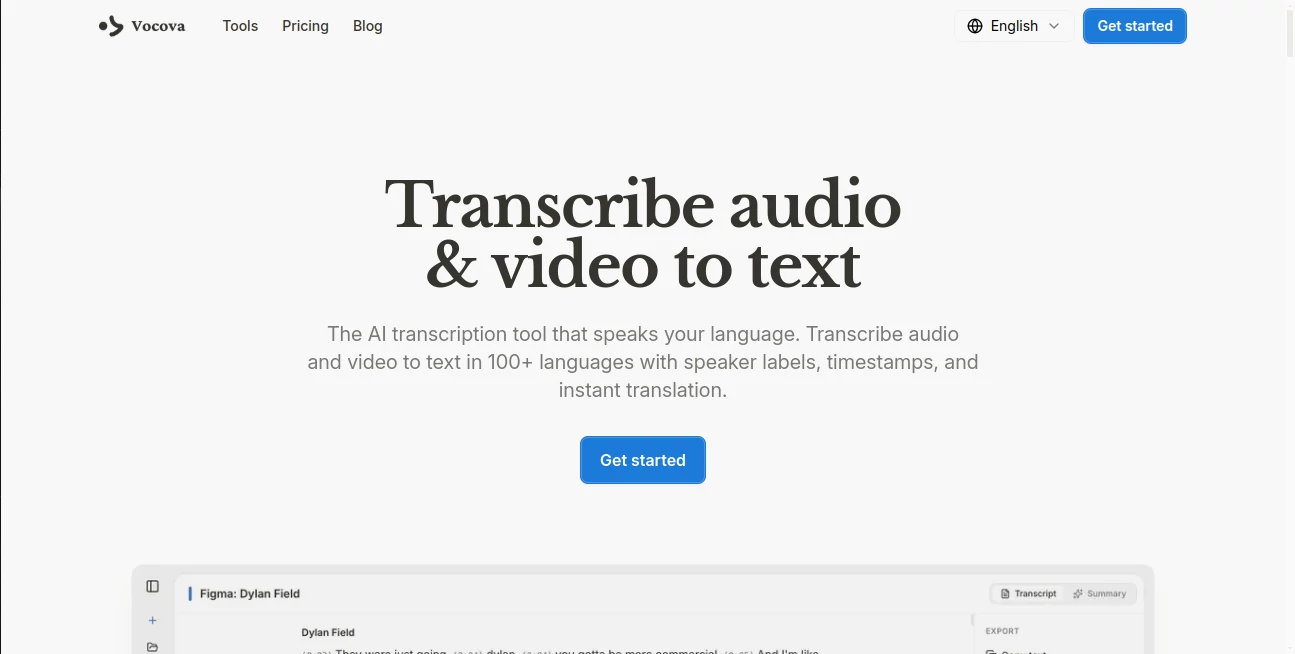
What is Vocova?
I used to dread transcribing interviews, meetings, or long podcast episodes. The endless pausing, rewinding, and typing made the task feel endless. Then I started using this tool, and suddenly transcription became almost enjoyable. You drop in a file or paste a link from YouTube, TikTok, or wherever, and a few minutes later you have a clean, accurate transcript with speaker labels and timestamps. It’s fast, reliable, and handles accents and multiple languages better than I expected. The difference in my workflow has been huge — what used to take hours now takes minutes.
Introduction
In a world full of meetings, podcasts, lectures, and content, turning spoken words into usable text shouldn’t be painful. This platform makes it effortless. Whether you’re a content creator pulling quotes from interviews, a student reviewing lectures, a researcher analyzing recordings, or a professional documenting meetings, it delivers accurate transcripts with speaker identification, timestamps, and even automatic summaries. It supports over 100 languages and works with files or links from more than 1,000 platforms. No complicated setup, no heavy software — just reliable results that save real time and mental energy.
Key Features
User Interface
The design is clean and welcoming. A big upload area invites you to drop files or paste links, with clear progress indicators and instant previews once processing starts. Editing the transcript is smooth, with inline changes, speaker label corrections, and easy export options right there. It feels modern without being overwhelming — exactly what you want when you’re trying to get work done quickly.
Accuracy & Performance
The transcription quality stands out. It handles different accents, background noise, and fast speech remarkably well, often reaching impressive accuracy levels. Speaker identification works reliably in multi-person recordings, and word-level timestamps make it easy to jump to specific moments. Processing is quick for most files, so you’re not left waiting. In my experience, it consistently beats what I used to get from older tools, especially with non-English content.
Capabilities
Beyond basic transcription, you get automatic translation into 140+ languages, bilingual views, AI-generated summaries with key takeaways, and multiple export formats including PDF, DOCX, SRT, and VTT for subtitles. It supports direct imports from YouTube, TikTok, Zoom, Google Drive, and many more. You can edit transcripts directly, adjust speaker labels, and even generate shareable links. It’s a complete solution for turning raw audio or video into usable, searchable content.
Security & Privacy
Your files and transcripts stay private. The platform uses strong security practices, with data handled responsibly and not used for training without permission. You can work confidently knowing sensitive interviews, client calls, or personal recordings are protected throughout the process.
Use Cases
A podcaster transcribes episodes in minutes and generates ready-to-post show notes with highlights. A journalist pulls accurate quotes from long interviews without hours of manual work. A student converts lecture recordings into searchable notes for exam prep. A business team documents important meetings with speaker-attributed transcripts and summaries for quick follow-up. Content creators repurpose long videos into blog posts or social clips faster than ever. The common benefit is reclaiming time while improving accuracy and accessibility.
Pros and Cons
Pros:
- Excellent accuracy across 100+ languages with strong speaker identification.
- Works with both uploaded files and links from 1,000+ platforms.
- Handy AI summaries and easy editing tools save even more time.
- Multiple export formats including subtitles for video work.
- Free tier is generous enough to test real projects.
Cons:
- Very noisy or poor-quality audio can still challenge even the best models.
- Heavy daily usage benefits from a paid plan for unlimited access.
Pricing Plans
It starts with a solid free plan so you can try it on real files without commitment. Paid tiers unlock higher usage limits, priority processing, advanced features, and more storage. Pricing is reasonable for the time it saves, and many users find the paid plans pay for themselves quickly through increased productivity.
How to Use Vocova
Go to the site, drag and drop an audio or video file, or paste a link from YouTube or another platform. Choose your language if needed (auto-detection usually works great), then start transcription. Once finished, review the transcript, correct any speaker labels if necessary, and use the built-in editor for tweaks. Generate a summary if you want key points at a glance, then export in your preferred format. The whole process feels natural and fast, letting you move from raw media to usable text with minimal effort.
Comparison with Similar Tools
Many transcription services feel clunky, require downloads, or struggle with multiple languages and speaker identification. This one stands out with its clean browser experience, broad platform support, and strong accuracy across languages. It combines speed, ease of use, and useful extras like summaries and translations in a way that feels more complete and user-friendly than most alternatives.
Conclusion
Transcription doesn’t have to be a chore anymore. This tool turns it into a quick, reliable step that actually helps you get more done. Whether you’re dealing with meetings, content, research, or lectures, it delivers clean, accurate results with the flexibility modern work demands. If you regularly work with spoken content, giving it a try could be one of the smartest productivity moves you make this year.
Frequently Asked Questions (FAQ)
How accurate is the transcription?
It uses state-of-the-art models and performs very well across most clear recordings, with strong results even in 100+ languages.
Can I transcribe videos from YouTube or TikTok?
Yes — just paste the link and it handles the audio extraction automatically.
Does it identify different speakers?
Yes, with color-coded labels and timestamps for easy reading.
Is there a free plan?
Yes, you can start transcribing right away with no credit card required.
Can I translate the transcript?
Absolutely — one-click translation to 140+ languages with bilingual viewing options.
AI Transcriber , AI Transcription , AI Speech to Text , AI Voice & Audio Editing .
These classifications represent its core capabilities and areas of application. For related tools, explore the linked categories above.

Vocova Alternatives Product

Goose Pod

Seedance 2.0…

Speech Notes

TurboScribe

Whisper AI

Speech Text
Medical Scri…
Video Transl…
Seed Audio