🧠 AI Quiz
Think you really understand Artificial Intelligence?
Test yourself and see how well you know the world of AI.
Answer AI-related questions, compete with other users, and prove that
you’re among the best when it comes to AI knowledge.
Reach the top of our leaderboard.


















0Portfolio

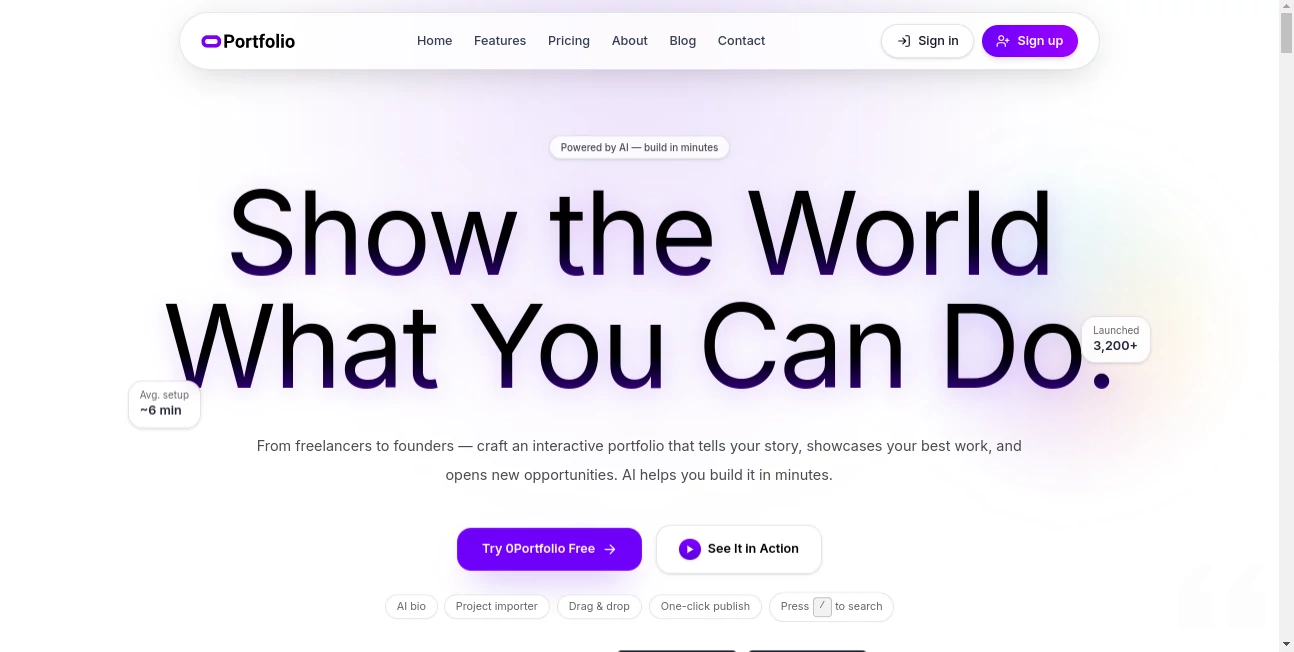
What is 0Portfolio?
0Portfolio steps in as a game-changer for anyone tired of flat resumes, offering a quick way to craft dynamic online displays that let your best work shine through. This platform takes the hassle out of pulling together a professional presence, blending smart suggestions with easy tweaks to create something that feels uniquely yours. Creators who've jumped in often share how it turned scattered projects into a cohesive story that grabs attention and opens doors, all without touching a line of code.
Introduction
0Portfolio came about from the frustrations of folks in creative fields who knew their skills deserved more than a plain PDF—something interactive that could weave in visuals, links, and real impact stories. It launched with a focus on speed and simplicity, quickly drawing in freelancers, job hunters, and team leads who wanted to stand out without the usual setup grind. In a short time, thousands have used it to launch personal hubs that highlight everything from design drafts to launch metrics, swapping tales of interviews landed or clients hooked after sharing a simple link. What keeps drawing people back is how it balances guidance with freedom, turning what could be a weekend chore into a half-hour highlight reel of your journey.
Key Features
User Interface
The dashboard greets you with a clean overview of your projects, where picking a starting layout leads straight into a hands-on editor that mirrors what visitors will see. Dragging sections around or swapping colors happens live, with previews updating on the spot so you always know how it lands. It's designed to feel intuitive, like arranging photos on a wall rather than wrestling with software, and even supports quick searches for elements when you're deep in tweaks.
Accuracy & Performance
Suggestions here pull from your own words to craft descriptions that ring true, trimming the extra bits while keeping your voice front and center—often nailing the right level of detail on the first try. The whole build process wraps up fast, with most folks reporting under ten minutes from start to share, and it holds steady even when layering in multiple pieces. Users highlight how reliable it feels, delivering polished results that match expectations without endless back-and-forth.
Capabilities
It goes beyond basic layouts by helping flesh out narratives for each entry, attaching everything from demo links to performance numbers that show your handiwork in action. You can juggle several versions for different crowds, like one for potential bosses and another for side gigs, all from the same spot. Upcoming tools for tracking views add even more depth, letting you see what resonates and refine from there.
Security & Privacy
Your drafts and details stay tucked away in personal folders, only going live when you say so, with straightforward controls over who peeks at what. It keeps things locked down without complicating the flow, so you can experiment freely knowing nothing slips out until you're ready. The setup prioritizes that peace of mind, especially for those sharing sensitive work samples or client stories.
Use Cases
Freelance designers pull together visual timelines of their latest builds, linking prototypes that let clients poke around before committing. New grads bundle school assignments with side hustles, creating a fresh face that beats a stiff CV at first glance. Marketers map out campaign wins with before-and-after stats, turning numbers into narratives that pitch themselves. Even startup leads use it to spotlight key launches, sharing a single spot that sums up traction without digging through emails.
Pros and Cons
Pros:
- Lightning-fast setup that gets you online without the usual headaches.
- Smart nudges that polish your story while staying true to you.
- Handles multiple angles from one easy hub, perfect for shifting gears.
- No tech barriers—anyone can make it look pro right away.
Cons:
- Relies on your starting material; sparse inputs might need more elbow grease.
- Full sharing perks tie to the paid side, limiting free peeks.
- Custom web addresses are on the horizon, not here yet.
Pricing Plans
You can poke around the basics for free, getting a feel for the flow without commitment, though going live calls for the pro option at fifteen bucks a month for up to five active spots and a good chunk of helper credits. The yearly deal drops it lower overall, stretching those credits further for steady users, while add-ons let you top up if you're churning out content. It's built flexible, so you scale as your needs grow without feeling locked in.
How to Use 0Portfolio
Start by signing in and grabbing a layout that fits your field, then drop in your pieces—let the built-in smarts suggest ways to describe them, tweaking as needed to hit your tone. Rearrange on the fly, add visuals or links that back up your claims, and hit publish for an instant shareable page. From there, keep an eye on what works or spin up variants for fresh opportunities, all nested in your main view.
Comparison with Similar Tools
Unlike broader site makers that bury you in options, 0Portfolio zeros in on the showcase side, skipping the extras for a tighter, faster fit—though those might suit if you need e-commerce ties. Against plain templates, it adds that layer of tailored text help, but could lag behind heavy customizers for wild designs. It shines for quick, impact-focused builds where storytelling trumps sprawl.
Conclusion
0Portfolio wraps up the scramble for a strong online face by making it simple, swift, and spot-on, letting your work do the talking without the setup static. It shifts the focus back to what matters—your stories and successes—proving that a great presence doesn't have to take forever. As more folks chase ways to cut through the noise, this one's poised to keep lighting paths, one polished page at a time.
Frequently Asked Questions (FAQ)
Who stands to gain from this?
Anyone from fresh faces to seasoned pros looking to swap stiff docs for something that pops.
Does it demand design know-how?
Not at all—it's all point-and-pull, with previews to guide the way.
How does the helper side work?
It scans your notes and suggests sharper takes, keeping things in your style.
What happens if I pause the plan?
Pages go quiet but wait as drafts, ready to roar back when you return.
Can I stretch beyond the basics?
Add-ons for more spots or boosts keep it growing with you.
AI Content Generator , AI Website Builder , AI No-Code & Low-Code , AI Design Generator .
These classifications represent its core capabilities and areas of application. For related tools, explore the linked categories above.
0Portfolio details
This tool is no longer available on submitaitools.org; find alternatives on Alternative to 0Portfolio.
Pricing
- Free
Apps
- Web Tools
Categories

0Portfolio Alternatives Product

TranslateAI
AI 3D World

Brave Pink H…

Consistent C…

SocialRails

Presenti AI

Z-Image Free

SlideStorm AI

text to 3d w…