
🧠 AI Quiz
Think you really understand Artificial Intelligence?
Test yourself and see how well you know the world of AI.
Answer AI-related questions, compete with other users, and prove that
you’re among the best when it comes to AI knowledge.
Reach the top of our leaderboard.


















Add Loved One to Photo

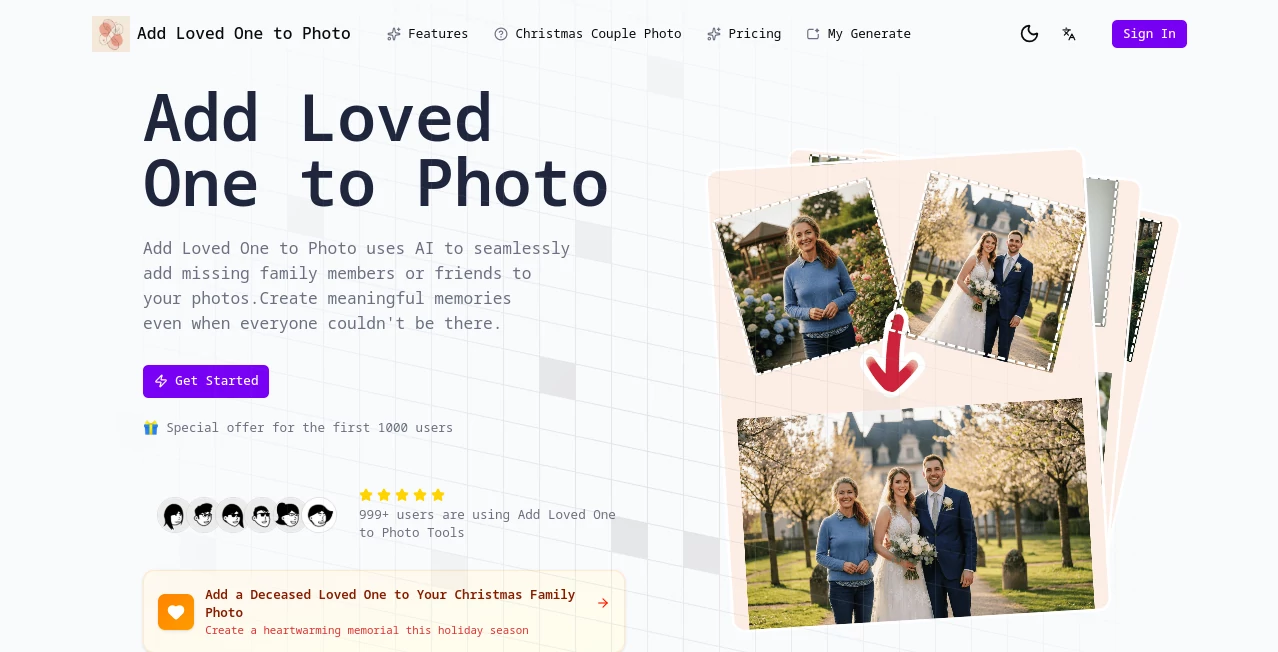
What is Add Loved One to Photo?
Add Loved One to Photo steps in as a heartfelt helper for those quiet wishes to fill in the gaps in treasured snapshots, weaving missing faces into group scenes with a touch that feels just right. This service turns what-if daydreams into tangible keepsakes, letting families bridge distances or time with images that capture the warmth of togetherness. Many who've used it speak of the lump in their throat when seeing a long-gone smile light up a holiday table again, making it more than a tool—it's a gentle nod to the bonds that linger.
Introduction
Add Loved One to Photo came about from those tender family stories where someone was always just out of frame, sparked by folks who knew the ache of incomplete albums too well. It started small, a way to mend photos for weddings or reunions, but soon folks from all walks were sharing how it mended hearts too—like adding a deployed parent to a kid's big day or slipping a grandparent into a grandkid's grin. Over time, it's touched over ten thousand homes, churning out fifty thousand moments that folks frame and cherish, proving that a bit of clever blending can heal the holes left by life's curveballs. What draws people in is that quiet realism, the way it honors the past without fanfare, turning solitary shots into stories worth passing down.
Key Features
User Interface
The setup greets you like an old photo album, simple and inviting, with clear slots for your main scene and the face to fold in, each capped at a friendly ten megs to keep things light. A progress nudge shows the way as uploads land, and once you tap go, a soft whirl takes over until the new view blooms in the preview spot. No tangled menus or tech talk—just a straightforward path that lets you linger on the memory rather than the mechanics, feeling as easy as flipping through faded prints on a rainy afternoon.
Accuracy & Performance
It catches the light and lines just so, easing the newcomer into the crowd with a natural ease that fools the eye, often matching moods and shades without a whisper of wrong. The whole dance wraps in under half a minute, even on busier scenes, delivering crisp results that hold up under close looks or big prints. Users nod at how it sidesteps the stiff spots that stiffen smiles, landing blends that breathe life into the frame every time.
Capabilities
From slipping one soul into a bustling bunch to potentially layering a few with care, it handles the heartfelt heavy lifting, tweaking glows and grins to fit the flow. It thrives on group gatherings or quiet tributes, pulling from clear references to craft high-clarity keepers ready for walls or wallets. The real gift lies in that adaptive touch, turning a lone portrait into part of the whole without losing the spark that made them shine.
Security & Privacy
Your snapshots stay safe in the shuffle, handled with care and cleared out once the magic's made, never wandering off to watchful eyes. It keeps the circle tight, letting you hold the reins on what stays or strays, so those private pieces of the puzzle remain yours alone. Families find comfort in that unspoken shield, focusing on the joy of the join rather than the jitters of the journey.
Use Cases
Wedding planners weave in far-off kin for toasts that include everyone, turning vows into village affairs. Reunion hosts mend the missing from miles away, crafting collages that close the gaps grown by years. Grieving hearts gently guide a lost parent into holiday huddles, or a service member into school stage smiles, while history buffs blend eras for albums that whisper family lore. Photographers even offer it as a quiet add-on, helping clients capture what cameras couldn't on the day.
Pros and Cons
Pros:
- Blends so smooth it feels like they were there all along.
- Quick as a heartbeat, no long waits to unwrap the wonder.
- Gentle on the soul, easing aches with authentic arms-around.
Cons:
- Credit tally means more magic costs a bit more for the often-users.
- Best with bright, clear starters—dimmer ones might need a nudge.
- One-at-a-time focus, so crowds call for careful chains.
Pricing Plans
It opens with a free flutter for first-timers, letting you taste the tenderness without a toll, though each weave pulls ten from the pot. Beyond that, credits stack up in bundles that suit the sporadic saver or steady storyteller, with a nod to early birds in the first thousand for extra ease. The flow stays flexible, no big binds, just enough to keep the keepsakes coming without the pinch.
How to Use Add Loved One to Photo
Start by slipping your group glimpse into the first fold, then add the absent one's angle next, minding the ten-meg mark for smooth sails. Give it the green light, and in a flash under thirty ticks, the fused frame fills the view for a fond look-over. Snag the sharp save, frame it fresh, and fold it into the family lore, perhaps circling back for another layer if the heart hungers.
Comparison with Similar Tools
Where broader brushes blend anything into everything, Add Loved One to Photo hones in on the heartfelt hook, trading wide whims for that pinpoint pathos, though those might mingle more for merry mixes. Against free-form fiddlers, it ups the seamlessness with soulful smarts, skipping the slips but perhaps skimping on side scenes. It warms the spot for sentimental souls, outshining the scatter with steady sentiment.
Conclusion
Add Loved One to Photo whispers a way to weave the woven-apart back into the whole, turning tender tugs into timeless treasures. It honors the hush of what was missed, proving that a soft stitch can mend more than the image—it mends the moment. As albums keep unfolding family folds, this gentle guide stays a steadfast thread, inviting all to include the ones who make the picture complete.
Frequently Asked Questions (FAQ)
How true-to-life do the blends turn out?
They land with a realism that warms the heart, matching lights and looks like long-lost kin.
What sorts of scenes sing best?
Clear group glows with steady smiles shine, pulling in the added one without a hitch.
Is it kind to kindle the lost in frames?
Many find it a soft solace, a way to hold the hold close without the hurt.
How swift is the stitch?
Under thirty heartbeats, from upload to unveil.
Can crowds come in one go?
It starts with singles, but chains can craft the fuller flock.
Where do my memories go after?
They stay yours alone, handled hushed and held no more than needed.
Photo & Image Editor , AI Photo Enhancer , AI Image to Image , AI Face Swap Generator .
These classifications represent its core capabilities and areas of application. For related tools, explore the linked categories above.
Add Loved One to Photo details
This tool is no longer available on submitaitools.org; find alternatives on Alternative to Add Loved One to Photo.
Pricing
- Free
Apps
- Web Tools
Categories

Add Loved One to Photo Alternatives Product

GPT Image 1.5

insMind

TextSharp | …

String Art

Picture to L…

Professional…

Gemini AI Ph…

GEMPIX2

img2img.net
