🧠 AI Quiz
Think you really understand Artificial Intelligence?
Test yourself and see how well you know the world of AI.
Answer AI-related questions, compete with other users, and prove that
you’re among the best when it comes to AI knowledge.
Reach the top of our leaderboard.


















AI Music Generator

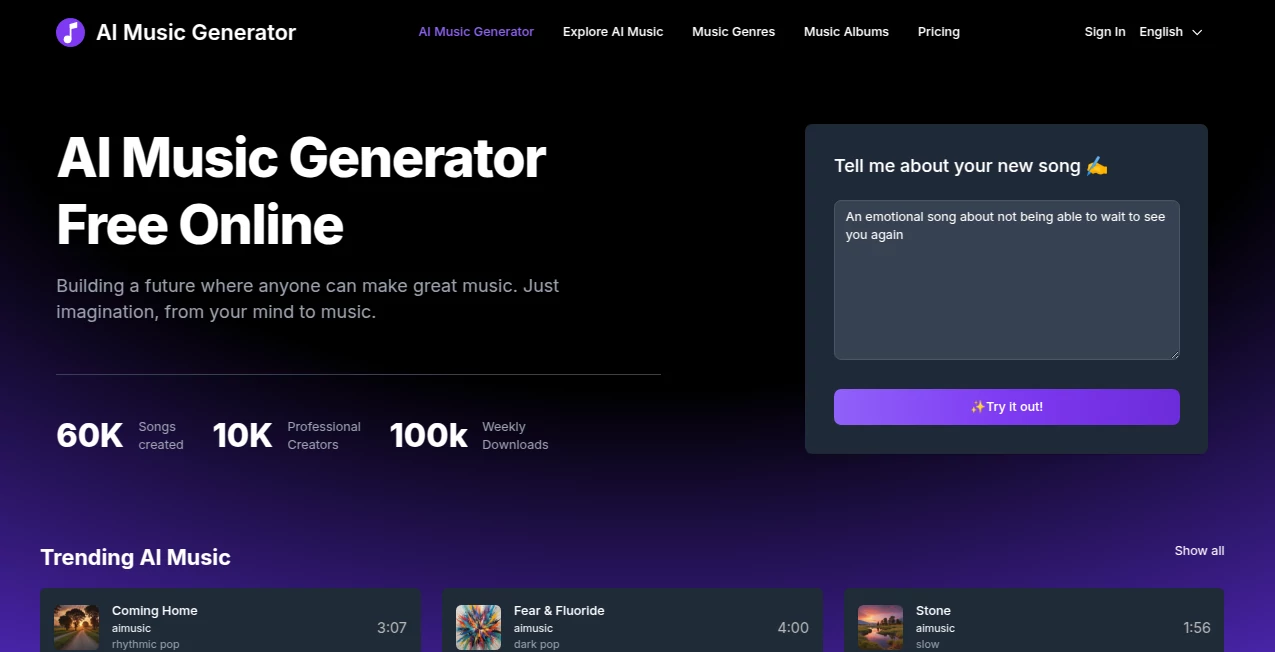
What is AI Music Generator?
There's something almost addictive about typing a few words—"melancholic lo-fi beat about rainy nights and lost love"—and thirty seconds later hearing a full track with drums that breathe, chords that tug, and a melody that feels like it’s always been yours. This tool turns that daydream into reality without asking for your MIDI skills or studio budget. I’ve seen bedroom producers, YouTubers, and even people who swore they “can’t make music” finish songs they’re genuinely proud of in one sitting. The results often have that human touch—imperfect in the best way, never sterile.
Introduction
Making music used to require gear, theory, time, and usually a fair amount of frustration. This platform quietly removes most of those gates. Describe the mood, genre, tempo, instruments, or even lyrics if you want vocals, and it composes, arranges, mixes, and masters a complete track that sounds like it came from a real session. It’s become a daily creative outlet for thousands—some use it to brainstorm hooks for their next single, others to score short films or podcasts, many just to chase a feeling they can’t quite name. The joy comes from how fast the loop is: idea → sound → tweak → export. That speed keeps inspiration alive instead of killing it with process.
Key Features
User Interface
The workspace is calm and inviting. A generous prompt box sits at the top where you can write as much or as little as you want. Below it, simple dropdowns for genre, mood, length, and energy level. Optional vocal toggle and lyric input if you’re feeling brave. One prominent “Generate” button. Once the track is ready, you get waveform visualization, stem separation buttons, and easy export options. It never feels like software—it feels like a creative partner who listens and gets to work.
Accuracy & Performance
It nails genre conventions while still leaving room for personality—lo-fi beats have real tape warmth, metal riffs have bite, orchestral pieces swell naturally. Vocals (when enabled) match the emotional tone of the prompt without sounding robotic. Generation usually takes 20–90 seconds depending on length and complexity. The model rarely produces the “AI mush” you hear elsewhere; stems are clean, mix is balanced, and mastering is surprisingly radio-friendly from the first try.
Capabilities
Text-to-music (describe anything from “upbeat tropical house summer anthem” to “dark ambient drone for horror trailer”), vocal generation with custom lyrics, full stem separation (drums, bass, vocals, instruments), multi-track editing view, genre blending, tempo/style reference upload, and export in MP3, WAV, or stems. It handles instrumental-only, lyric-driven songs, background scores, and loop-friendly 30-second drops equally well. The vocal synthesis in particular stands out—natural phrasing, believable emotion, and accent flexibility.
Security & Privacy
Your prompts and generated tracks are yours—no automatic training on user content, no long-term storage unless you save. No mandatory account for basic use. For creators protecting unreleased ideas or client work, that clean separation matters. Exports are watermark-free on paid plans and carry no licensing strings beyond standard commercial use rights.
Use Cases
A YouTuber needs royalty-free background music for vlogs—types “chillhop with jazzy piano and soft rain” and gets a 3-minute loop that fits perfectly. An aspiring singer writes lyrics about heartbreak, generates a ballad, tweaks the chorus, and records her own vocals over the instrumental stems. A game dev creates ambient menu music and tension-building stings in one afternoon. A marketer produces short audio logos and ad jingles without hiring a composer. The common thread: people who need music now, not in three weeks.
Pros and Cons
Pros:
- Results sound like real productions—warm, mixed, mastered, never thin or robotic.
- Vocal generation is leagues ahead of most competitors—natural phrasing and emotion.
- Stem separation makes remixing and customization effortless.
- Fast enough to iterate creatively in one session.
- Free tier lets you feel the quality before committing.
Cons:
- Longer tracks (over 3–4 minutes) can lose some focus on paid plans.
- Very niche or experimental genres sometimes need extra prompt tuning.
- Unlimited generations and commercial stems require a subscription.
Pricing Plans
Free tier gives daily credits—enough to create several short tracks or experiment with styles. Starter plan unlocks higher quality, longer generations, and basic commercial use. Pro plan adds unlimited generations, full stem packs, priority queue, and advanced vocal controls. Pricing feels fair for the leap in quality and speed—many creators say one month saves them more than hiring a freelance producer for a single track.
How to Use AI Music Generator
Start with a clear, vivid prompt: genre + mood + instruments + structure (“dreamy synthwave night drive, retro drums, female vocals, 90 BPM”). Add custom lyrics if desired. Toggle vocal generation on/off. Choose length and aspect (instrumental vs song). Hit generate. Listen to the preview—regenerate or tweak prompt if needed. Once happy, download the full mix or separate stems. For longer pieces, generate sections and stitch in your DAW. The loop is fast enough to finish a track in one focused sitting.
Comparison with Similar Tools
Many AI music generators produce flat loops or robotic vocals. This one stands out with richer arrangements, better vocal realism, and true stem separation that lets you own the production. Where others feel like toys, this feels like a real creative partner—capable of delivering release-ready material with minimal post-production. The combination of quality, speed, and control puts it in a league of its own for serious creators.
Conclusion
Music should be about feeling and expression, not gatekeeping or endless gear debates. This platform opens the door wide—letting anyone with an idea turn it into something that sounds finished and alive. It doesn’t replace human musicians; it amplifies them, gives them new starting points, and removes the friction between inspiration and realization. When you hear your words sung back in a voice that fits, or a mood you described become a track you can’t stop playing, you realize how powerful that moment is. For creators who dream in sound, it’s hard to imagine going back.
Frequently Asked Questions (FAQ)
How long can tracks be?
Up to 4 minutes on paid plans; shorter loops on free tier. Longer pieces can be generated in sections.
Are the vocals royalty-free?
Yes—paid plans grant full commercial rights to generated audio, including vocals.
Can I input my own melody or chords?
Currently text/lyric-driven with optional reference audio; direct MIDI input is in development.
What genres does it handle best?
Strong across pop, electronic, hip-hop, lo-fi, cinematic, indie, and singer-songwriter; more niche styles improve with detailed prompts.
Is there a watermark on free tracks?
Small audible watermark on free generations; paid removes it completely.
AI Text to Music , AI Lyrics Generator , AI Music Generator .
These classifications represent its core capabilities and areas of application. For related tools, explore the linked categories above.
AI Music Generator details
This tool is no longer available on submitaitools.org; find alternatives on Alternative to AI Music Generator.
Pricing
- Free
Apps
- Web Tools
Categories

AI Music Generator Alternatives Product
Musikalis AI…

AI Rap Gener…

AI Music API

lyria 3

HypeClip

Custom Gift …

Seedance

gemini music

Song Lyrics …