🧠 AI Quiz
Think you really understand Artificial Intelligence?
Test yourself and see how well you know the world of AI.
Answer AI-related questions, compete with other users, and prove that
you’re among the best when it comes to AI knowledge.
Reach the top of our leaderboard.


















AI Notes

What is AI Notes?
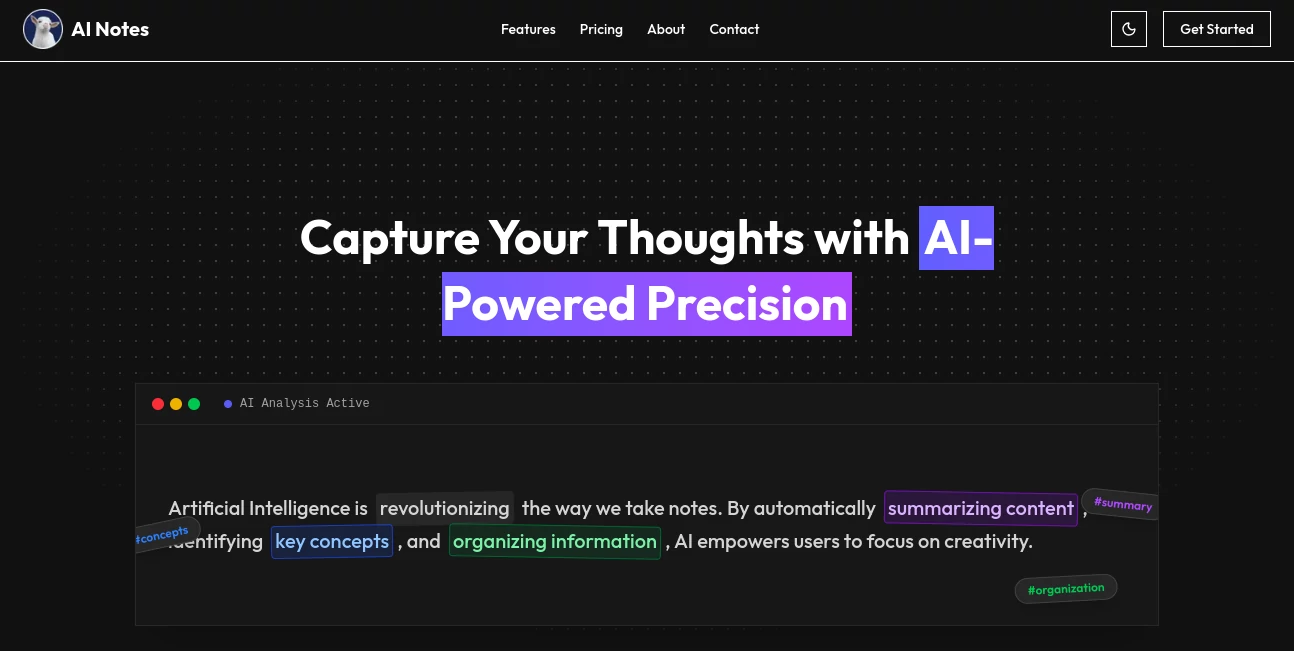
There's something satisfying about jotting down thoughts and watching them transform into something clearer, more organized, and ready to act on. This tool nails that feeling, taking your raw notes and polishing them with smart summaries, fixes, and even translations that make sense across languages. I tried it with a rambling brainstorm from a late-night idea session, and it pulled out the gold nuggets without me lifting a finger—suddenly my scattered points felt like a proper plan. It's the kind of quiet helper that makes you wonder how you managed without it.
Introduction
In the rush of daily life, notes pile up fast—meeting scribbles, lecture highlights, personal reminders—and sorting through them can feel like a chore. This platform changes that by layering in thoughtful AI touches that summarize long entries, spot errors, tag everything neatly, and translate on demand. It's designed for anyone who captures ideas regularly, from students juggling classes to pros tracking projects, offering a private space where your words stay yours. The real charm lies in how it respects your privacy with strong encryption while delivering insights that cut through the clutter, turning note-taking from a task into a tool that actually helps you think better.
Key Features
User Interface
It keeps things straightforward with clean sections that highlight the main actions—drop in your text, and options for summary or translation sit right there, no digging required. The layout focuses on readability, with features presented like friendly cards that explain what each does, making it easy to jump in without a tutorial. On my first visit, I pasted a chunk of meeting minutes, and the response felt immediate and uncluttered, like chatting with someone who just gets it.
Accuracy & Performance
The summaries capture the essence without fluff, pulling key points and insights that align closely with what you'd highlight yourself. Grammar tweaks are subtle yet spot-on, cleaning up without changing your voice, and translations flow naturally, handling nuances better than basic converters. It processes quickly, even with longer entries, delivering results that feel reliable and ready to use right away.
Capabilities
Beyond basics, it auto-tags for easy searching, analyzes for deeper takeaways, checks grammar to polish your prose, and translates seamlessly into any language you need. That global reach is a standout—switch a note from English to Spanish or further, and it keeps the meaning intact. It's all about elevating your notes from storage to something actionable, with encryption wrapping everything in security.
Security & Privacy
Everything gets AES-256 encryption, the kind trusted for sensitive stuff, ensuring your personal or work notes stay locked down and private. No unnecessary sharing or tracking; it's built with the mindset that your thoughts are yours alone, giving that reassuring backdrop for free-flowing ideas without worry.
Use Cases
Students paste lecture ramblings and get tidy summaries perfect for review sessions, spotting connections they might have missed. Professionals organize project updates with auto-tags that make searching a breeze, or translate client feedback for international teams. Writers refine drafts with grammar nudges and analysis that sparks better flow. Even casual journalers turn daily entries into insightful overviews, uncovering patterns in their own words.
Pros and Cons
Pros:
- Turns messy notes into clear, actionable insights without effort.
- Strong privacy focus that lets you note freely.
- Handy translation for crossing language barriers smoothly.
- Smart tagging keeps everything findable as your collection grows.
Cons:
- Best with text input; no built-in voice capture mentioned.
- Analysis depth shines on structured notes more than pure streams of consciousness.
Pricing Plans
It leans generous with core access available at no cost, letting you summarize, translate, and organize without barriers—ideal for everyday use or testing the waters deeply. As needs grow, upgrades likely unlock more volume or advanced touches, but the free foundation feels solid enough for most, keeping it approachable for students or casual users alike.
How to Use AI Notez
Drop your text into the main field—whether a quick bullet list or full paragraph dump—and choose what you need: a summary for the gist, analysis for deeper dives, or translation for a language switch. Watch it process, then review the output, tweak if wanted, and copy or save. I often start with raw meeting notes, hit summary first, then translate sections for a colleague—simple steps that yield big clarity.
Comparison with Similar Tools
While some focus heavily on voice transcription or flashy integrations, this one excels at pure text refinement with privacy and translation as strong suits, feeling more discreet and versatile for written workflows. It skips the bells for a focused polish that hits harder on organization and insights, making it a steady choice for those who value substance over spectacle.
Conclusion
This tool quietly elevates the simple act of noting into something more powerful, helping you not just record but truly master your ideas. It's a thoughtful companion for anyone drowning in thoughts, offering clarity and control with a privacy-first heart. Give it a spin with your next batch of notes—you might find, like I did, that it changes how you capture and keep what matters.
Frequently Asked Questions (FAQ)
How secure are my notes?
Locked with AES-256 encryption, keeping everything private and protected.
What languages does translation cover?
Any you need—instant shifts that keep meaning true.
Does it fix grammar automatically?
Yes, subtle checks that clear errors while preserving your style.
Is there a limit on free use?
Core features flow freely, perfect for regular note mastery.
How does auto-tagging work?
Smart sorting that categorizes as you go, making searches effortless.
AI Translate , AI Summarizer , AI Writing Assistants , AI Notes Assistant .
These classifications represent its core capabilities and areas of application. For related tools, explore the linked categories above.
AI Notes details
This tool is no longer available on submitaitools.org; find alternatives on Alternative to AI Notes.
Pricing
- Free
Apps
- Web Tools
Categories

AI Notes Alternatives Product

Meet-Ting

AHelp

Futurwise
markdown to …

nano banana …

AiZolo

AI page tran…

EasyVC

Sourcetable