🧠 AI Quiz
Think you really understand Artificial Intelligence?
Test yourself and see how well you know the world of AI.
Answer AI-related questions, compete with other users, and prove that
you’re among the best when it comes to AI knowledge.
Reach the top of our leaderboard.

















AI Best
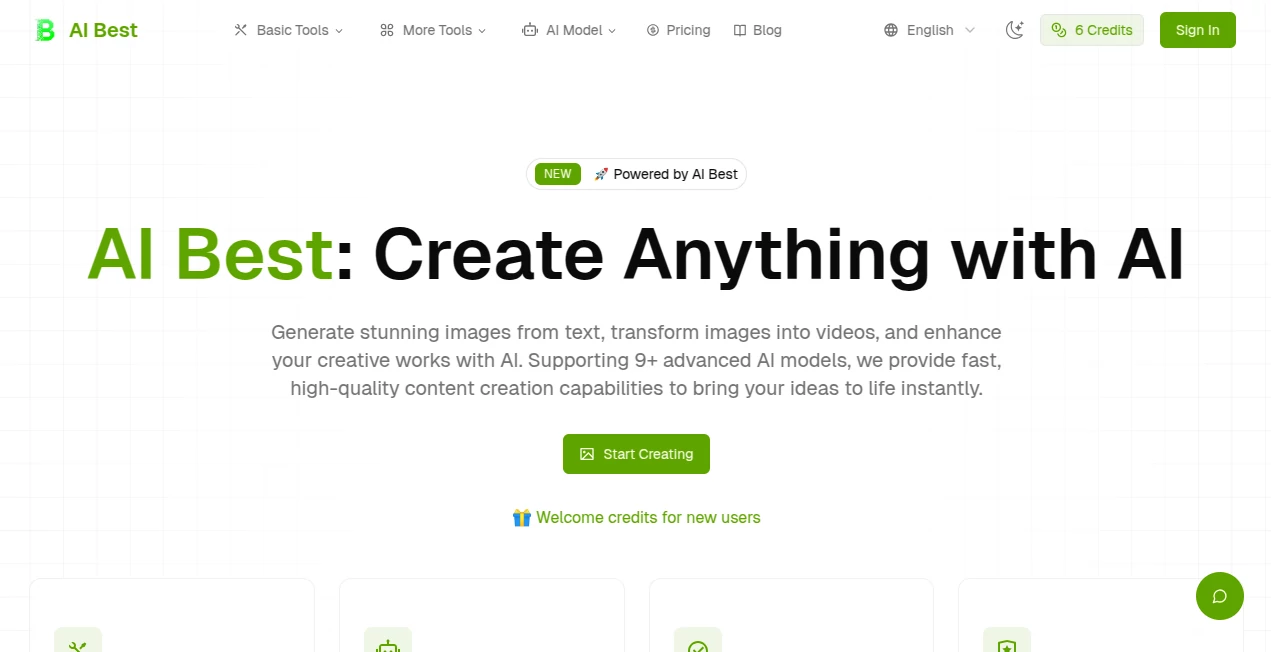
What is AI Best?
There's something downright thrilling about typing a wild idea into a box and watching it bloom into a breathtaking visual seconds later—sharp details, perfect lighting, the works. This platform nails that experience, blending cutting-edge smarts with a straightforward setup that lets anyone craft hyper-realistic scenes or smooth videos without a hitch. A buddy of mine, who's no tech wizard, whipped up a fantasy landscape for his game's cover art on his first try, and it looked like something from a big studio budget. It's the kind of tool that sparks joy in creators, turning "what if" moments into "wow, look at that" realities.
Introduction
Powered by heavy hitters like Google DeepMind tech, this spot focuses on making image and video creation feel effortless and exciting. You chat in everyday words about what you envision, and it delivers polished results that respect physics, styles, and even tricky text overlays. From photorealistic portraits that capture emotion just right to abstract pieces that play with light in unexpected ways, it handles a huge range with finesse. New folks get welcome credits to dive in, and the whole vibe is about speed without skimping on quality—most pieces ready in a handful of seconds. It's become a favorite for those who want pro-grade output without the pro-level fuss, bridging the gap for hobbyists and hustlers alike.
Key Features
User Interface
Jump in and you're greeted by a clean space that invites you to start typing or uploading right away—no overwhelming menus or hidden tabs. Pick your model from a solid lineup of nine-plus options, tweak ratios or resolutions with a click, and fire it off. Previews pop quick, and the flow keeps things moving, whether you're on a laptop or phone. It's that rare setup where you forget you're using a tool and just get lost in the making.
Accuracy & Performance
It gets the nuances spot-on: better text that reads clear, characters that stay true across variations, and scaling that ups to 4K without losing punch. Generations zip along at 2-8 seconds for most, even with layered prompts, keeping your momentum high. In my tinkering, it rarely missed the mark on style shifts or realistic touches, delivering that satisfying "exactly what I meant" feel more often than not.
Capabilities
Text to vivid images, image tweaks that transform moods, or turning stills into flowing videos—it's packed with ways to play. Handle up to eight references for complex builds, choose from ten aspect ratios or three resolution tiers, and export clean PNGs or JPGs. The hyper-realistic edge shines in everything from product shots that sell to dreamy worlds that inspire, all with physics that make sense and styles that blend seamless.
Security & Privacy
Creations tie to your account with clear terms on usage, especially for commercial flips where plans matter. It keeps things straightforward, encouraging responsible play while giving you confidence to experiment. No red flags in the handling—solid for sharing ideas without second-guessing.
Use Cases
Designers mock up client concepts in a flash, iterating styles until the vision clicks. Marketers craft eye-catching ads or social visuals that stand out in feeds. Artists explore wild ideas for personal projects, blending references into fresh takes. Even educators pull together illustrative examples for lessons, making abstract ideas tangible and engaging.
Pros and Cons
Pros:
- Lightning-quick turns that keep ideas flowing without waits.
- Top-notch realism and consistency that rivals pricier options.
- Flexible models and formats for all kinds of projects.
- Easy entry with credits that let you test the magic upfront.
Cons:
- Commercial details depend on your plan, so check for big uses.
- Heavier lifts might queue a bit longer during peaks.
Pricing Plans
Newcomers snag welcome credits for a no-risk spin, ideal for seeing the quality firsthand. Plans scale from there to fit casual dips or heavy workflows, with affordable steps that unlock more models, faster queues, and full rights. It's thoughtful pricing that grows with you, keeping the focus on creating rather than counting coins.
How to Use AIBest
Sign up quick if you want to track your gems, then head to the create section—type your description, upload refs if you've got 'em, and pick your specs like ratio or res. Hit go, sip your coffee for a few seconds, and grab the results. Tweak prompts for variations, download your favorites, and build a collection that fuels your next big thing.
Comparison with Similar Tools
It stands out with that DeepMind-backed polish for realism and text handling, where others might blur or botch details. Faster than many for everyday runs, with broader model choices that adapt to your style. For folks chasing quality that feels thoughtful over quantity, it's a standout that delivers more bang without the bloat.
Conclusion
This one's a genuine delight for anyone who loves turning thoughts into eye candy, offering that rare mix of power and playfulness. It lowers the bar for stunning visuals while raising the ceiling on what's possible, inviting you to experiment boldly. Give it a whirl with those starter credits—you might just find your new go-to for bringing ideas to brilliant life.
Frequently Asked Questions (FAQ)
How fast are generations?
Most wrap in 2-8 seconds, quick enough to keep the creative spark alive.
What resolutions can I choose?
1K, 2K, or smart-scaled 4K for that extra crisp.
Can I use outputs commercially?
Depends on your plan—check the terms for clear guidance.
How many models are there?
Over nine, giving you plenty of flavors to match your vision.
Video from images too?
Yes, transform stills into smooth clips with ease.
AI Photo & Image Generator , AI Video Generator , AI Art Generator , AI Text to Image .
These classifications represent its core capabilities and areas of application. For related tools, explore the linked categories above.
AI Best details
Pricing
- Free
Apps
- Web Tools
Categories

AI Best Alternatives Product

Seedance 2.0

String Art G…

ChromaPeel

AI Slop Canv…

NanoAI

Gemini AI vi…

Consistent C…

bananaai.app

ds video