🧠 AI Quiz
Think you really understand Artificial Intelligence?
Test yourself and see how well you know the world of AI.
Answer AI-related questions, compete with other users, and prove that
you’re among the best when it comes to AI knowledge.
Reach the top of our leaderboard.


















AI Christmas Photo

What is AI Christmas Photo?
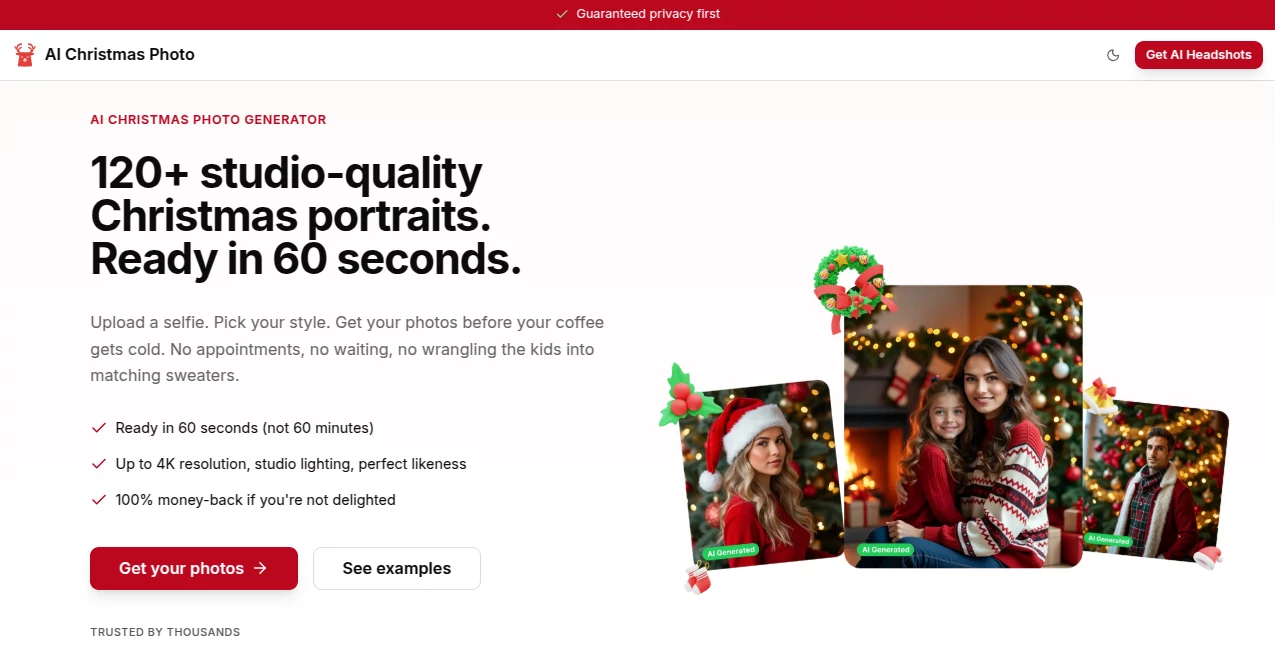
There's something truly special about those holiday photos that capture the season's warmth—the lights twinkling, the family gathered around the tree, everyone in cozy sweaters. But let's be honest: getting the perfect shot can be stressful, especially with kids who won't sit still or lighting that never quite cooperates. This tool takes all that pressure away. Upload a regular photo, describe the festive scene you want, and in seconds you have a professional-looking Christmas card ready to share. I tried it with a simple family selfie last week and ended up with everyone in Santa hats by a roaring fireplace—my mom thought I'd hired a photographer. It's the kind of thing that makes the season feel even more magical.
Introduction
The holidays come with enough to-do lists; the last thing anyone needs is another chore. This platform was built precisely for moments like that: a quick, delightful way to turn everyday snapshots into joyful Christmas scenes without any design skills or complicated software. You can place your family in a snowy village, add a gentle snowfall, or have everyone gathered around a beautifully decorated tree. What makes it stand out is how natural the results look—no weird artifacts or mismatched lighting. It's become a favorite among friends who share their creations and ask, "How did you do that?" And the best part? You can do it in minutes, leaving more time for cocoa and carols.
Key Features
User Interface
Everything is designed to feel simple and inviting. You land on a clean page with a big upload area and a text box where you describe what you want. No menus buried three levels deep, no confusing options—just pick your photo, type your idea, and hit generate. The preview shows up fast, and you can tweak the prompt if needed. It's the kind of interface that makes you feel creative rather than technical, which is exactly what holiday prep should be.
Accuracy & Performance
The results are surprisingly consistent. Faces stay recognizable, outfits match the description, and the holiday elements blend naturally. It handles different lighting and angles well, so even a quick phone snap from the living room can become a postcard-worthy scene. Processing is quick—usually under a minute—and it rarely needs multiple tries to get it right. I've seen it nail tricky things like kids with messy hair or pets that don't cooperate, delivering images that look like they were staged by a pro.
Capabilities
Beyond basic holiday scenes, you can create everything from vintage Christmas cards to playful, whimsical illustrations. Want your family ice skating on a frozen pond or building a snowman in a winter wonderland? Just say it. The tool also handles different art styles—cozy watercolor, classic photography, even animated GIFs for extra fun. It's flexible enough for personal cards, social media posts, or even custom invitations.
Security & Privacy
Your photos stay private. They're processed securely and not stored after you download your final image. There's no account required, so you're not handing over personal information just to make a festive picture. In a world where privacy matters more than ever, that kind of straightforward approach is refreshing.
Use Cases
Parents love turning chaotic family photos into perfect holiday cards to send to grandparents. Couples create romantic winter scenes for their Christmas announcements. Small businesses use it for quick, festive social media content without hiring a designer. I've even seen teachers make fun classroom-themed holiday photos to share with parents. It's perfect for anyone who wants that holiday magic without the stress of photo shoots or editing software.
Pros and Cons
Pros:
- Fast and easy—perfect for busy holiday schedules.
- Results look natural and professional, not artificial.
- No design skills needed; just describe what you want.
- Private and secure—no account required.
Cons:
- Free version includes a small watermark.
- Best results come from clear, well-lit photos.
Pricing Plans
You can start for free with a few generations per day, which is plenty for most holiday cards. Paid plans remove the watermark and give you unlimited creations—perfect if you're making cards for the whole family or running a small business. The pricing feels fair, especially considering how much time and frustration it saves.
How to Use AI Christmas Photo
Upload any clear photo of yourself, your family, or even your pet. Write a short description of the scene you want—like "family in matching pajamas by a decorated tree with snow outside." Choose your preferred style if you want something specific, then hit generate. Download your favorite version and share it. The whole process takes less than a minute, and you can always tweak the prompt for different variations.
Comparison with Similar Tools
While other AI image generators exist, this one is laser-focused on holiday magic. It understands festive themes better, handles group photos more naturally, and produces results that feel authentic rather than overly stylized. For Christmas cards and seasonal content, it's simply more reliable and easier to use than general-purpose tools.
Conclusion
The holidays are about creating memories, not stressing over perfect photos. This tool takes one of the season's biggest hassles and turns it into something fun and effortless. Whether you're making cards for loved ones or content for your business, it delivers beautiful, shareable results that capture the spirit of the season. Give it a try this year—you'll wonder how you ever did holiday photos without it.
Frequently Asked Questions (FAQ)
Do I need to create an account?
No, you can use it without signing up.
What kind of photos work best?
Clear, well-lit photos with visible faces give the best results.
Can I remove the watermark?
Yes, with a paid plan the watermark is completely removed.
How many photos can I generate for free?
You get a few free generations per day.
Can I use the images commercially?
Yes, especially with a paid plan—perfect for small businesses and content creators.
AI Photo & Image Generator , AI Fun Tools , AI Design Generator , AI Image to Image .
These classifications represent its core capabilities and areas of application. For related tools, explore the linked categories above.
AI Christmas Photo details
This tool is no longer available on submitaitools.org; find alternatives on Alternative to AI Christmas Photo.
Pricing
- Free
Apps
- Web Tools
Categories

AI Christmas Photo Alternatives Product

volume shade…

Text Behind …

Berrioo

MakeMyOC
Birthday Car…

Freepik

PaperYak

Nano Banana 2

VIGGLE