
🧠 AI Quiz
Think you really understand Artificial Intelligence?
Test yourself and see how well you know the world of AI.
Answer AI-related questions, compete with other users, and prove that
you’re among the best when it comes to AI knowledge.
Reach the top of our leaderboard.

















AI Color Analysis

What is AI Color Analysis?
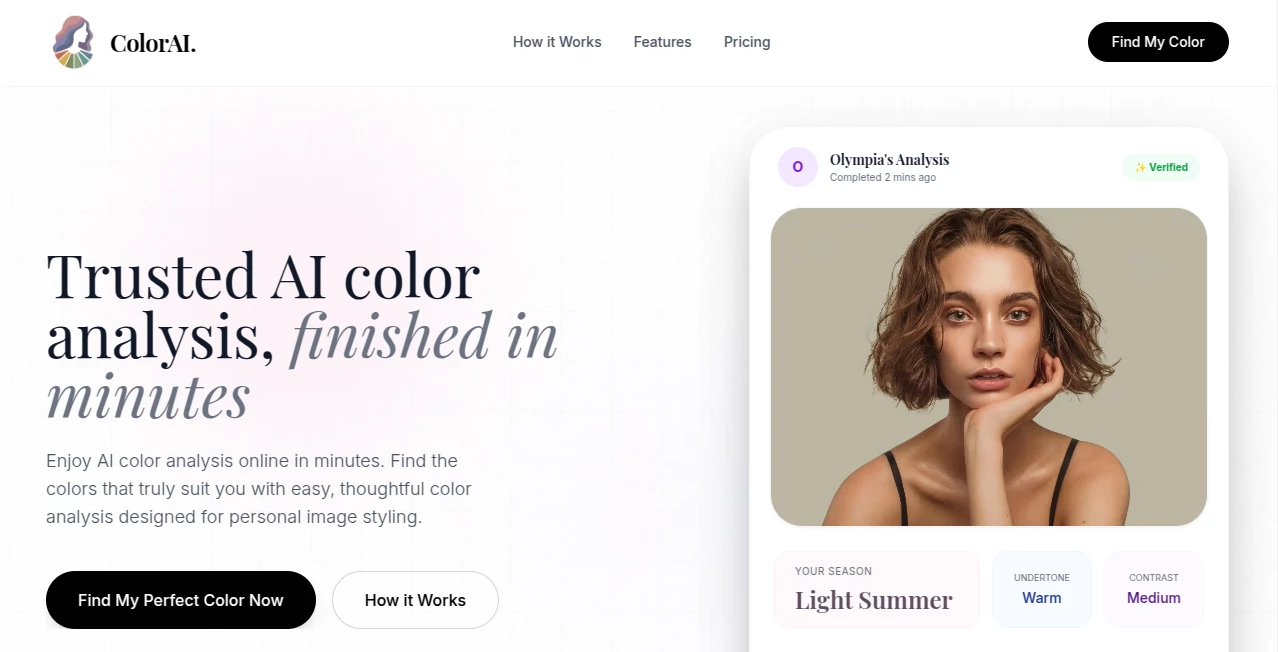
Have you ever stood in front of a mirror holding up different shirts, wondering which shade actually makes you glow? I’ve done it more times than I care to admit. Then I tried this tool and suddenly everything clicked. Upload a selfie, wait a few moments, and it tells you exactly which colors flatter your skin, eyes, and hair the most. No guesswork, no dragging friends along to the mall—just honest, personalized advice that actually works.
Introduction
Personal color analysis used to be something you booked with a consultant for a couple hundred dollars, sitting under bright lights while someone draped fabrics over you. Now, this tool brings that same expertise straight to your phone. It analyzes your facial features, undertones, and contrast level in seconds and hands you a custom palette that feels tailor-made. I was skeptical at first—how accurate could a photo be?—but after seeing the results match what a professional stylist once told me, I was sold. It’s become one of those little discoveries that quietly changes how you shop, dress, and even do makeup.
Key Features
User Interface
The whole thing is beautifully simple. You land on a clean page with a big “Upload Photo” button that practically begs you to start. No sign-up walls, no endless forms—just take a selfie in good natural light and hit go. The progress bar appears briefly, then your results pop up in a calm, easy-to-read layout. It even shows you side-by-side comparisons of warm vs cool tones so you can see the difference yourself. It feels like the designers really thought about what people actually want: clarity and zero hassle.
Accuracy & Performance
Here’s where it really shines. The analysis is surprisingly precise. It picks up subtle undertones that even I didn’t notice in my own face—those slight golden flecks in my eyes or the pinkish flush on my cheeks. The recommendations match what I’ve heard from in-person sessions, and the speed is impressive: under 10 seconds for most uploads. Even when I tested with slightly blurry selfies (bad lighting, my bad), it still got the core right. It’s not magic—it’s just really good at reading faces.
Capabilities
Beyond telling you your season, it gives you a full breakdown: best neutrals, accent colors, even jewelry metals and makeup shades. There’s a handy “contrast level” score, so you know whether high-contrast looks (black + white) or softer blends suit you better. Some users also love the “color harmony” section—it suggests palettes that work together, perfect for building a wardrobe or picking outfits for special occasions. It’s not just “you’re a summer”—it’s a complete guide that grows with you.
Security & Privacy
Privacy is handled thoughtfully here. Your photo is processed instantly and deleted right after the analysis—no long-term storage, no creepy cloud backups. The site is clear about it: your image isn’t saved or shared. For something as personal as your face, that kind of transparency matters a lot. You can use it anonymously if you want, which feels reassuring.
Use Cases
Wedding planners use it to help clients pick bridesmaid dresses that flatter everyone. Online shoppers check palettes before buying clothes they can’t try on. Makeup artists reference it when creating custom looks. One of my friends used it to finally figure out why black always made her look washed out—it turned out she’s a soft autumn, and switching to warmer tones changed everything. It’s surprisingly practical for everyday decisions too, like choosing a new hair color or deciding between silver and gold accessories.
Pros and Cons
Pros:
- Fast, accurate, and genuinely helpful—no fluff.
- Free basic analysis with clear, actionable results.
- Clean, mobile-friendly design that just works.
- Privacy-first approach you can trust.
Cons:
- Best results require good lighting and a front-facing photo.
- Advanced features (like detailed reports) are behind a small paywall.
Pricing Plans
The core analysis is completely free, which is already generous. If you want the full report—seasonal palette, color harmony guide, and makeup/jewelry recommendations—it’s a one-time fee that’s less than a single department store lipstick. No subscriptions, no hidden costs. You pay once, download your personalized guide, and keep it forever. For what it offers, it feels like a steal.
How to Use It
Take a well-lit selfie (natural daylight is ideal) with no heavy makeup or filters. Upload it straight from your phone or computer. The tool analyzes your skin tone, eye color, hair, and contrast level, then shows your best colors in a clear, visual format. Scroll through the suggestions, save the palette to your phone, and start shopping with confidence. It takes less time than scrolling Instagram, but the impact lasts way longer.
Comparison with Similar Tools
Most color analysis apps either rely on outdated quizzes or give generic answers. This one uses real facial analysis, so the results feel personal instead of one-size-fits-all. Other tools might look flashier, but they often fall short on accuracy or bury the good stuff behind paywalls. Here, you get solid, honest advice without the gimmicks—and the free version is actually useful, not just a teaser.
Conclusion
If you’ve ever wondered why some colors make you look radiant and others leave you looking tired, this tool finally gives you the answer. It’s fast, accurate, and surprisingly empowering. Whether you’re revamping your wardrobe, picking makeup, or just curious, it’s one of those little life upgrades that feels like a secret weapon. Once you know your colors, everything gets easier—and you’ll wonder why you waited so long to find out.
Frequently Asked Questions (FAQ)
Do I need perfect lighting?
Natural daylight works best, but it still does a great job with indoor photos as long as your face is clear.
Is the free version really free?
Yes—basic analysis is 100% free. Paid upgrades are only for the full downloadable report.
Can I use it for other people?
Absolutely—great for helping friends or family find their colors too.
Does it work for all skin tones?
Yes, it’s trained on a wide range of tones and undertones.
Is my photo saved?
No—processed instantly and deleted right after. Your privacy is respected.
AI Selfie & Portrait , AI Design Assistant , AI Photo Enhancer , AI Image Recognition .
These classifications represent its core capabilities and areas of application. For related tools, explore the linked categories above.
AI Color Analysis details
This tool is no longer available on submitaitools.org; find alternatives on Alternative to AI Color Analysis.
Pricing
- Free
Apps
- Web Tools
Categories

AI Color Analysis Alternatives Product
FaceShapeDet…

Image Text E…
Seedream 4.5

Remove Text

ModelsLab

Face Shape D…

Beard Remover

Alai

GTA AI
