
🧠 AI Quiz
Think you really understand Artificial Intelligence?
Test yourself and see how well you know the world of AI.
Answer AI-related questions, compete with other users, and prove that
you’re among the best when it comes to AI knowledge.
Reach the top of our leaderboard.


















AI Image Editor

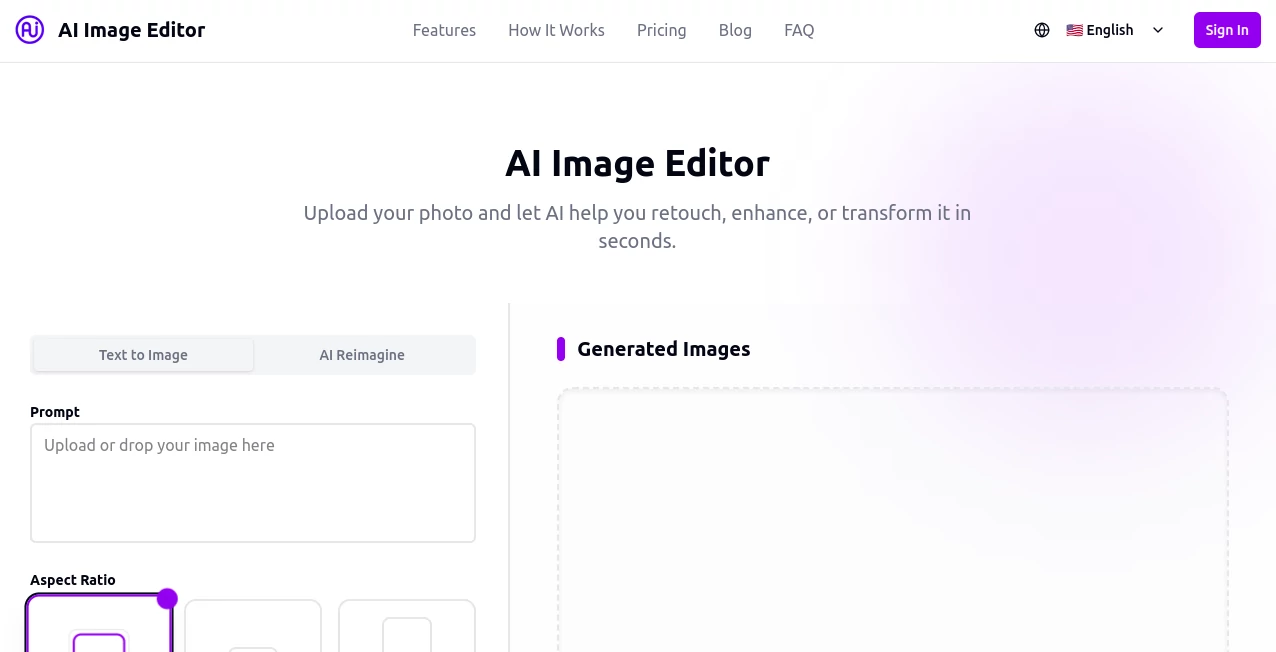
What is AI Image Editor?
AI Image Editor opens up a playground for turning ordinary snapshots into eye-catching wonders, all with a few simple clicks that feel more like play than work. This handy spot lets you upload a picture and let clever tweaks handle the heavy lifting, whether you're smoothing out a portrait or dreaming up a scene with a dragon gliding over a sunset castle. Folks who've given it a whirl often chat about how it saves them from hours of fiddling, delivering results that look like they came from a pro's desk without the hassle.
Introduction
AI Image Editor came along a short while back, sparked by the everyday gripes of people tired of clunky programs that buried the fun under layers of buttons and sliders. It started as a way to make quick fixes feel fresh, and soon enough, word spread through creative circles where photographers and hobbyists swapped tips on getting that perfect shot without the sweat. What began with basic touch-ups has grown into a full-fledged hub for visual tweaks, pulling in everyone from casual snappers to marketing whizzes who need visuals that pop. At its heart, it's about handing over the reins to something that gets your vision right away, turning 'what if' moments into 'there it is' delights that keep users coming back for more.
Key Features
User Interface
The setup greets you with a welcoming drag-and-drop zone that makes adding your photo as easy as sliding a postcard across a table. Once loaded, a tidy dashboard lays out choices like square frames or wide landscapes, with previews that update on the spot so you see the shift before committing. No overwhelming menus or hidden tricks—just straightforward picks that guide you through, feeling like a chat with a helpful friend who's got a knack for pictures.
Accuracy & Performance
When you ask for a subtle glow-up or a bold backdrop switch, it lands the details just so, keeping skin tones natural and edges crisp without overdoing it. Tasks wrap up in a blink, even for batch runs, spitting out files that hold up sharp on any screen size. Users often point out how it nails those tricky spots, like fading out distractions without blurring the main focus, making every edit feel spot-on from the first try.
Capabilities
It juggles everything from wiping away messy backgrounds to layering in artistic twists, like neon pops or soft minimalist washes that add personality without effort. Boost resolutions for prints that wow, or play with prompts to spin up fresh scenes from a single idea, all while fitting formats for posts or posters. The real charm lies in how it blends these moves seamlessly, letting you chain changes into something wholly new without starting over.
Security & Privacy
Your uploads get handled with care, processed on the fly and cleared out once you're done, so nothing lingers longer than needed. You call the shots on saves and shares, with straightforward locks that keep personal snaps under your thumb. It's the kind of quiet reliability that lets you tinker freely, knowing those vacation memories or work drafts stay just where you left them.
Use Cases
Photographers lean on it for quick portrait polishes, evening out lights and spots to make clients grin wider. Marketers whip up product setups against clean slates, testing appeals before the big push. Social sharers apply fun filters to daily snaps, turning mundane moments into scroll-stoppers. Even educators craft visual aids, like labeled scenes that bring lessons to life without the drawing desk.
Pros and Cons
Pros:
- Snappy changes that turn rough drafts into refined pieces fast.
- Welcomes all levels, from newbies to old hands, without a steep climb.
- Packs multiple tricks in one easy reach, skipping app swaps.
- Yields consistent shines that look pro without the price tag.
Cons:
- Free spins cap quick, nudging toward upgrades for steady use.
- Batch magic waits behind paid doors for bulk dreamers.
- Tricky inputs like cluttered shots might need a pre-trim.
Pricing Plans
Start off free with a taste of the basics—handful of tweaks and simple swaps each month, enough to dip toes without a dime. Pro steps in at about twenty bucks monthly for deeper dives, like high-end cleanups and more plays. Premium pushes to forty for the full ride, with endless options and top-shelf exports, all while yearly picks shave a bit off the tab for long-haul fans.
How to Use AI Image Editor
Drop your photo into the open slot, then eye the dashboard for your pick—maybe a backdrop brush-off or a glow tweak. Watch it whirl, preview the polish, and snag the finish in your go-to size. Chain a few more if the mood strikes, then save or share straight from the screen, building a habit that turns edits into effortless escapes.
Comparison with Similar Tools
Where some rivals load you with endless sliders that slow the spark, AI Image Editor keeps it light and lively, trading bells for breezy results, though those might offer more manual might for finicky folks. Against free-for-alls that falter on finesse, it layers in that extra touch for outputs that endure, but could bow to heavyweights in raw range. It fits folks after quick, quality leaps over labored layers.
Conclusion
AI Image Editor wraps the world of visual tweaks in a package that's as inviting as it is effective, turning everyday images into something worth a second look. It nudges creators toward bolder plays without the barriers, proving that a dash of smarts can spark wonders in the simplest snaps. As more eyes seek standout scenes, this one's primed to keep the magic flowing, one polished pixel at a time.
Frequently Asked Questions (FAQ)
What kinds of photos work best?
Clear shots with good light shine brightest, but it handles the hazy ones with grace too.
Can I tweak after the first go?
Load it back in and layer on—the flow picks up right where you left off.
How about group edits?
Pro and up open batch doors, perfect for feeding a folder at once.
Does it fit mobile shares?
Tailored formats make it a snap for posts or stories that grab the feed.
What if the output's off?
Refine your pick and rerun—small shifts often seal the deal.
Photo & Image Editor , AI Background Remover , AI Art Generator , AI Graphic Design .
These classifications represent its core capabilities and areas of application. For related tools, explore the linked categories above.
AI Image Editor details
This tool is no longer available on submitaitools.org; find alternatives on Alternative to AI Image Editor.
Pricing
- Free
Apps
- Web Tools
Categories

AI Image Editor Alternatives Product

XIMAGIN
free ai face…
GPT Image 1.5

Face Shape D…
China Brush

Editaimg

ai banana
Sora Waterma…

z-image.me
