
🧠 AI Quiz
Think you really understand Artificial Intelligence?
Test yourself and see how well you know the world of AI.
Answer AI-related questions, compete with other users, and prove that
you’re among the best when it comes to AI knowledge.
Reach the top of our leaderboard.

















AI OCR
What is AI OCR?
There's something quietly satisfying about watching a blurry photo of a receipt or a page from an old book transform into crisp, searchable text in seconds. This tool makes that moment feel almost routine, yet every time it delivers, it's a small victory over the chaos of paper and pixels. You drop in whatever image or PDF you have—maybe a handwritten note from a meeting, a scanned invoice, or a textbook page—and it returns not just raw text, but the layout, tables, bolding, and structure intact. I once fed it a faded receipt from a trip; the totals, dates, and merchant name popped out perfectly, saving me from squinting and typing everything by hand. It's the kind of helper that quietly makes life smoother.
Introduction
Paper still lingers everywhere—receipts in wallets, notes in notebooks, contracts in folders—and turning it all digital used to mean slow typing or unreliable scans. This platform changes that with a level of intelligence that feels almost intuitive. It handles printed text, handwriting, complex layouts, and over a hundred languages with a calm confidence that makes you trust it right away. What draws people back is how it preserves the original feel of the document while making the content fully editable and searchable. Students digitizing textbooks, professionals clearing out filing cabinets, small businesses tracking expenses—everyone finds something useful here. It's not flashy, but it is deeply practical, and that reliability builds loyalty fast.
Key Features
User Interface
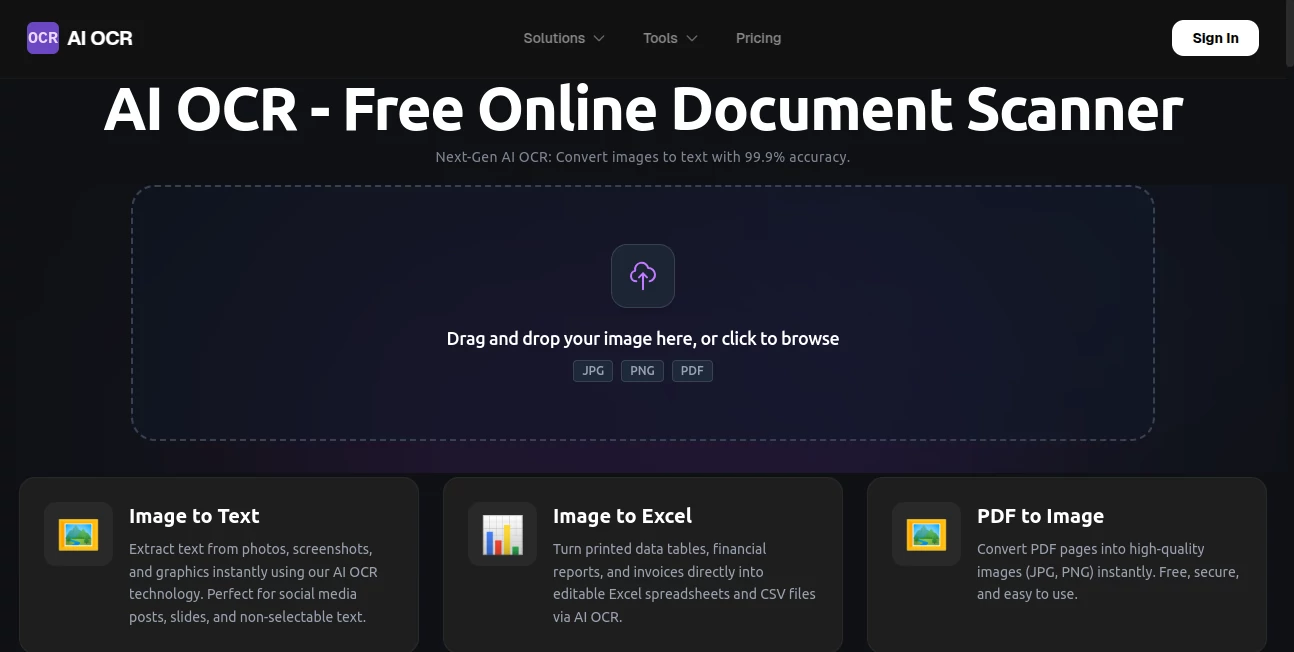
The page greets you with a generous drop zone that invites you to drag or click—nothing complicated, just a clear space that says "put your file here." Once uploaded, progress shows cleanly, and results appear with the text nicely formatted beside the original image. It's web-based, works on any device, and never asks for more than it needs. That simplicity is a gift; you can go from photo to editable text in under a minute without ever feeling lost.
Accuracy & Performance
The standout claim is 99.9% accuracy on clean documents, and it lives up to it in practice—printed pages come out nearly flawless, and even handwriting or tricky fonts hold together surprisingly well. Tables stay structured, columns don't bleed, and the text flows naturally. Processing happens in moments, even for multi-page PDFs, so you're not left waiting. The difference shows most on messy inputs: a crumpled receipt or low-light photo still yields usable results where other tools would give up.
Capabilities
It goes beyond basic extraction. Handwriting turns into readable lines, tables export straight to Excel or CSV, receipts pull out dates and totals automatically, and ID cards or passports yield structured data. Layout preservation is a highlight—paragraphs, lists, bold and italic text all stay in place. With support for over 100 languages, including scripts like Arabic, Chinese, and Cyrillic, it opens doors for truly global use. The combination of speed, formatting, and language breadth makes it feel like a complete solution rather than a single trick.
Security & Privacy
Files travel over SSL, get processed in secure sandboxes, and are wiped from servers within an hour (or right after you download). There's no lingering data or hidden sharing—your documents stay yours. For anyone dealing with invoices, personal IDs, or confidential notes, that matters a lot. It's reassuring to know the tool respects boundaries as carefully as it handles the content.
Use Cases
A student photographs textbook pages during a late-night study session and turns them into searchable notes for review. A freelancer scans receipts at the end of each month, exporting totals to a spreadsheet for quick bookkeeping. A researcher digitizes old case files, making decades of handwritten records searchable in minutes. Small business owners pull merchant details from business cards for contact lists. It's these everyday wins—saving time, reducing errors, freeing mental space—that make it quietly indispensable.
Pros and Cons
Pros:
- Exceptional accuracy that handles handwriting and complex layouts better than most.
- Layout and formatting preserved—text comes out ready to edit, not jumbled.
- Broad language support opens it up for international or multilingual work.
- Generous free tier means you can test thoroughly before deciding.
Cons:
- Free daily limit can feel tight if you process lots of pages regularly.
- Very poor-quality or heavily stylized inputs may still need cleanup first.
Pricing Plans
It starts generously—plenty of free conversions every day so you can try it on real documents without pressure. When needs grow, affordable premium tiers unlock batch processing, higher volume, and API access for integrating into workflows. The progression feels natural: experiment freely, then scale smoothly as the tool proves itself. No aggressive upsell, just options that match actual use.
How to Use AI OCR
Visit the page, drag your image or PDF into the drop zone (or click to browse), and wait a few seconds while it processes. Results show side-by-side: original on one side, extracted text on the other, with formatting intact. Copy to clipboard, download as Word, TXT, or Excel, or keep going with the next file. For tables or receipts, it often auto-detects structure—export directly to spreadsheet if that's your goal. It's quick, clean, and forgiving even on imperfect scans.
Comparison with Similar Tools
Many OCR services stop at raw text dumps or struggle with layout and handwriting. This one stands apart by keeping the document's structure alive—tables stay tables, bold stays bold—and by handling messy inputs with surprising grace. Where others falter on non-Latin scripts or cursive notes, it performs reliably across languages and styles. It's less about being the fastest single-scan tool and more about delivering usable, formatted output every time.
Conclusion
Paper doesn't have to be a barrier anymore. This tool quietly turns physical documents into digital allies—searchable, editable, organized—without asking you to fight outdated tech. It's the small daily relief that adds up: one less hour squinting at faded ink, one less spreadsheet typed from scratch. For students, freelancers, researchers, or anyone drowning in paper, it's a simple, smart way to reclaim time and clarity. Once you try it, going back to manual entry feels almost unthinkable.
Frequently Asked Questions (FAQ)
How accurate is it really?
Up to 99.9% on clean printed text; handwriting and tough fonts still impress, though perfect scans help most.
Does it keep formatting?
Yes—paragraphs, lists, tables, bold/italic all carry over so you don't have to rebuild.
What languages does it support?
Over 100, including Chinese, Arabic, Japanese, Korean, Cyrillic—handles mixed languages too.
Is the free version usable?
Very—generous daily conversions let you handle real work without paying upfront.
Are my files safe?
SSL encrypted, processed in secure sandboxes, deleted within 1 hour after conversion.
AI Transcriber , AI PDF , AI Document Extraction , AI Documents Assistant .
These classifications represent its core capabilities and areas of application. For related tools, explore the linked categories above.
AI OCR details
Pricing
- Free
Apps
- Web Tools
Categories

AI OCR Alternatives Product

SuperAI

UPDF AI

GLM-OCR Onli…

Ryne AI
FluentDictat…

Zeemo AI

Sourcetable

Rename files…

Watermark in…
