
🧠 AI Quiz
Think you really understand Artificial Intelligence?
Test yourself and see how well you know the world of AI.
Answer AI-related questions, compete with other users, and prove that
you’re among the best when it comes to AI knowledge.
Reach the top of our leaderboard.

















AI Photo Editor
What is AI Photo Editor?
Most photo editing still feels like work. You open an app, hunt for the right tool, fight with layers, and hope the final result doesn’t look fake. This one changes the game. You upload a picture and simply tell it what you want—“remove the background,” “make the sky dramatic at sunset,” “change her outfit to a red dress,” or “turn this product shot into a lifestyle scene.” A few seconds later, you get a clean, natural-looking edit. I’ve used it to fix vacation photos where someone photobombed the shot, and to create marketing images that would have taken hours in Photoshop. The best part? It feels like magic without the usual AI weirdness.
Introduction
AI photo editing has been around for a while, but most tools either overdo it or require you to learn complex prompting tricks. This platform keeps things refreshingly straightforward while delivering impressive results. It combines several strong AI models so you get the best output for different tasks—whether removing objects, changing backgrounds, enhancing portraits, or doing creative transformations. No subscriptions forced on you to start, no confusing interfaces, just upload and describe what you want. For casual users, content creators, small business owners, and even hobby photographers, it’s become the go-to when they need fast, high-quality edits without the hassle.
Key Features
User Interface
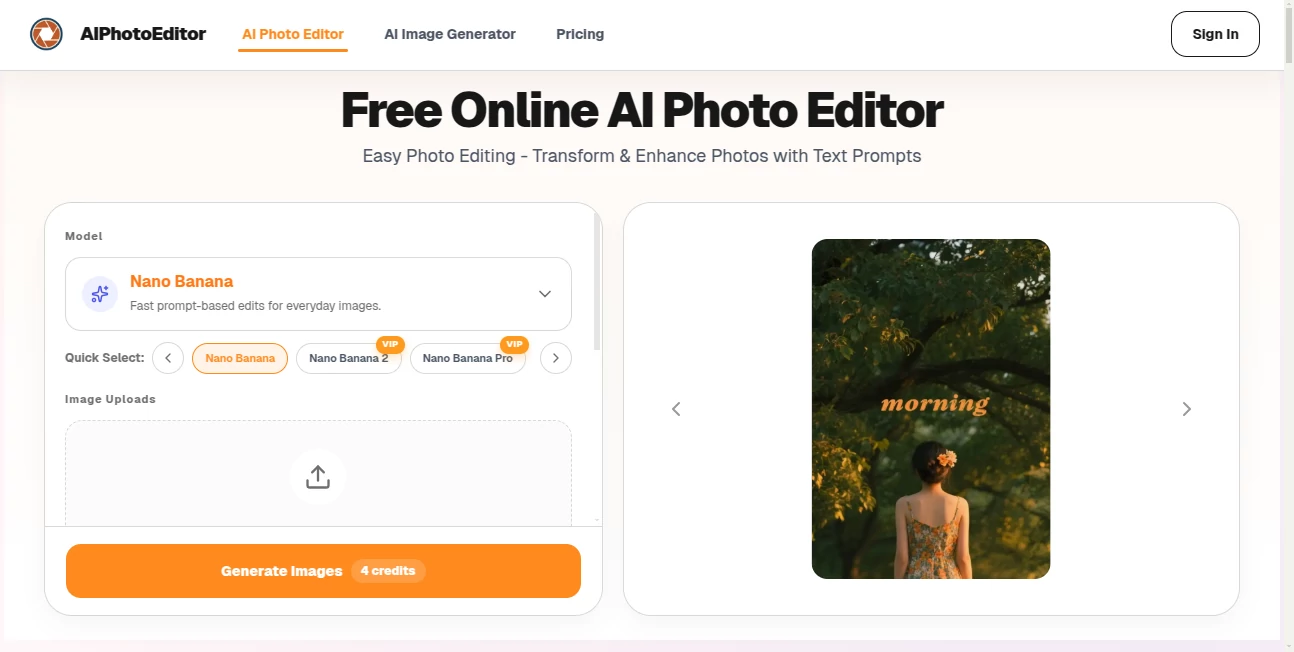
The design is wonderfully minimal. A big upload area in the center, clear buttons for common tasks, and a simple text box where you type exactly what you want changed. No overwhelming toolbars or hidden menus. As soon as the image processes, you see clean before-and-after views and can refine with follow-up prompts. It feels more like chatting with a skilled editor than using software.
Accuracy & Performance
The edits are surprisingly natural. When you ask to remove something, it doesn’t leave ugly patches—it intelligently fills the area. Background changes respect lighting and perspective. Face enhancements look human, not plastic. Processing is fast, even on detailed photos, and the quality holds up at higher resolutions. It rarely produces the weird artifacts or distortions you see in lesser tools.
Capabilities
You can remove unwanted objects or people, replace backgrounds with text descriptions, enhance portraits (skin smoothing, eye brightening, etc.), upscale images, change clothing or styles, expand images beyond original borders, and do creative transformations. It handles product photos, travel shots, portraits, and even old family pictures. Multiple AI models work behind the scenes so you get the best result for each specific request.
Security & Privacy
Your photos are processed securely and not stored long-term unless you choose to save them. No account is required for basic edits, so you can test the tool privately. For anyone editing personal or client images, this low-friction privacy approach is a big plus.
Use Cases
A small business owner quickly turns plain product shots into lifestyle images that convert better. A traveler removes photobombers from scenic photos before posting. A portrait photographer cleans up and enhances client shots without hours in editing software. Someone restores old family photos by removing damage and improving color. Content creators experiment with different styles for social media posts in minutes instead of hours.
Pros and Cons
Pros:
- Text prompts make editing intuitive and fast—no technical skills needed.
- Results look natural and high-quality, not over-processed.
- Fast processing even on detailed images.
- Free to try with strong capabilities before any upgrade.
- Handles a wide range of real-world editing needs.
Cons:
- Very complex or artistic edits may need a few prompt refinements.
- Heavy daily use benefits from paid plans for unlimited generations.
- Some highly specific creative visions still work better with manual editing.
Pricing Plans
You can start completely free and get solid results right away. Paid plans remove daily limits, unlock faster processing, higher resolutions, and priority access to newer models. The pricing is reasonable for the time it saves—many users find it pays for itself after just a few big editing sessions compared to hiring a freelancer or spending hours in traditional software.
How to Use AI Photo Editor
Go to the main page and upload your photo. Once it loads, type what you want in the prompt box—“remove the person on the left,” “change background to tropical beach at sunset,” or “make this product shot on a wooden table with natural lighting.” Hit generate and review the result. If you want adjustments, simply type a follow-up prompt. Download the final image when you’re happy. The whole process usually takes under a minute.
Comparison with Similar Tools
Many AI editors are either too basic (limited to one or two functions) or too complicated (steep learning curve). This one stands out for its balance—powerful enough for real work, simple enough for anyone to use. Where some tools produce obvious AI artifacts or struggle with natural lighting, the edits here tend to blend seamlessly. It’s particularly strong for users who want quick, high-quality results without learning complex software.
Conclusion
Good photo editing shouldn’t feel like a chore or require years of practice. This tool makes professional-looking edits accessible to everyone while keeping the results natural and impressive. Whether you’re fixing personal memories, creating content for work, or just having fun with creative ideas, it delivers speed and quality without the usual headaches. In a world full of average photos, it helps yours stand out—and makes the whole process enjoyable again.
Frequently Asked Questions (FAQ)
Do I need to create an account to start?
No—you can upload and edit immediately without signing up.
How good is the quality for professional use?
Many users successfully use it for e-commerce, social media, and marketing—results are often print and web ready.
Can I edit multiple photos at once?
Yes, paid plans support batch processing for larger projects.
What if I don’t like the first result?
Just describe the changes you want in a new prompt—it usually improves quickly.
Are my photos kept private?
Yes—processed securely and not stored long-term unless you save them yourself.
Photo & Image Editor , AI Photo Enhancer , AI Design Generator , AI Image to Image .
These classifications represent its core capabilities and areas of application. For related tools, explore the linked categories above.
AI Photo Editor details
Pricing
- Free
Apps
- Web Tools
Categories

AI Photo Editor Alternatives Product

Caricature G…
Nano Banana …

Nano Banana 2

MAGIK FACE

Art-Neurona

Transform An…
AI Ease AI P…

AI Clothes

Nano Banana …
