
🧠 AI Quiz
Think you really understand Artificial Intelligence?
Test yourself and see how well you know the world of AI.
Answer AI-related questions, compete with other users, and prove that
you’re among the best when it comes to AI knowledge.
Reach the top of our leaderboard.


















AI UGC Video Generator

What is AI UGC Video Generator?
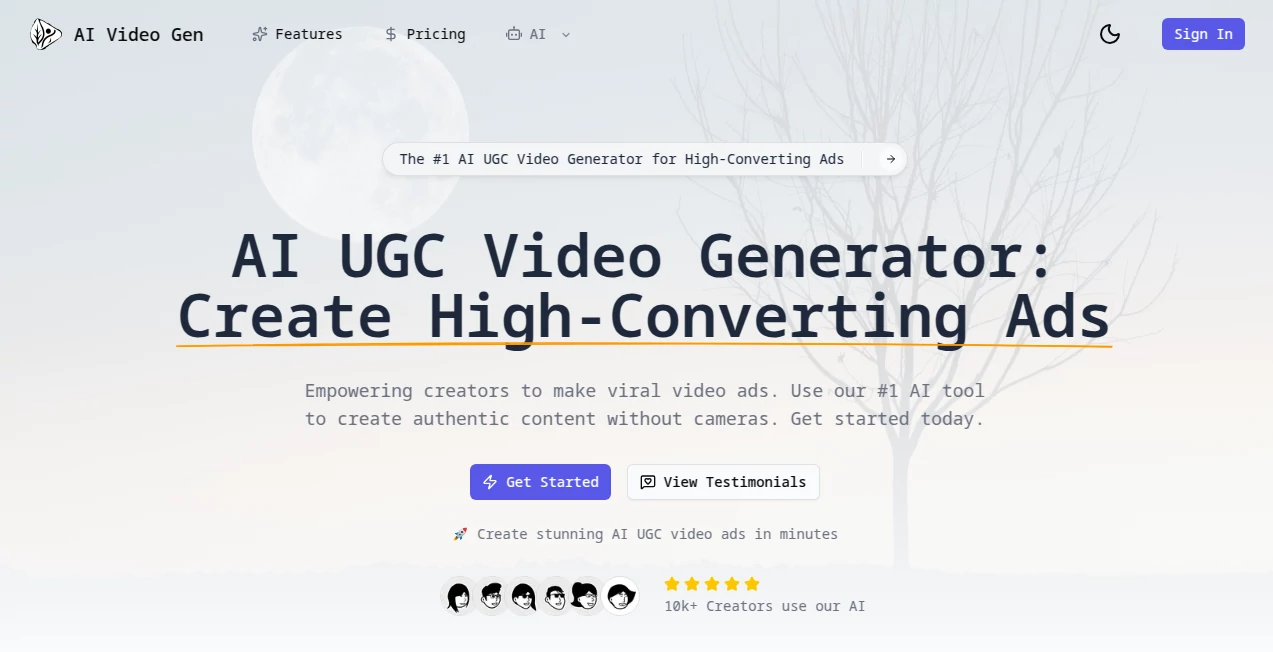
Nothing sells quite like a real person talking straight to the camera with natural lighting, casual framing, and that unscripted energy UGC videos are famous for. The problem has always been: getting that look consistently is time-consuming and expensive. This tool changes the equation completely. Type what you want said, pick a realistic avatar or upload your own reference, choose a background or style, and in under a minute you have a talking-head video that looks like someone filmed it on their phone in their living room—except it’s perfectly lit, perfectly paced, and says exactly what you need. I’ve seen small brands use these clips in ads and watch click-through rates jump because people actually believe the person on screen is real.
Introduction
User-generated content has become the gold standard for trust online—people scroll past polished studio ads but stop for someone holding their phone saying “I actually use this every day.” The catch is producing UGC at scale is hard: you need actors, good lighting, multiple takes, editing… or you can let this platform do 90% of the heavy lifting. It specializes in hyper-realistic talking avatars that match UGC aesthetics—imperfect framing, natural eye movement, subtle head tilts, realistic lip-sync, and even minor “phone shake” if you want it. Creators and marketers who’ve tried it often say the same thing: “I didn’t think AI could look this convincingly human yet.” For anyone running ads, building funnels, or posting social proof content, it’s become a shortcut that saves thousands in production while keeping authenticity intact.
Key Features
User Interface
The dashboard keeps things dead simple: paste your script, select avatar (dozens of diverse, realistic options or upload your own reference), pick background (indoor casual, outdoor, plain wall, etc.), choose voice tone and pacing, then hit generate. Real-time preview lets you tweak script or delivery before final render. No complicated timeline editors or keyframe nonsense—just focused inputs that lead straight to output. It’s built so non-video people can get pro results in their first session.
Accuracy & Performance
Lip-sync is tight even on fast speech or emotional delivery. Avatars maintain consistent identity and expression across takes. Lighting and shadows match the chosen environment naturally—no floating heads or mismatched color temperature. Generation is quick (30–90 seconds for most clips), and the realism holds up on mobile screens where most UGC is consumed. The model avoids uncanny valley pitfalls better than most—skin texture, micro-expressions, and subtle blinks feel human, not robotic.
Capabilities
Text-to-talking-video, reference-based avatar creation (upload 1–3 photos for custom likeness), 100+ ultra-realistic stock avatars, multiple languages and accents, customizable backgrounds and framing styles (phone vertical, webcam horizontal, selfie mode), emotional tone control (excited, calm, sarcastic, etc.), script highlighting for natural pauses/emphasis, and export in MP4 ready for ads, TikTok, Reels, YouTube Shorts. Clips are watermark-free on paid plans and optimized for social aspect ratios.
Security & Privacy
Uploaded reference photos are processed temporarily and deleted after generation—no permanent storage unless you explicitly save a custom avatar. Scripts and outputs are not used for training. Paid plans include private generations (not visible in public gallery). For brands handling sensitive messaging or personal likenesses, the ephemeral processing and clear data policy provide genuine peace of mind.
Use Cases
A skincare brand creates 20 short testimonial-style clips with different avatars saying the same core message—each looks like a different real customer, boosting trust and reach. A SaaS founder records one script and generates localized versions in five languages for global ads without hiring voice actors. An affiliate marketer produces daily “honest review” style videos that blend seamlessly with organic UGC content. A course creator adds personalized welcome messages to students using their own likeness. Wherever authenticity and scale need to coexist, this tool quietly solves the puzzle.
Pros and Cons
Pros:
- UGC look is exceptionally convincing—people genuinely mistake it for real footage.
- Fast turnaround lets you test dozens of variations in an afternoon.
- Custom avatar creation from photos gives brands consistent “spokesperson” options.
- Emotional tone and pacing controls make scripts feel natural, not robotic.
- Watermark-free, social-ready exports on affordable plans.
Cons:
- Maximum clip length is still modest (typically 15–60 seconds depending on plan).
- Very long scripts or complex multi-person scenes are not yet supported.
- Free tier is limited (short clips with watermark); serious use requires paid plan.
Pricing Plans
Free tier offers several short test generations with watermark—enough to feel the realism. Paid plans start low and scale with usage: more credits, longer clips, no watermark, custom avatars, priority queue, and commercial rights. Pricing is competitive—many small businesses say one month’s cost is less than hiring a single UGC creator for a day of shooting.
How to Use AI UGC Video Gen
Sign up (quick email or Google), go to create, paste your script (keep it conversational), select or upload avatar reference, choose background style and tone (enthusiastic, honest, relaxed, etc.), adjust pacing if desired, preview a short sample, then generate full clip. Download MP4 when ready. For custom likeness, upload 1–3 clear photos and let it build the avatar (takes a few minutes first time). Iterate by tweaking script or tone until it feels perfect. Most users get a usable ad-ready clip in under 10 minutes.
Comparison with Similar Tools
Many AI video tools produce either cartoonish results or uncanny stiff talking heads. This one specializes in authentic UGC aesthetics—imperfect framing, natural micro-movements, realistic lighting falloff—and nails the “shot on iPhone” look better than most competitors. Where others require heavy prompt engineering or multiple passes, the workflow here is streamlined and focused on social-selling realism, making it the go-to for marketers who live or die by conversion.
Conclusion
Trust is currency in today’s attention economy, and nothing builds trust faster than content that looks like a real person genuinely recommending something. This tool hands creators and brands that capability at scale—without casting calls, lighting setups, or editing suites. It’s not about replacing human creators; it’s about giving them superpowers to produce the kind of authentic-looking content that actually moves the needle. When your next ad performs better because it feels real, you’ll know exactly why.
Frequently Asked Questions (FAQ)
How realistic do the avatars look?
Extremely—most viewers can’t tell they’re AI on first watch, especially in vertical social formats.
Can I use my own face?
Yes—upload a few clear photos and generate a custom avatar that looks convincingly like you.
What’s the maximum video length?
Typically 15–60 seconds depending on plan; longer scripts can be split into multiple clips.
Is commercial use allowed?
Yes—paid plans grant full commercial rights with no attribution required.
Watermark on free videos?
Yes, small watermark on free tier; completely removed on any paid plan.
AI Personalized Video Generator , AI Video Generator , AI Text to Video , AI UGC Video Generator .
These classifications represent its core capabilities and areas of application. For related tools, explore the linked categories above.
AI UGC Video Generator details
This tool is no longer available on submitaitools.org; find alternatives on Alternative to AI UGC Video Generator.
Pricing
- Free
Apps
- Web Tools
Categories

AI UGC Video Generator Alternatives Product

Blinkly AI

Veo 3.2

kling 3 AI
ds video

WonderShare …
Render of Dr…

KKV AI

Ltx 2.3

Sora2 AI Vid…
