🧠 AI Quiz
Think you really understand Artificial Intelligence?
Test yourself and see how well you know the world of AI.
Answer AI-related questions, compete with other users, and prove that
you’re among the best when it comes to AI knowledge.
Reach the top of our leaderboard.

















AnividAI
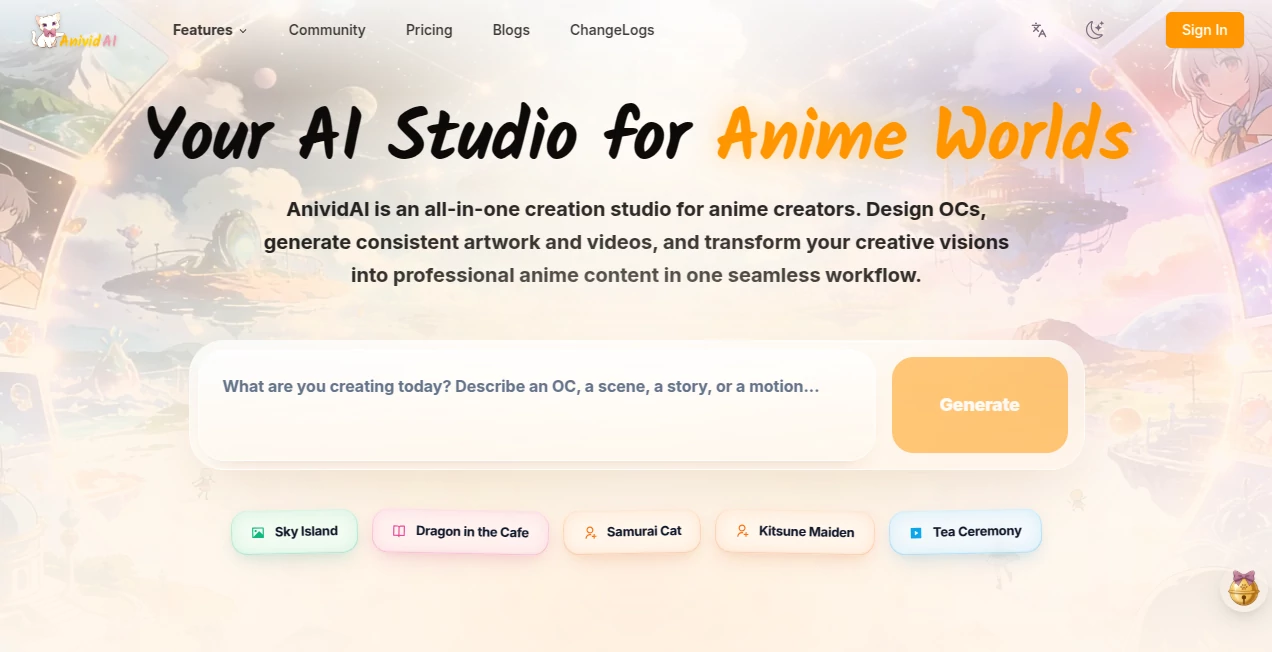
What is AnividAI?
There’s something special about creating your own anime character and then watching that same character come alive in consistent artwork and fluid video scenes. This platform makes the entire process feel seamless and exciting. You design an original character once, and from there you can generate matching illustrations, animated clips, and even interactive stories — all while keeping the look and personality perfectly consistent. I’ve seen hobbyists build entire small worlds and indie creators produce short animated content that looks far more polished than expected. It turns the dream of running your own little anime studio into something you can actually do from your laptop.
Introduction
Anime creation has always been time-intensive and technically demanding. You need character sheets, consistent designs across angles, and smooth animation that doesn’t break the style. This tool brings everything together in one place: a dedicated OC maker, powerful image generator, and video creator that remembers your characters. The workflow feels natural — design your character, generate artwork in different poses and scenes, then turn those into short animated videos. It’s especially loved by people who want to tell their own stories without needing a full production team or years of drawing practice. The consistency across images and videos is what keeps users coming back; once you create a character, it stays true to that vision throughout.
Key Features
User Interface
The studio feels welcoming and focused. You start in the OC Maker where you build and refine characters with clear controls for appearance, clothing, and personality traits. From there, you move smoothly into image generation or video tools. Everything is connected — your characters are saved and easily accessible across all sections. The interface avoids clutter so you can stay in creative flow rather than hunting for buttons. Previews load quickly, making iteration enjoyable instead of frustrating.
Accuracy & Performance
The real strength lies in character consistency. Once you create an OC, the system remembers the face, hairstyle, outfit details, and overall vibe across different images and video frames. Motion in videos feels natural rather than robotic, and artistic styles stay coherent. Generation times are reasonable, allowing you to experiment without long waits. The results often require very little cleanup, which is rare in anime-style AI tools.
Capabilities
You can create detailed original characters, generate consistent anime-style images in various poses and scenes, produce short animated videos (text-to-video or image-to-video), and even build small interactive experiences. It supports multiple artistic styles while keeping your characters recognizable. The platform also includes prompt helpers and templates to spark ideas when you’re starting from scratch. It’s a true end-to-end studio for anime creators who want to go from concept to finished clip in one place.
Security & Privacy
Your characters and creations stay under your control. The platform focuses on delivering the output without unnecessary data retention or sharing. For creators building personal stories or original IPs, this respectful approach provides comfort to experiment freely and keep their ideas private until they’re ready to share.
Use Cases
Aspiring manga artists design their main cast once and then generate endless reference sheets and cover art without redrawing. Indie animators create short character-driven clips for social media or crowdfunding campaigns. Fan creators bring their favorite ships or original stories to life with consistent visuals. Game developers prototype character animations and cutscenes quickly. Writers visualize scenes from their novels to better describe them or share with readers. Wherever anime-style storytelling is involved, it becomes a powerful creative companion.
Pros and Cons
Pros:
- Excellent character consistency across images and video.
- All-in-one workflow from OC design to final animation.
- Strong anime aesthetic understanding with multiple styles.
- Fast enough iteration to keep creative momentum alive.
- Accessible for beginners while powerful for serious creators.
Cons:
- Longer or more complex video scenes may need multiple generations.
- Mastering advanced prompting takes a short learning period.
- High-volume or commercial projects benefit from paid plans.
Pricing Plans
It offers a generous free tier so you can explore character creation and generate sample artwork and short videos without commitment. Paid plans unlock higher limits, faster generation, more advanced features, and commercial usage rights. The pricing feels reasonable for the creative freedom it provides, especially for users who start seeing their characters come to life and want to do more with them.
How to Use AnividAI
Begin in the OC Maker by describing or uploading reference images for your character. Refine details until you’re happy with the design. Move to image generation to create scenes and poses with your new character. When ready, head to the video section — write a short scene description, select your character, and generate a clip. Review the result, adjust prompts or references as needed, and export. The connected workflow means you can go from character concept to animated scene without switching tools or losing consistency.
Comparison with Similar Tools
Many AI anime tools focus on either images or video but struggle with consistency when you try to combine them. This platform stands out by treating character creation as the foundation and keeping that character consistent throughout the entire creative process. It feels more like a dedicated anime studio than a general-purpose generator, giving creators better control and more coherent results for storytelling projects.
Conclusion
Creating anime content used to require years of practice or a big team. This tool opens the door for anyone with a story to tell. By making character design, artwork, and animation work together seamlessly, it turns imagination into shareable content faster than ever before. Whether you’re building a personal project, growing a following, or just exploring creative ideas, it gives you the tools to bring your anime world to life with consistency and joy. For storytellers who love anime style, it’s one of the most exciting developments in recent years.
Frequently Asked Questions (FAQ)
How consistent are characters across generations?
Very consistent — once you create an OC, the system maintains the look across images and videos remarkably well.
Can I create videos from just text?
Yes, though adding character references or images gives even stronger and more consistent results.
Is it suitable for beginners?
Absolutely — the workflow is designed to be approachable while still offering depth for experienced creators.
What kind of video lengths can I generate?
Short clips perfect for social media, Reels, and story prototypes; longer sequences can be built by combining multiple generations.
Can I use the content commercially?
Paid plans include commercial rights — check current terms for specifics.
AI Animated Video , AI Image to Video , AI Art Generator , AI Design Generator .
These classifications represent its core capabilities and areas of application. For related tools, explore the linked categories above.
AnividAI details
Pricing
- Free
Apps
- Web Tools
Categories

AnividAI Alternatives Product

ModelsLab
Veo 4 AI

gempix2
Card Maker AI

Flux2 Klein

ai seedance …
ai image cre…
Veo

LongCat Image