🧠 AI Quiz
Think you really understand Artificial Intelligence?
Test yourself and see how well you know the world of AI.
Answer AI-related questions, compete with other users, and prove that
you’re among the best when it comes to AI knowledge.
Reach the top of our leaderboard.


















Artta AI

What is Artta AI?
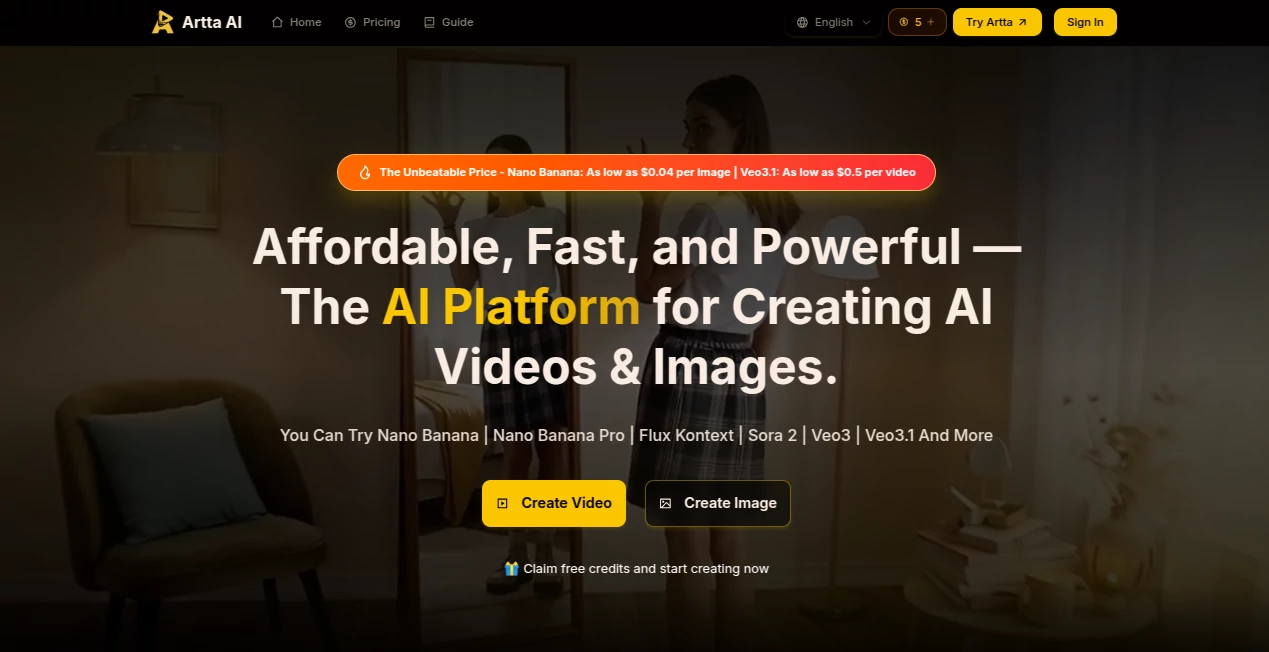
When I first stumbled across this platform, I was skeptical—another all-in-one AI creative tool? But after generating a full short video from a rough script in under an hour, complete with voiceover and music that actually fit the mood, I was sold. It pulls together the best models out there and lets you chain them into workflows that feel custom-built for your project. Whether you're a solo creator cranking out social content or a small agency needing pro-grade output without a massive budget, this thing just works—fast, reliable, and surprisingly affordable.
Introduction
In the rush to produce content that stands out, most tools force you to jump between apps—video here, images there, audio somewhere else. This platform fixes that by bringing everything under one roof: top-tier video models like Sora 2 and Veo 3, image generators from Flux to Midjourney, voice synthesis in dozens of languages, and even original music composition. What really sets it apart is the workflow engine—you describe your vision, and it breaks the project into steps, generates scenes, adds voice and music, then stitches it all together. I tried it for a quick product teaser; started with a text prompt, uploaded a reference image, and ended up with a polished 15-second clip that looked like it came from a studio. For anyone who's ever lost hours switching tabs, this feels like a quiet revolution.
Key Features
User Interface
The dashboard is straightforward and welcoming—drop your prompt, pick a model, upload references if you want, and everything flows naturally. No buried menus or confusing settings; it's designed so you can go from idea to export without second-guessing. I especially like the real-time previews that let you tweak mid-generation and the asset library that keeps your creations organized with tags and search. It's the kind of interface that disappears when you're in the zone, letting the creativity take center stage.
Accuracy & Performance
Consistency is where it truly shines—characters stay the same across scenes, lighting matches, and movements feel natural even in longer clips. Generations are quick, often finishing complex videos in minutes rather than hours, and the output holds up at 4K without artifacts or weird glitches. I've thrown some tricky prompts at it—multi-subject interactions, specific styles—and it delivered results that looked professionally directed. The speed alone saves so much time that you can iterate freely instead of waiting around.
Capabilities
It covers the full creative spectrum: text-to-video, image-to-video, voiceovers with natural intonation, background music that syncs perfectly, and automated pipelines that handle everything from script to final render. You can chain operations—generate a script, create scenes, add voice, compose music—all in one flow. The asset library with versioning and collaboration tools makes it perfect for teams or long-term projects, while the effects pack adds pro touches like transitions and color grading. It's built for everything from quick social posts to short films, and the quality is consistently impressive.
Security & Privacy
Your content stays yours—processed securely and stored only as long as you need, with enterprise-grade controls for teams. No hidden data sharing, and everything complies with strict standards. For creators handling client work or sensitive ideas, that peace of mind is huge; you can focus on making rather than worrying about leaks.
Use Cases
Social media creators love it for churning out consistent branded videos—upload a logo, set a style, and get reels that look like they belong to a big agency. Marketers build full campaigns from scratch: product demos, explainer videos, or ad variants all generated in one go. Filmmakers prototype shorts or storyboards, testing ideas without a full production crew. Small businesses create professional product videos or social content without hiring editors, and educators turn lessons into engaging animated clips. The versatility is what keeps people coming back—it's powerful enough for pros but simple enough for anyone with an idea.
Pros and Cons
Pros:
- All the best models in one place—no more app-hopping.
- Workflow automation that saves hours on every project.
- Incredible consistency for characters and styles across scenes.
- Pricing that actually makes sense for creators and teams.
Cons:
- Longer videos might need splitting due to generation limits.
- Free tier has watermarks, though paid plans remove them easily.
Pricing Plans
It starts free with credits to get you going—no card needed to try the core features. Paid plans kick in affordably: images as low as $0.04 each, videos around $0.50, with subscriptions that scale up for more volume and higher priority. Enterprise options add collaboration and API access. The value is hard to beat—you're getting access to premium models without the usual premium price tag.
How to Use Artta
Sign up (quick and painless), head to the create section, and type your idea—be as specific as you like about style, mood, or references. Upload images or clips if you want to guide the look, choose your models, and let the workflow run. Preview in real-time, tweak as needed, then export in your preferred format. For more complex projects, set up a pipeline once and reuse it. My favorite part? The asset library keeps everything organized so you can build on past work without starting over.
Comparison with Similar Tools
While other platforms offer one or two strong models, this one combines the best—Sora, Veo, Flux, and more—into seamless workflows that save time and deliver better consistency. Many competitors force you to piece things together manually or charge a fortune for similar quality. Here, the focus on automation and team features makes it stand out, especially for creators who need professional results without a big team or budget.
Conclusion
This platform quietly raises the bar for AI creation, giving you studio-level tools without the studio price or complexity. It turns big ideas into finished content faster than ever, with results that look and feel pro. Whether you're building a brand, telling a story, or just experimenting, it's hard to imagine going back to fragmented workflows once you've experienced this kind of power in one place. Give it a try—you might just find your new creative home.
Frequently Asked Questions (FAQ)
How good is the character consistency?
Excellent—faces, outfits, and details stay locked across scenes, even in longer videos.
Can I use my own music or voice?
Yes—upload tracks for perfect sync or generate original voiceovers in multiple languages.
What resolutions do you support?
Up to 4K for videos and high-res images, with flexible aspect ratios.
Is it suitable for commercial use?
Absolutely—paid plans include full commercial rights and no watermarks.
How fast are generations?
Most tasks finish in minutes, with priority queues on higher plans.
AI Animated Video , AI Image to Video , AI Video Generator , AI Text to Video .
These classifications represent its core capabilities and areas of application. For related tools, explore the linked categories above.
Artta AI details
This tool is no longer available on submitaitools.org; find alternatives on Alternative to Artta AI.
Pricing
- Free
Apps
- Web Tools
Categories

Artta AI Alternatives Product

AI Hug

Sora-2.co
Kling 4.0 AI

Seedance2 Vi…
Render of Dr…
VideoFlux

Sisif

vei4 ai

Seedance 2.0