
🧠 AI Quiz
Think you really understand Artificial Intelligence?
Test yourself and see how well you know the world of AI.
Answer AI-related questions, compete with other users, and prove that
you’re among the best when it comes to AI knowledge.
Reach the top of our leaderboard.


















audio2textai
Effortless Audio to Text Conversion Online

What is audio2textai?
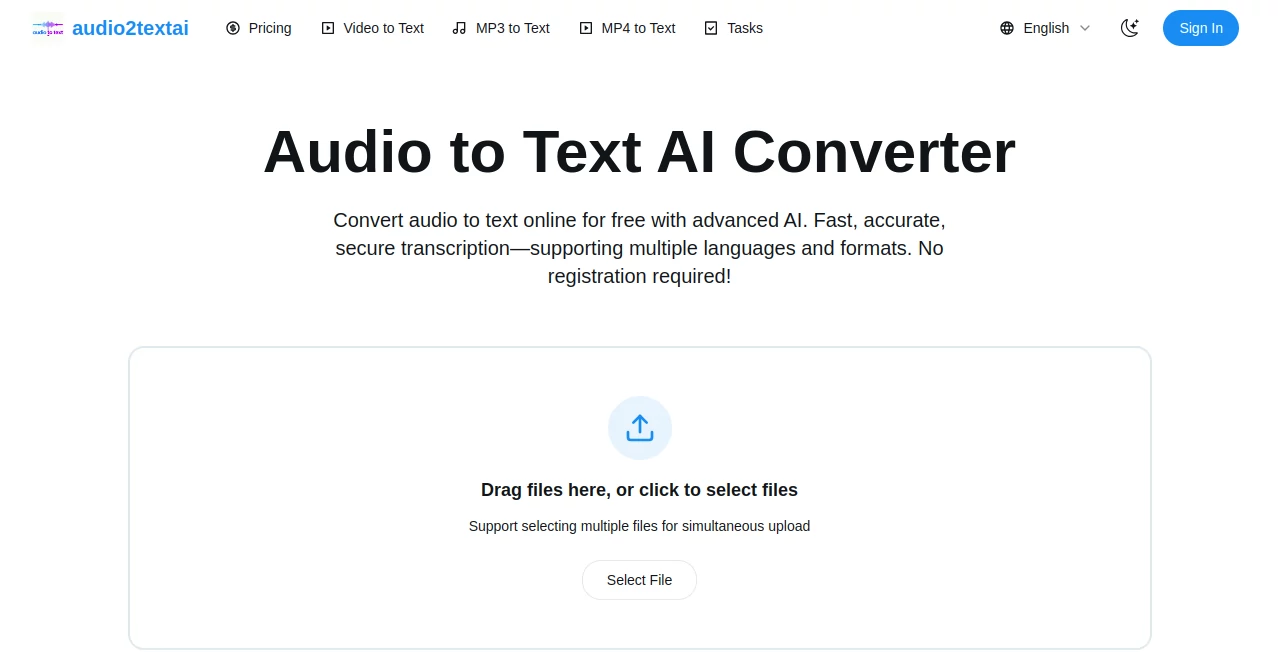
Audio2TextAI serves as a handy online spot for turning spoken words from recordings into readable scripts, making it simple to capture discussions or talks without the hassle of typing everything out. This service draws in a range of folks who need quick ways to document audio moments, offering results that feel reliable and ready to use right away. Many who've given it a spin mention how it cuts down on those long hours spent replaying and noting, letting them focus on what comes next instead.
Introduction
Audio2TextAI came together as a response to the common headache of sifting through hours of spoken content, put forward by a group keen on smoothing out that process for everyday users. It has steadily built a following among those handling everything from casual chats to formal sessions, with stories floating around of how it turned a rambling interview into a neat summary overnight. What stands out is its no-fuss entry point, where you can jump in without signing up for a basic try, and over time, it has refined its approach to handle a wider array of voices and tongues. At its essence, it's about bridging the gap between fleeting sounds and lasting notes, giving people a tool that feels like a thoughtful assistant rather than a rigid machine.
Key Features
User Interface
The layout keeps things light and direct, with a prominent area right up front where you can slide in your files or tap to pick them, even stacking a few at once if needed. Once you let go, it shifts to a waiting screen that updates as it works, then lays out the finished pieces in a straightforward view, complete with choices to grab or pass along. It's the kind of setup that doesn't demand much figuring out, more like dropping a note in a shared folder than navigating a maze.
Accuracy & Performance
It picks up on who is speaking and marks the timing with a steadiness that holds up well in mixed settings, catching the flow without too many slips even when accents layer in. The whole job wraps up promptly, fitting long stretches into a short wait, so you can move on without staring at a spinner. Those testing it out often point to how it manages the back-and-forth in group talks, keeping names and pauses in place for a read that rings true.
Capabilities
It takes in a broad spread of recording types, from common sound clips to moving pictures, sizing up to hefty loads without a stutter, and spots over a hundred ways of speaking on its own. You end up with options to pull down in plain files or formatted ones for sharing, plus links to hand off securely to others. That range makes it handy for pulling words from varied sources, whether a quick voice memo or a full streamed event.
Security & Privacy
Files get wrapped in protection layers from the moment they arrive until the job's done, and nothing sticks around afterward unless you choose to keep it. It sticks to solid guidelines on keeping things under wraps, so your shared moments stay just that—yours to control. Users feel at ease dropping in sensitive talks, knowing the setup prioritizes that quiet handling without extra steps on their end.
Use Cases
Team leads run it on meeting captures to jot down action points and follow-ups, turning hours of talk into bullet-ready recaps. Pod hosts feed in episodes to craft show notes that pull listeners deeper, while reporters sift interview reels for quotes that shape stories. Trainers use it to outline session highlights for handouts, and researchers compile lecture bits into organized overviews that speed up reviews.
Pros and Cons
Pros:
- Grabs a wide mix of voices and styles without much prep.
- Handles big batches and lengths that match real needs.
- No sign-up barrier for a first taste, easing the jump in.
- Shares and saves come in forms that fit most workflows.
Cons:
- Noisy spots or heavy overlaps can nudge a few spots off.
- Full runs lean toward paid credits after the free window.
- Lacks a built-in player for scrubbing through the original.
Pricing Plans
You start with a no-strings five minutes to see it in action, perfect for a single clip or test drive. From there, it shifts to credit buys or steady subs that match your pull, with extras that don't fade out over time. The tiers keep it flexible, so light users stick low while frequent ones scale without a shock, all without locking you into long hauls.
How to Use Audio2TextAI
Head over and slide your clip into the open slot, or click through to select if dragging's not your thing. Let it hum along on its own, spotting the language and sorting speakers as it goes, then pull up the fresh text with timestamps laid in. From there, tweak if needed, snag a copy in your preferred shape, or fire off a link to loop in the group. It's a loop you can rerun as your pile grows, building a steady stream of scripted moments.
Comparison with Similar Tools
Where some setups demand you trim files first or pick tongues by hand, Audio2TextAI smooths that out with auto picks and broad pulls, though those might offer deeper cleans for spotty feeds. Against heavier apps that pack in edits, it stays lean for the core job, skipping the extras but shining in speed for straight shots. It fits right for those wanting a quick, capable hand without the full toolkit weight.
Conclusion
Audio2TextAI quietly reshapes how we hold onto spoken sparks, handing back clean scripts that free up time for the real work ahead. It turns the tide on those endless replays, proving a smart listener can capture the heart of a talk without missing a beat. As more voices fill our days, this one's poised to keep easing the echo into something enduring and easy to grasp.
Frequently Asked Questions (FAQ)
What kinds of files can I bring over?
A bunch of sound and picture types, up to big sizes and long runs, no tweaks needed upfront.
Does it catch different ways of talking?
Yes, over a hundred spots covered, with auto spots for most common ones.
How soon do I get the words back?
Pretty quick, fitting minutes of talk into a short wait, even for fuller pieces.
Can I pass the results to others?
Sure, through safe links or downloads that keep things tidy and tied down.
What if the noise throws it off?
It holds up well in most spots, but cleaner setups yield the sharpest takes.
AI Transcriber , AI Video to Video , AI Speech to Text , AI Recording .
These classifications represent its core capabilities and areas of application. For related tools, explore the linked categories above.
audio2textai details
This tool is no longer available on submitaitools.org; find alternatives on Alternative to audio2textai.
Pricing
- Free
Apps
- Web Tools
Categories

audio2textai Alternatives Product

FluentDictat…

Klyra AI

AI OCR

TurboScribe

SuperAI

Zeemo AI

PDF to MD

Maestra

Adobe Podcast
