🧠 AI Quiz
Think you really understand Artificial Intelligence?
Test yourself and see how well you know the world of AI.
Answer AI-related questions, compete with other users, and prove that
you’re among the best when it comes to AI knowledge.
Reach the top of our leaderboard.


















Audio Cleaner AI

What is Audio Cleaner AI?
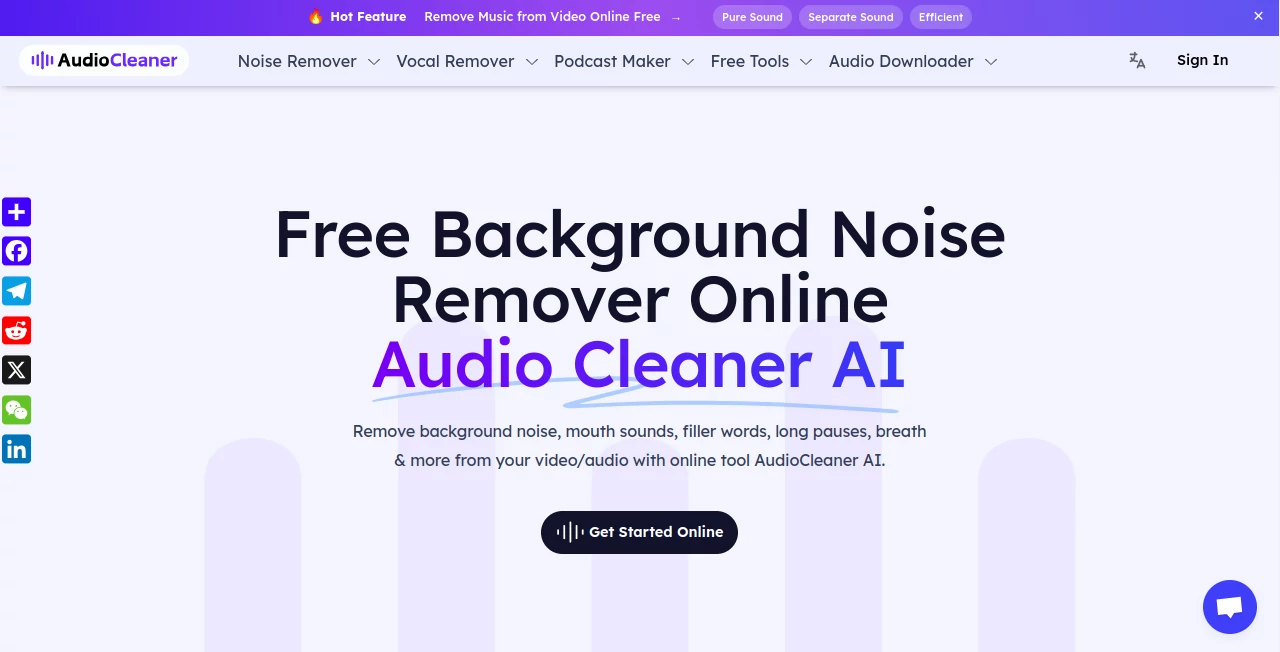
AudioCleaner slips into the toolkit of anyone wrestling with raw recordings, quietly stripping away the hums and hisses that muddy the message. This web-based wonder takes the edge off imperfect captures, turning café chatter or street-side static into smooth, studio-like flows without a single manual scrub. Folks who've dipped in often linger, hooked on how it rescues those off-the-cuff moments that would otherwise hit the delete bin.
Introduction
AudioCleaner came about a short while back, sparked by creators fed up with the grind of chasing perfect sound in less-than-ideal spots. It started as a simple fix for podcasters dodging echoey rooms, but soon drew in a wider crowd sharing stories of salvaged sessions that sparked real connections. What began with basic hum removal has grown into a go-to for anyone piecing together audio tales, praised for keeping the heart of the voice while whisking away the distractions. Users swap nods over how it levels the field, letting solo storytellers sound as sharp as big-studio pros, all from a browser tab that hums along unnoticed.
Key Features
User Interface
The landing spot unfolds with a bare essentials vibe, just a drag zone for files or a record button that kicks in without fanfare. No jargon-packed menus or hidden toggles—pick your clip, hit go, and watch the wheel turn while a progress nudge keeps you looped. Even on a phone screen, it shrinks smooth, feeling like a quick note to a sound-savvy pal rather than a deep dive into tech.
Accuracy & Performance
It zeros in on the rough bits with a gentle touch, lifting voices clear without nicking the natural lilt or warmth. Jobs wrap in a blink, even for longer reels, spitting out files that ring true on earbuds or speakers alike. Those who've run it through windy walks or crowded chats often marvel at how it holds the line, dodging the over-polish that flattens feeling, and lands results that fool even picky listeners.
Capabilities
From shushing filler breaths to smoothing out long gaps or mouth pops, it tackles the little thieves that steal focus, all while juggling formats from clips to waves. Snap a direct take right there or feed in videos for audio-only polish, and it layers on enhancements that brighten without bloating. The real draw is how it fits varied vibes, from quick voice notes to full narrative arcs, keeping the flow intact across devices big and small.
Security & Privacy
Your uploads get a swift once-over then fade from the books after a day, processed in sealed spots that keep things close to the chest. No sneaky holds or shares—it's all eyes-off after the handoff, with you calling the shots on what sticks around. Creators lean on that quiet promise, tossing in tender takes without the nagging itch of exposure.
Use Cases
Pod hosts scrub episode drafts caught in home-office hums, prepping polished drops that draw listeners back week after week. Vloggers wipe street noise from on-the-go rants, turning raw rambles into reels that resonate. Teachers tidy lecture clips for online shares, ensuring every point lands crisp over spotty connections. Even sales folks refine pitch recordings, ditching distractions to let the sell shine through unfiltered.
Pros and Cons
Pros:
- Snags the grit without grazing the good stuff, keeping tones true.
- Pocket-easy entry with free spins to test the tide.
- Plays nice on phones, no desk-bound chains.
- Shaves hours off the edit slog, freeing flow for fresh ideas.
Cons:
- Heavy chaos might need a pre-trim for peak punch.
- Credit caps nudge upgrades for steady streams.
- No deep dives into custom curves yet.
Pricing Plans
New faces bag thirty-five credits on sign-up, with ten more trickling in daily up to three grabs, enough for light lifts without a dime. For endless runs and extra perks, subs unlock the gates, scaling with your steady needs while keeping the door cracked for casual callers. It's the sort of setup that eases in, rewarding regulars without rushing the rest.
How to Use AudioCleaner
Drop your name in the sign-up box, then haul a file or hit record to capture fresh. Let the system sift and shine it up, peeking at the preview if the mood strikes. Snag the cleaned cut once it lands, slot it into your next edit, and circle back for the stragglers—simple as a second take.
Comparison with Similar Tools
Where some demand desk-bound downloads and degree-level dials, AudioCleaner keeps it web-light and word-free, though those might edge on endless tweaks for sound surgeons. Against free-for-all filters that fuzz the fine lines, it carves cleaner paths without the guesswork, but could bow to pro packs in raw power plays. It fits folks craving quick clarity over deep dives, bridging the gap with grace.
Conclusion
AudioCleaner nudges the noise aside to let stories breathe easy, turning tangled takes into treasures worth the tell. It hands the hush to creators everywhere, proving that smooth sound starts with a simple sweep. As voices keep vying for ears in a crowded clip world, this quiet corner keeps the craft alive, one clear note at a time.
Frequently Asked Questions (FAQ)
What file flavors does it fancy?
Waves, bees, aces, and more—most common cuts clean up fine.
Does it ding the voice vibe?
Nah, it lifts the lift without losing the lilt.
Mobile magic or desk dream?
Works wonders on both, no matter the screen size.
How long do uploads linger?
A day tops, then poof—gone for good.
Free for the full ride?
Starters get spins, but steady sails seek subs.
AI Audio Enhancer , AI Speech to Text , AI Voice & Audio Editing , AI Noise Cancellation .
These classifications represent its core capabilities and areas of application. For related tools, explore the linked categories above.
Audio Cleaner AI details
This tool is no longer available on submitaitools.org; find alternatives on Alternative to Audio Cleaner AI.
Pricing
- Free
Apps
- Web Tools
Categories

Audio Cleaner AI Alternatives Product

Transcribe A…

SAM Audio

AudioScribe

TranslateAI …

TyTyAi

AI Describe …

Krisp

AI ASMR Gene…

Soniq Chat