
🧠 AI Quiz
Think you really understand Artificial Intelligence?
Test yourself and see how well you know the world of AI.
Answer AI-related questions, compete with other users, and prove that
you’re among the best when it comes to AI knowledge.
Reach the top of our leaderboard.

















AudioScribe
What is AudioScribe?
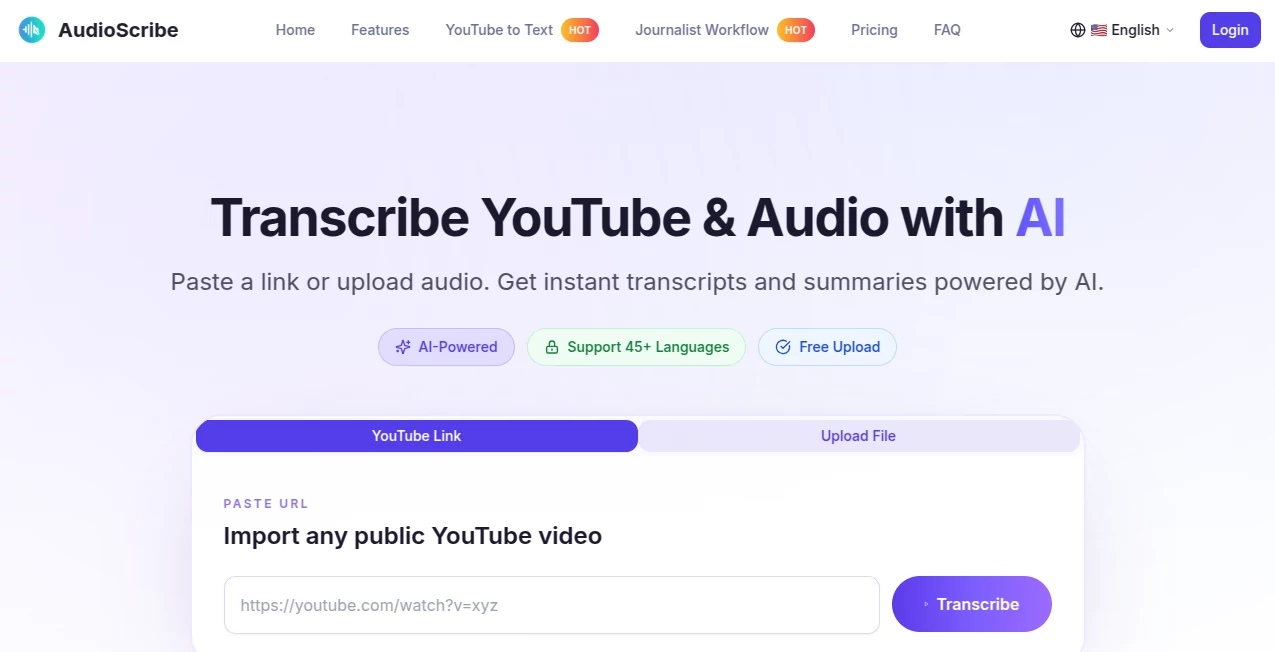
There's something almost magical about dropping a rambling podcast episode or a heated team call into a tool and getting back clean, searchable text laced with smart takeaways— all without lifting a finger for the grunt work. This platform nails that experience, turning hours of audio into bite-sized, actionable notes that feel like they were crafted by a meticulous assistant. I've tossed in everything from client interviews to late-night brain dumps, and it consistently delivers transcripts that read smooth and summaries that cut straight to the heart, saving me more time than I care to admit.
Introduction
Designed with busy pros in mind—think journalists chasing deadlines, sales reps reviewing calls, or creators repurposing content—this service handles the heavy lift of turning spoken chaos into organized gold. It goes beyond basic scribbles, spotting who's talking and pulling out themes or sentiments that spark real follow-ups. What draws people in is the no-fuss upload and the way it respects long-form stuff, no chopping required. A colleague of mine swears it turned her backlog of research chats into a searchable archive overnight, freeing her to focus on the stories rather than the scramble. It's that blend of reliability and insight that makes it stick, especially when accuracy hovers high and the outputs feel tailored just for you.
Key Features
User Interface
Straightforward from the jump: a big upload button, clear progress bars, and results that lay out transcripts with timestamps and speaker labels in an easy scroll. No overwhelming dashboards—just what you need to review, search, or export without hunting. My favorite part is how the insights panel sits right there, ready for quick questions without switching tabs; it keeps the momentum going, like having a quiet helper over your shoulder.
Accuracy & Performance
It picks up nuances in accents and overlapping talk better than most I've tried, delivering clean reads even on noisy recordings, with claims of strong precision that hold up in real use. Processing flies for shorter clips and chugs steadily on longer ones, no endless waits that kill your flow. In one test with a group discussion, it nailed speaker switches and tricky terms, turning potential headaches into handy references.
Capabilities
Core strength lies in speaker detection, full-text search, and those clever follow-up queries that extract quotes, sentiments, or key decisions from the mess. Export options cover the bases for docs or subs, and the free trial hour lets you feel the full power upfront. It's particularly good with extended sessions, structuring outputs that make revisiting old audio feel fresh and fruitful.
Security & Privacy
Files get processed securely and wiped after, with exports under your control—no lingering data or surprise shares. It's built for sensitive stuff like interviews or internal calls, giving that reassurance when handling client voices or personal notes. Solid handling that lets you upload without second-guessing.
Use Cases
Journalists turn raw interviews into quoted drafts fast, spotting themes for sharper stories. Sales teams dissect calls for coaching moments or follow-up gold, turning talk into tactics. Podcasters repurpose episodes into show notes or clips, while researchers build archives from field recordings that search like text books. Even therapists or coaches review sessions ethically, pulling insights without endless replays.
Pros and Cons
Pros:
- Handles long hauls without slicing, ideal for deep dives.
- Speaker tags and searches make reviewing a breeze.
- Insightful add-ons turn plain text into real value.
- Generous trial to prove its worth before committing.
Cons:
- Very noisy backgrounds can trip it up a bit, like any in this space.
- Editing transcripts might need extra steps for now.
Pricing Plans
A solid free trial hour gets you started, then plans scale sensibly for occasional or heavy use, keeping costs predictable without hidden bites. It's approachable for solos dipping in, yet flexible for teams needing more volume—fair value that matches the time it hands back.
How to Use AudioScribe
Grab your file—up to a decent size—and drop it in, pick any options like language if needed, and let it run. Once done, scroll the transcript, search for bits, or ask follow-ups right there for summaries or highlights. Export what clicks, and you're set; simple enough that you'll be processing backlogs in no time.
Comparison with Similar Tools
It holds its own on longer content where others falter or force splits, with stronger speaker handling and built-in depth that skips extra apps. Less flash, more focus—reliable for pros who want clean results over gimmicks, edging out generalists with that targeted polish for interviews and meetings.
Conclusion
This one's a quiet powerhouse for anyone buried in audio, handing back time and clarity in spades. It turns the tedious into tolerable—no, enjoyable—letting you mine gold from spoken words without the dig. If your days involve recordings waiting to be tamed, give it a spin; the insights alone might just change how you work.
Frequently Asked Questions (FAQ)
How accurate is it with accents?
Strong across varied voices, though crystal-clear audio always helps the most.
What formats does it take?
Common ones like MP3, WAV, or direct recordings—no fuss.
Can I try before buying?
A full hour free to test on your own stuff.
Speaker labels automatic?
Yes, it detects and tags them smartly for easy following.
Exports options?
Text, subs, or docs—whatever fits your next step.
AI Meeting Assistant , AI Summarizer , AI Transcription , AI Speech to Text .
These classifications represent its core capabilities and areas of application. For related tools, explore the linked categories above.
AudioScribe details
Pricing
- Free
Apps
- Web Tools
Categories

AudioScribe Alternatives Product

David One

Jamy.ai | Au…

MeetAssist

Adobe Podcast

Read

TurboScribe

VideoText

Zeemo AI

Ryne AI
