🧠 AI Quiz
Think you really understand Artificial Intelligence?
Test yourself and see how well you know the world of AI.
Answer AI-related questions, compete with other users, and prove that
you’re among the best when it comes to AI knowledge.
Reach the top of our leaderboard.

















Bangshair

What is Bangshair?
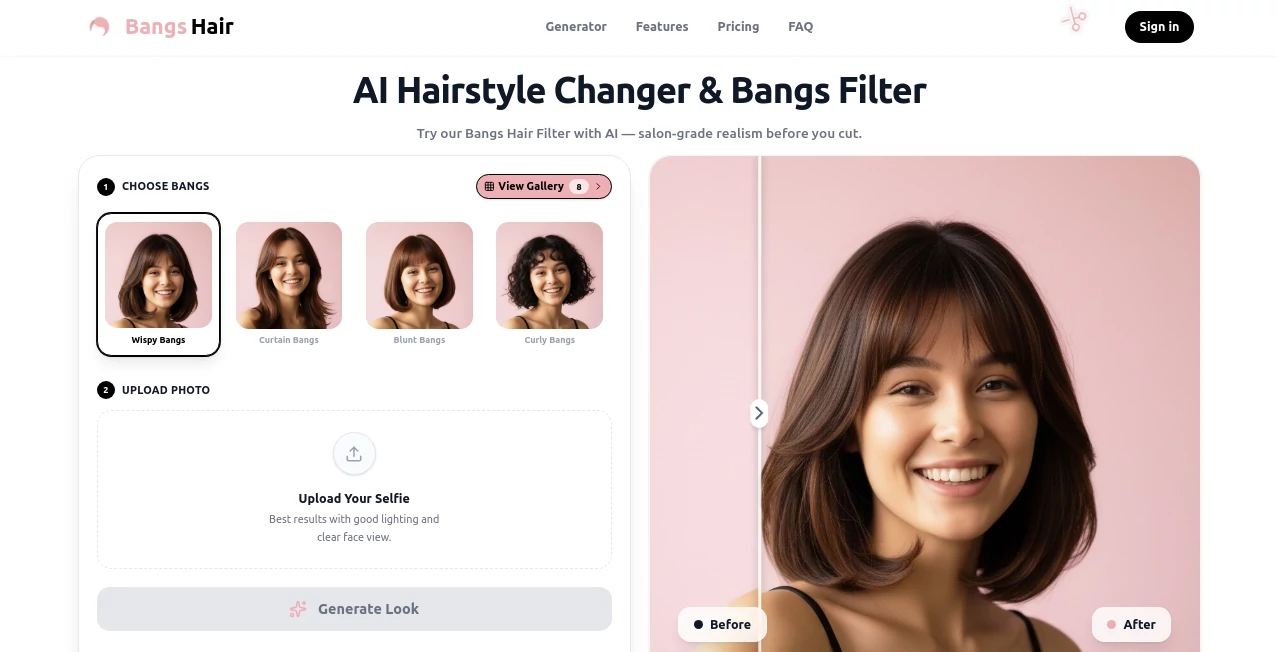
Changing your hairstyle can feel like a big commitment—especially bangs, which frame your face in a way that’s hard to undo if you don’t love the result. This tool takes away that fear completely. Upload a selfie, pick the bang style you’re curious about, and within seconds you’re looking at yourself with soft curtain bangs, blunt fringe, side-swept wisps, or textured layers that actually sit naturally on your forehead. The difference is striking: no floating hair, no weird shadows, just realistic strands that blend with your lighting and skin tone. I’ve watched friends who’ve been too scared to cut bangs finally see what they’d look like—and half of them booked the salon appointment the next day. It’s the kind of confidence boost that makes experimentation feel safe and fun.
Introduction
Most hairstyle try-on apps still feel gimmicky—cartoonish overlays, mismatched lighting, hair that floats off the head. This one stands apart because it actually understands how hair behaves: gravity, thickness, face shape, and how strands fall around eyes and cheekbones. It’s built for people who want to see a real preview before committing to scissors, not just a playful filter. From soft wispy bangs to bold blunt cuts, curtain styles to side-swept looks, it covers the popular trends while keeping the result looking like it could walk out of a salon chair. For anyone who’s ever stared at their reflection wondering “what if,” this tool answers the question in the most honest, flattering way possible.
Key Features
User Interface
The experience is deliberately simple and inviting. One big upload area for your selfie (or live camera option), a carousel of bang styles with clear names and thumbnails, and a prominent “Try” button. Once generated, you get a side-by-side view with easy zoom and rotate controls. No account required to start, no confusing settings—just pick, generate, enjoy. It’s fast enough that you can try five styles in under a minute and still have time to send the best one to your group chat for instant feedback.
Accuracy & Performance
The AI reads your face shape, hairline, skin tone, and lighting with impressive precision. Bangs follow natural contours—no floating or clipping—and blend seamlessly into existing hair. Processing is near-instant (usually 2–8 seconds), and results stay consistent across different selfies of the same person. It handles curly, straight, thin, thick, light, and dark hair types without breaking a sweat. The realism is what keeps people coming back; it rarely feels “AI-generated” and more like a skilled stylist did a quick mock-up.
Capabilities
Multiple bang styles: curtain, blunt, side-swept, wispy, layered, micro, long, short, textured, and more. Full hair color change, length adjustment, and fringe density sliders for fine-tuning. Works on selfies, portraits, and even group shots (though best on single clear faces). Outputs are high-res and ready for sharing, saving, or showing your stylist. It also supports male and female faces, various ages, and different ethnicities with natural-looking results across the board.
Security & Privacy
Your photos are processed in the moment and deleted from servers immediately after download—no permanent storage, no account linking required for basic use. No sneaky data collection or model training on user images. For something as personal as trying a new look, that clean, no-strings privacy feels like a small but important detail.
Use Cases
A woman who’s been too nervous to cut bangs finally sees herself with soft curtain ones—she books the appointment the next day and loves the result. A guy wonders if a short fringe would suit his face; the preview convinces him to try it at the barber. A content creator tests trendy styles for a “bang transformation” video without actually cutting her hair. Friends send each other silly versions with wild bangs just for laughs. It’s perfect for impulsive curiosity, serious consideration, or just playful what-if moments.
Pros and Cons
Pros:
- Realistic blending and lighting—no floating hair or obvious overlays.
- Fast generation keeps the fun alive; try multiple styles in seconds.
- Wide variety of bang styles and adjustment sliders for personalization.
- High-res outputs look great shared or shown to a stylist.
- Free to try with generous daily limits—no hard paywall upfront.
Cons:
- Very low-quality or heavily filtered selfies can reduce realism.
- Group shots or very obscured faces sometimes confuse detection.
- Unlimited generations and extra styles require a paid plan.
Pricing Plans
Free daily allowance lets you experiment with several looks per day—more than enough to decide if bangs are for you. Premium unlocks unlimited tries, priority processing, extra styles, and no small watermark. It’s priced like a single coffee run, which feels fair when you consider how many salon visits (and regrets) it can help you avoid.
How to Use Bangshair
Click the big upload area or use your camera to take a selfie. Wait a couple seconds while it detects your face and hairline. Browse the bang style thumbnails—tap one to generate. Use the sliders to adjust length, thickness, or fringe spacing if you want. Compare before/after, zoom in to check blending, then download your favorite version. That’s it—under a minute from curiosity to seeing yourself with new bangs.
Comparison with Similar Tools
Many hairstyle apps slap on obvious overlays or struggle with lighting mismatches. This one actually studies your face and hair to make the bangs look like they belong there. Where others produce cartoonish or flat results, the realism and variety here feel closer to a real stylist’s preview. Speed, quality, and natural integration make it the clear favorite for anyone serious about seeing what bangs would really look like.
Conclusion
Changing your look should feel exciting, not scary. This tool takes the fear out of bangs by showing you the truth in seconds—realistic, flattering, and honest. Whether you end up booking the salon or deciding it’s not your vibe, you get to make an informed choice instead of a blind one. In a world of filters that lie, this is the one that tells the truth with kindness. For anyone who’s ever stared in the mirror wondering “what if,” it’s the answer you’ve been waiting for.
Frequently Asked Questions (FAQ)
How realistic do the results look?
Very—lighting, shadows, and hair blending match your photo naturally.
Do I need a perfect selfie?
Clear face and decent lighting help most, but it handles casual shots surprisingly well.
Can I try it without signing up?
Yes—generate several looks right away, no account required.
What if I want to save my favorites?
Download them instantly; paid plan lets you save to your profile.
Does it work on men too?
Absolutely—great for short fringes, textured bangs, and more masculine styles.
AI Fun Tools , Photo & Image Editor , AI Design Generator , AI Image to Image .
These classifications represent its core capabilities and areas of application. For related tools, explore the linked categories above.
Bangshair details
This tool is no longer available on submitaitools.org; find alternatives on Alternative to Bangshair.
Pricing
- Free
Apps
- Web Tools
Categories

Bangshair Alternatives Product

Image to Ima…

volume shade…

Undertale Te…
Kirkify Al
SurgePix
Image To Ima…

Grow A Garde…

Nano Banana …

SAM 3D