
🧠 AI Quiz
Think you really understand Artificial Intelligence?
Test yourself and see how well you know the world of AI.
Answer AI-related questions, compete with other users, and prove that
you’re among the best when it comes to AI knowledge.
Reach the top of our leaderboard.


















Bank PDF Converter

What is Bank PDF Converter?
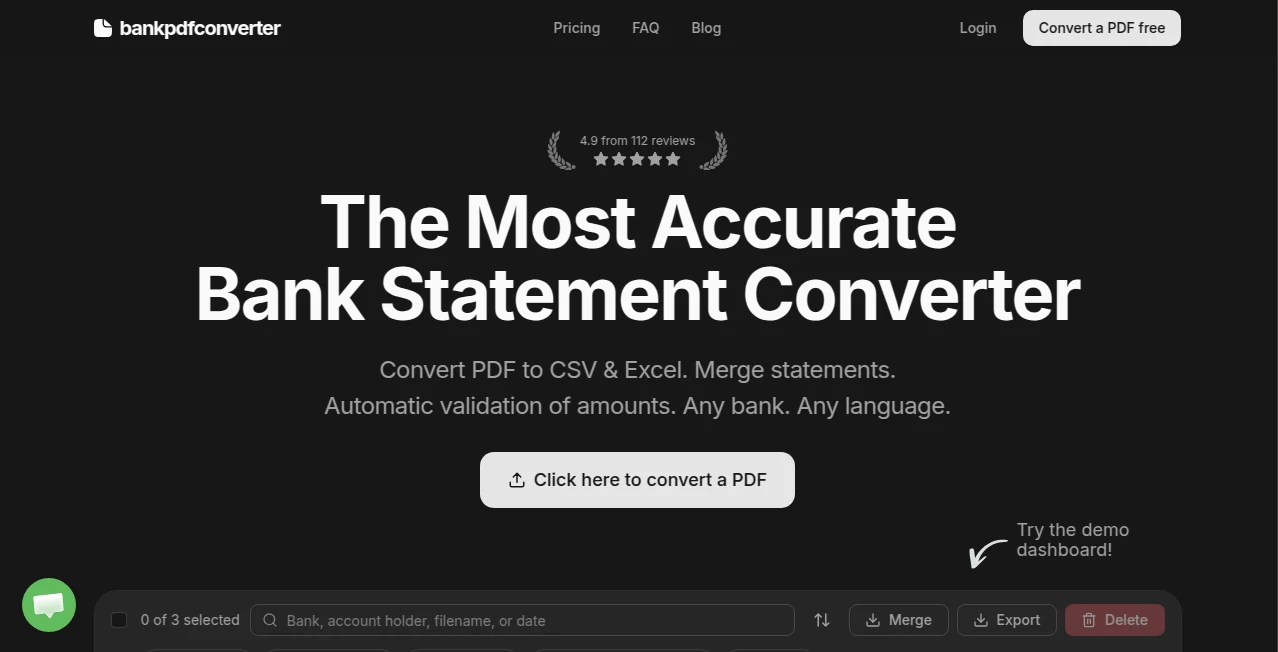
Bank statements arrive as PDFs that look nice on screen but are a nightmare to work with—locked tables, weird formatting, months of transactions you need to sort, sum, or import somewhere. This tool quietly solves that pain. Upload any bank PDF (statements, credit card bills, investment summaries), and it returns clean, accurate Excel or CSV files where dates, descriptions, amounts, and balances land exactly where they belong. No manual copying, no fighting merged cells, no guessing which column is which. I've seen accountants go from dreading monthly reconciliations to finishing them over coffee because the data just works right out of the converter. That kind of reliability turns frustration into quiet satisfaction.
Introduction
Most people treat bank PDFs as read-only documents, but the moment you need to analyze spending, track reimbursements, prepare taxes, or feed data into accounting software, they become the enemy. Traditional PDF-to-Excel converters often mangle layouts, mix up debit/credit columns, or drop entire transactions. This one is built specifically for financial statements—recognizing statement headers, transaction tables, opening/closing balances, and currency symbols with a level of precision that feels almost uncanny. It’s become a small but essential part of many freelancers’, small-business owners’, and accountants’ monthly routines. The difference is noticeable the first time you open the output file and everything is already in the right place—no cleanup required.
Key Features
User Interface
The page is deliberately uncluttered: a large drag-and-drop upload area, a few radio buttons for output format (Excel or CSV), and a prominent “Convert” button. No account creation forced upfront, no multi-step wizards. After upload, you get a live preview of detected tables and a one-click download. It’s the kind of simplicity that makes you wonder why every financial tool isn’t this straightforward.
Accuracy & Performance
It consistently extracts transaction dates, descriptions, amounts (positive/negative), running balances, and even transaction types (ACH, check, card) with near-perfect column alignment. Multi-page statements are stitched together correctly, and currency symbols or decimal places don’t confuse it. Processing is fast—most statements finish in 5–20 seconds—and the output opens cleanly in Excel, Google Sheets, or any CSV-compatible software without reformatting. Users repeatedly note how rarely they need to fix anything afterward.
Capabilities
Handles statements from virtually any bank (US, UK, EU, India, etc.), including checking, savings, credit card, investment, and loan accounts. Outputs structured Excel with separate columns or CSV for direct import into QuickBooks, Xero, Wave, or spreadsheets. Supports password-protected PDFs (you enter the password once), multi-month statements, and foreign-language statements with good accuracy on numbers and dates. Batch upload available on paid plans for processing dozens at once.
Security & Privacy
Files are processed in memory and deleted from servers within minutes after conversion—no long-term storage, no sharing. Encryption in transit, no account required for basic use, and no logging of transaction details. For freelancers or small businesses handling sensitive financial data, that zero-retention policy is a genuine relief.
Use Cases
A freelancer downloads monthly statements from three different accounts, converts them all in one go, and has a single clean spreadsheet for tax prep by lunchtime. A small e-commerce owner imports credit-card statements into accounting software without manual entry errors. A bookkeeper processes client bank PDFs in bulk, delivering categorized CSV files faster than ever. A family reviewing household spending turns years of saved statements into one searchable expense tracker. Wherever financial PDFs pile up, this tool turns them into usable data instead of digital paperweights.
Pros and Cons
Pros:
- Exceptional table detection—columns stay aligned, no merged cells or missing rows.
- Handles password-protected statements smoothly.
- Fast processing even on multi-page, multi-year statements.
- Free tier is generous—enough for regular personal or small-business use.
- Output is immediately usable in any spreadsheet or accounting tool.
Cons:
- Very non-standard or heavily scanned statements may need minor manual fixes.
- Batch processing and unlimited conversions require a paid plan.
- Does not categorize transactions (that’s left to your accounting software).
Pricing Plans
Free plan offers several high-quality conversions per day—perfect for personal use or occasional small-business needs. Paid plans remove daily limits, enable batch upload, support larger files, and offer priority processing during peak times. Pricing is modest—many users say it pays for itself the first time they avoid hours of manual data entry or catch a missed deduction during tax season.
How to Use Bank PDF Converter
Drag your bank statement PDF into the upload area (or click to browse). If it’s password-protected, enter the password when prompted. Choose Excel (.xlsx) or CSV output. Click Convert. Wait a few seconds—watch the progress bar—and download the structured file. Open in Excel or import directly into your accounting software. For multiple statements, paid users can upload a batch and process them together. That’s it—clean financial data in under a minute.
Comparison with Similar Tools
Generic PDF-to-Excel converters often scramble financial tables or misread debit/credit signs. This one is purpose-built for bank statements—recognizing statement-specific patterns like transaction codes, running balances, and date formats—so the output is consistently usable. It’s faster and more accurate than manual copy-paste or most free online converters, and the privacy-first approach beats tools that require account creation or store your financial documents.
Conclusion
Bank statements should be data, not just documents. This tool quietly turns them into the former without the usual headaches. It saves time, reduces errors, and gives you clean, trustworthy numbers to work with—whether you’re reconciling accounts, preparing taxes, or simply trying to understand where your money goes. In a world of financial complexity, that kind of simple, reliable clarity is surprisingly powerful. Once you use it, going back to manual extraction feels like punishment.
Frequently Asked Questions (FAQ)
How many free conversions do I get?
Several per day—enough for personal statements or small business use.
Does it handle password-protected PDFs?
Yes—just enter the password during upload; it processes them cleanly.
Will it work with my bank’s statements?
It handles statements from most major banks worldwide—US, UK, EU, India, etc.
Can I upload multiple files at once?
Yes on paid plans—batch mode processes dozens quickly.
Are my statements stored anywhere?
No—processed in memory and deleted immediately after download.
AI Document Extraction , AI PDF , AI Documents Assistant , AI Spreadsheet .
These classifications represent its core capabilities and areas of application. For related tools, explore the linked categories above.
Bank PDF Converter details
This tool is no longer available on submitaitools.org; find alternatives on Alternative to Bank PDF Converter.
Pricing
- Free
Apps
- Web Tools
Categories

Bank PDF Converter Alternatives Product

Markdown to …

TurboScribe

Transcribe A…

Certificate …

PDF to MD

VideoText

jpg to excel

UPDF AI

GLM-OCR Onli…
