
🧠 AI Quiz
Think you really understand Artificial Intelligence?
Test yourself and see how well you know the world of AI.
Answer AI-related questions, compete with other users, and prove that
you’re among the best when it comes to AI knowledge.
Reach the top of our leaderboard.


















BatchVideo.ai

What is BatchVideo.ai?
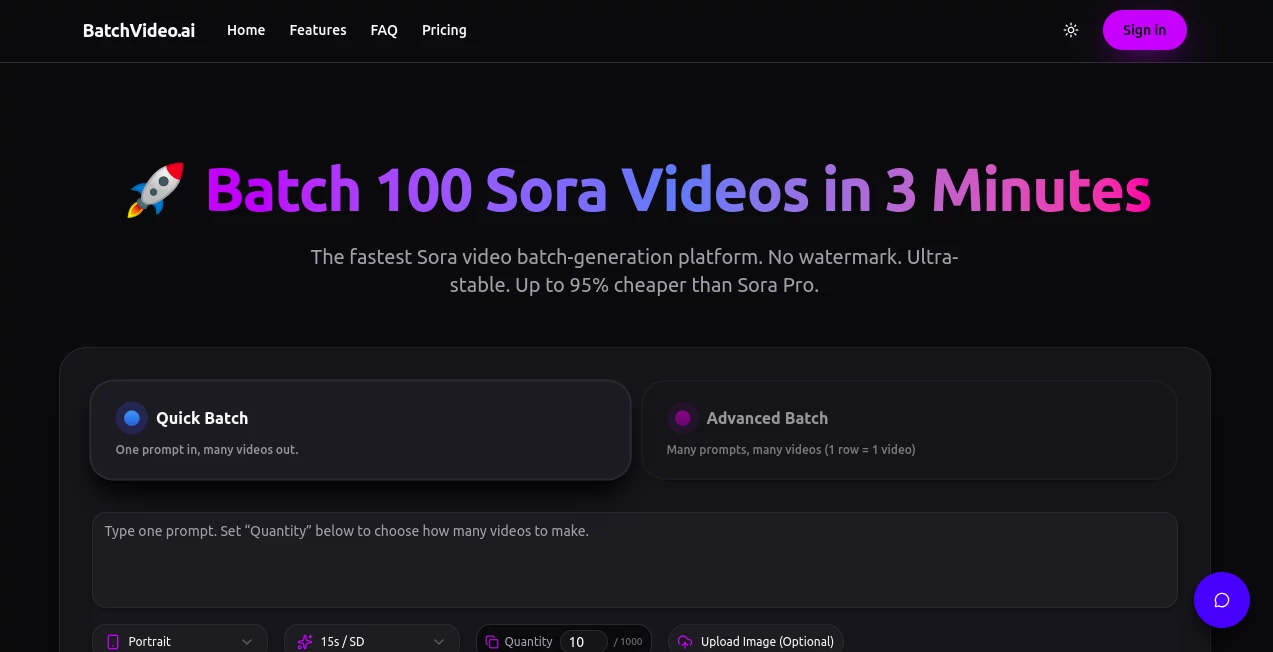
BatchVideo steps in as a game-changer for creators juggling high-volume video needs, turning what used to be a time-sink into a streamlined sprint. This platform harnesses cutting-edge generation tech to crank out dozens of clips at once, all while dodging the usual pitfalls like waits or watermarks. Those who've tapped into it often share how it freed up their days, letting them focus on the spark rather than the slog of rendering queues.
Introduction
BatchVideo came about from the grind of folks who needed quick ways to flood their channels with fresh content, but kept hitting walls with clunky tools that dragged on delivery. It launched with a clear aim: make high-output video creation as painless as possible, pulling in a wave of social hustlers and marketers right off the bat. Users started buzzing about batches that wrapped in minutes, not hours, turning solo creators into content machines overnight. What keeps it clicking is that blend of speed and smarts, evolving from a niche fix to a staple for anyone chasing volume without the vanishing act on quality.
Key Features
User Interface
The dashboard hits you with a no-fuss entry, where you slot in your prompts and set batch sizes without wading through menus. It lays out progress bars that tick live, showing each clip's status, and options to tweak on the fly pop up clean and quick. Even for first-timers, it feels like flipping through a well-thumbed playbook, with tooltips that nudge without nagging.
Accuracy & Performance
Outputs land crisp and consistent, mirroring your inputs down to the lighting and flow, with rare hiccups that don't ding your tally. It hums along steady, pushing through heavy loads without a stutter, often wrapping a full run in under a handful of minutes. Creators point to how it holds the line on quality even at scale, dodging the drop-offs that plague lesser setups.
Capabilities
It shines at churning out waves of tailored scenes, from trend-chasing shorts to product spotlights, with room for up to hundreds per go depending on your setup. You get the full suite of models without the usual gates, layering in custom vibes or viral clones that fit your feed. The batch magic extends to storyboarding runs, swapping costly shoots for instant mocks that nail the vision.
Security & Privacy
Your projects stay locked in private lanes, with no traces left after the run unless you stash them, and billing skips the sting on any flops. It keeps the backend tight, ensuring your creative blueprints don't spill over, so you can experiment bold without the backend blues.
Use Cases
Social climbers batch viral riffs to ride trends, flooding timelines with fresh takes that pull in views without the daily grind. Marketers spin product plays for quick ads, customizing angles to hook shoppers across platforms. Filmmakers storyboard sequences in bulk, validating arcs before the camera rolls, turning rough ideas into ready reels that save on scouting and setups.
Pros and Cons
Pros:
- Blasts through batches fast, wrapping dozens in minutes flat.
- No marks or waits—clean clips from the get-go.
- Trims costs sharp, hitting pennies per piece at scale.
- Steady as a rock, up round the clock without a blip.
Cons:
- Caps on free spins push toward paid for big blasts.
- Heavy runs need higher tiers to unlock full speed.
- Best on clear cues—fuzzy ones might need a redo.
Pricing Plans
It eases in with a no-card trial packing enough juice for a taste, then rolls out tiers that scale with your output. The entry level hits low teens monthly for solid starters, stepping to mid-range for creators craving more credits and quicker queues, and tops out around seventy for pros with unlimited lanes and top support. Yearly wraps shave off half the bite, keeping it flexible without the lock-in.
How to Use BatchVideo
Sign up for the free peek, then head to the board to drop your prompts and dial the batch depth. Watch it whirl through the queue, snag the finished files watermark-free, and slot them straight to your streams. Top up credits as you go, tweaking sizes for the next wave to keep the content current.
Comparison with Similar Tools
Where some generators gatekeep with lists or limits, BatchVideo opens the floodgates wide, though those might edge on niche tweaks for solo spins. Against pricier pros, it slashes the spend while matching the muscle, skipping the invites but perhaps skimping on extra bells. It pulls ahead for volume chasers, blending bulk with brains where others trickle or trip.
Conclusion
BatchVideo redefines the rush of video volume, handing creators a shortcut that packs pro punch without the pull. It turns the tide on time thieves, proving that smart scaling can spark streams that stick. As feeds keep hungering for more, this one's primed to keep the pipeline pumping, one batch at a time.
Frequently Asked Questions (FAQ)
Is there a way to dip in without paying?
Yes, new folks get a starter pack of credits to test the waters free.
What's the biggest batch I can run?
Up to a hundred clips per push, scaling with your plan's power.
Do outputs come clean of marks?
Always—every clip rolls out pristine, no tags attached.
What if a run goes wrong?
No sweat—flops don't touch your credits, just retry smooth.
How steady is the uptime?
Near-perfect, with round-the-clock reliability for your rushes.
AI Animated Video , AI Video Editor , AI Video Generator , AI Short Clips Generator .
These classifications represent its core capabilities and areas of application. For related tools, explore the linked categories above.
BatchVideo.ai details
This tool is no longer available on submitaitools.org; find alternatives on Alternative to BatchVideo.ai.
Pricing
- Free
Apps
- Web Tools
Categories

BatchVideo.ai Alternatives Product

Seedance 2 A…

Sora by Open…

ReelsBuilder…

Kling 3 AI

UniVideo

Seedance 2.0

HypeClip

Artifox

Shoorts AI
