
🧠 AI Quiz
Think you really understand Artificial Intelligence?
Test yourself and see how well you know the world of AI.
Answer AI-related questions, compete with other users, and prove that
you’re among the best when it comes to AI knowledge.
Reach the top of our leaderboard.


















Blinkly AI
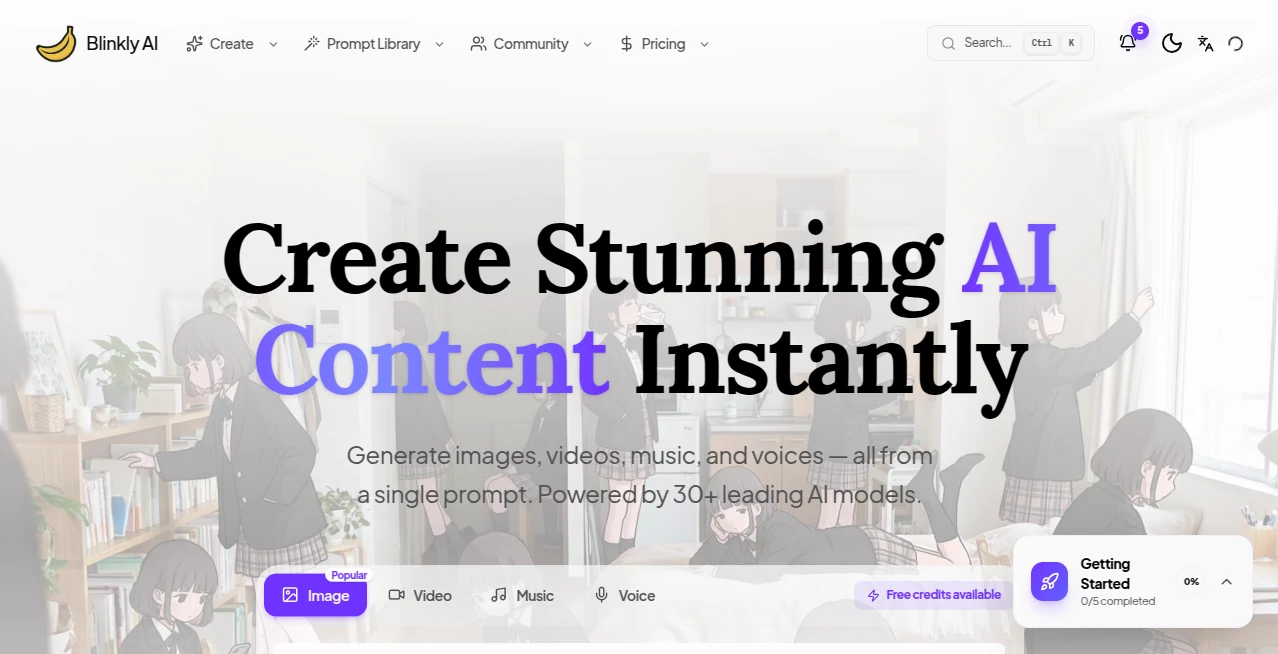
What is Blinkly AI?
There’s something exciting about opening a blank canvas and watching an idea turn into a finished piece of art, a short video, a melody, or even a voice recording—all without needing years of training or expensive software. This platform makes that possible in one place. You choose what you want to create—images, videos, music, or voice—and the AI handles the heavy lifting while you guide the vision. I’ve seen hobbyists turn weekend doodles into polished visuals and small creators produce social media clips that look professionally shot. It’s the kind of tool that lowers the barrier between “I wish I could make that” and “here it is.”
Introduction
Creative work often gets stuck in the gap between inspiration and execution. You have the idea, but turning it into something shareable takes too much time or skill. Blinkly AI bridges that gap by bringing together several powerful AI models under one roof. Whether you’re generating eye-catching images from text, turning prompts into cinematic videos, composing original music, or cloning voices for narration, everything happens in a unified workspace. It’s designed for both beginners who just want quick results and more experienced creators who need reliable tools to iterate fast. The best part is how it keeps the focus on your creativity instead of the technology.
Key Features
User Interface
The dashboard feels welcoming and uncluttered. You pick from clear categories—AI Image, AI Video, AI Music, or AI Voice—and the relevant options appear without overwhelming you. Prompts are entered in a simple box, with helpful examples and quick presets nearby. Previews load fast so you can see results almost immediately and make adjustments on the fly. It never feels like you’re learning a new piece of software; instead, it feels like opening a creative notebook that happens to be incredibly smart.
Accuracy & Performance
The outputs consistently match what you describe. Images come out detailed and stylistically coherent, videos maintain motion and character consistency better than many single-model tools, and the music and voice options deliver natural-sounding results. Generation times are reasonable—quick enough to keep your momentum going rather than breaking your flow. It handles complex prompts well without falling apart into random artifacts, which makes the whole experience feel dependable rather than experimental.
Capabilities
You can generate stunning visuals from text or reference images, create cinematic videos with various models under the hood, compose original songs and background tracks, and produce natural text-to-speech or voice clones. The platform supports different styles and lengths, letting you experiment with everything from quick social media assets to more polished creative pieces. It’s versatile enough for marketing, content creation, personal projects, or even prototyping ideas for larger productions.
Security & Privacy
Your prompts and generated content are handled with care. The platform doesn’t make a big deal about data collection, and you can create without forced accounts for basic use. It gives you the freedom to explore ideas privately, which matters when you’re testing concepts or working on client-sensitive material.
Use Cases
A small business owner generates eye-catching product images and short promotional videos without hiring a designer or videographer. A content creator produces daily Reels with custom visuals and background music that match their brand voice. A musician experiments with new song ideas or creates instrumental tracks for videos. A podcaster or YouTuber uses the voice tools for narration or character voices in stories. Teachers and educators quickly make engaging visual aids or short animated explainers. The tool fits naturally into any workflow where visuals, sound, or voice can make an idea more compelling.
Pros and Cons
Pros:
- All-in-one workspace saves switching between different apps and accounts.
- Multiple creative categories (image, video, music, voice) in one place.
- Fast generation with surprisingly high-quality, usable outputs.
- Simple enough for beginners yet flexible for more advanced users.
- Free options let you try before committing.
Cons:
- Some advanced features or higher-quality models may require paid credits.
- Video length and complexity still have practical limits typical of current AI tech.
- Best results often come from well-crafted prompts (though examples help).
Pricing Plans
The platform offers free access with daily limits so you can explore and create without upfront cost. Paid options provide more credits, faster generation, access to premium models, and higher usage limits for heavier creators or businesses. It’s structured so casual users stay comfortable on free, while serious creators can scale up affordably as their needs grow.
How to Use Blinkly AI
Start by choosing what you want to create—image, video, music, or voice—from the main options. Write a clear description of what you have in mind (the more specific, the better). For images or videos, you can upload a reference photo if desired. Hit generate and review the result. Like it? Download or refine the prompt for another version. The whole process is quick enough that you can experiment with several ideas in one session and still have time left to refine your favorites.
Comparison with Similar Tools
Many AI platforms specialize in one area—images only, or video only—which forces you to jump between sites and learn different interfaces. This one brings the best of several worlds together in a single, cohesive experience. While single-purpose tools might edge out in one narrow category, the convenience of switching seamlessly between images, videos, music, and voice without losing your creative flow gives it a real advantage for most everyday creators.
Conclusion
Creativity shouldn’t be limited by tools or time. Blinkly AI makes it easier to turn ideas into finished pieces across multiple mediums without the usual frustration or steep learning curves. Whether you’re a hobbyist looking for fun, a content creator needing consistent output, or a professional prototyping concepts, it delivers quality results with surprising ease. In a world full of creative demands, having a reliable, all-in-one AI partner like this feels like a genuine advantage—and one worth exploring.
Frequently Asked Questions (FAQ)
Do I need to sign up to start creating?
You can try many features without an account, though signing up unlocks saving work and higher limits.
Is it completely free?
There’s a generous free tier with daily limits; paid plans give more flexibility and access to premium options.
Can I use the generated content commercially?
Check the specific terms for each model, but most outputs are suitable for personal and many commercial uses on paid plans.
How good are the video generations?
They produce surprisingly cinematic results with good motion and consistency, especially when using clear prompts and references.
What if I’m not good at writing prompts?
The interface provides examples and suggestions to help you get better results even if you’re new to prompting.
AI Voice Cloning , AI Video Generator , AI Music Generator , AI Art Generator .
These classifications represent its core capabilities and areas of application. For related tools, explore the linked categories above.
Blinkly AI details
Pricing
- Free
Apps
- Web Tools
Categories

Blinkly AI Alternatives Product

Nano Banana 2

Banana AI

vio4 ai video
AI Music Gen…
RightAI
Kling 3 AI

wan2-6.org
Seedance 2.0…
Fuser Studio
