🧠 AI Quiz
Think you really understand Artificial Intelligence?
Test yourself and see how well you know the world of AI.
Answer AI-related questions, compete with other users, and prove that
you’re among the best when it comes to AI knowledge.
Reach the top of our leaderboard.


















ChatGPT Watermark Remover

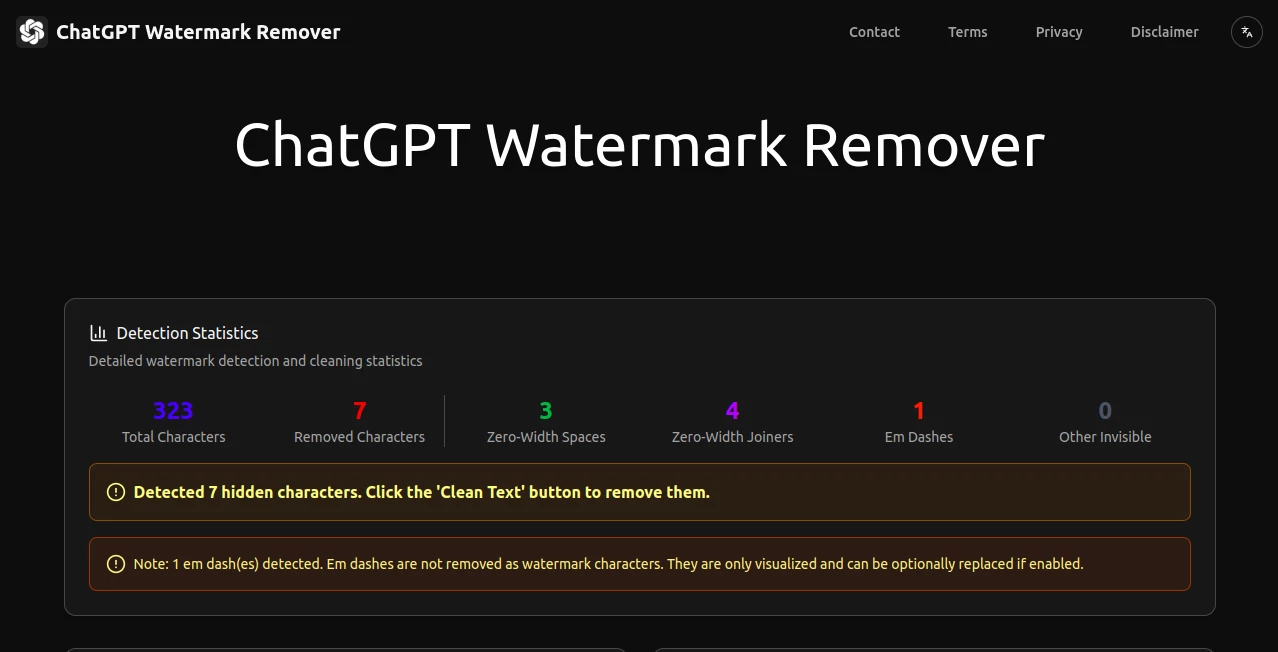
What is ChatGPT Watermark Remover?
ChatGPTWatermarkRemover steps in as a handy sidekick for anyone dealing with machine-made words, quietly stripping away those sneaky invisible bits that tag along uninvited. It's the sort of tool that saves a headache, letting you paste in a draft and walk away with something fresh and unmarked, all without a whisper to the outside world. Writers who've run into these hidden hurdles often breathe a sigh of relief after a quick pass through it, turning suspect copy into smooth sailing material that's ready for wherever it needs to go next.
Introduction
ChatGPTWatermarkRemover popped up amid the growing chatter about how generated content carries quiet signatures that can trip up checks or just feel off. A few sharp minds put it together to tackle that exact itch, starting small but spreading fast through shares from folks who'd hit snags with flagged files. It caught on with bloggers and business types who needed a no-fuss fix, and now it's a quiet staple for keeping drafts discreet. What draws people back is how it handles the unseen stuff with a light touch, turning what could be a tech tangle into a simple swap that keeps your flow unbroken.
Key Features
User Interface
The screen lays out clean and open, with a big paste spot up top that grabs your text without a fight, followed by a mirror pane below that shows the scrubbed version side by side. Buttons for peeking at the hidden bits or wiping them sit right there, easy to tap, and a sidebar pops stats like a quick report card on what got caught. It's the kind of setup that clicks after one look, no hunting for switches or scrolling through menus to get the job done.
Accuracy & Performance
It spots those tricky empty spots with a keen eye, pulling out over thirty kinds without missing a beat or tossing the baby with the bathwater. The whole scrub happens in a snap, right where you're working, so there's no wait or worry about lag. Users nod at how it nails the job on first go, leaving behind text that reads natural and passes muster without a second glance needed.
Capabilities
Beyond just zapping the zeros, it lights up the lurkers with colors so you can see what's what, from joiners to separators that sneak in scripts. You get counts on the catches, plus choices to tweak how it treats certain marks like longer pauses. It works across tongues and setups, handling the odd ones in eastern scripts or formatted flows, making it versatile for bits pulled from various corners.
Security & Privacy
Everything stays put on your end, with no dash to distant servers or digital footprints left behind, keeping your words wrapped up tight. Once the clean comes through, the originals fade away without a trace, giving you full say on what lingers. That hands-off approach puts minds at ease, especially for those sharing sensitive scraps that need to stay under the radar.
Use Cases
Content folks run their posts through it before hitting publish, dodging those flags that can stall shares. Teams crafting reports from quick gens use it to smooth the seams, ensuring the final reads seamless. Students tweaking essays pulled from helpers give it a once-over to keep things original-feeling. Even casual note-takers who grab ideas from bots pass them here for a polish that feels personal.
Pros and Cons
Pros:
- Grabs a wide net of sneaky spots without overdoing it.
- Runs smooth and silent, all local for zero waits.
- Shows you the before and after clear as day.
- No cost to kick off, open to all comers.
Cons:
- Sticks to the script side, no pics or extras.
- Needs a nudge for the rare marks it skips.
- Lacks a save history for backing up batches.
Pricing Plans
It's all open access from the get-go, with no tiers or tabs to track, letting you dive in deep without a dime. That free-for-all vibe keeps it welcoming, especially for one-offs or daily dips, and there's no push to upgrade since the full kit sits ready. Folks appreciate that straightforward setup, making it a pick for budgets big or squeezed.
How to Use ChatGPTWatermarkRemover
Copy your draft and drop it into the top box, then tap the eye to spot the shadows if you want a look. Flip any switches for what to watch, hit the wipe, and watch the bottom fill with the fresh take plus a tally of what went. Snag the clean copy with a quick grab button, paste it where it belongs, and you're set—simple as that for keeping things crisp.
Comparison with Similar Tools
Where some setups send your stuff off-site for a scan, ChatGPTWatermarkRemover keeps it close, trading that for instant peace but maybe missing cloud backups. Against broader cleaners that juggle files too, it zeros in sharp on text tricks, skipping the sprawl for focused fixes. It stands out for the everyday editor who wants quick and quiet over bells and whistles.
Conclusion
ChatGPTWatermarkRemover clears the quiet clutter from your crafted lines, handing back words that feel wholly yours without the unseen strings. It turns a potential pitfall into a passing breeze, proving small tweaks can smooth big paths. As more folks lean on helpers for hasty hauls, this one's a steady stand-in, keeping the essence intact while easing the edges.
Frequently Asked Questions (FAQ)
What sorts of hidden bits does it catch?
Over thirty types, from empty joins to odd spaces that slip in unnoticed.
Does it change the meaning at all?
No, it just lifts the lurkers, leaving your lines as laid out.
Works on stuff from other sources?
Yep, any text with those tricks, not just one bot's output.
Any limits on how much I can paste?
Handles hefty hunks fine, as long as your screen can scroll.
What if I spot something it missed?
Tweak the view options or run it again after a manual skim.
AI Rewriter , AI Checker Essay , AI Grammar Checker , AI Content Detector .
These classifications represent its core capabilities and areas of application. For related tools, explore the linked categories above.
ChatGPT Watermark Remover details
This tool is no longer available on submitaitools.org; find alternatives on Alternative to ChatGPT Watermark Remover.
Pricing
- Free
Apps
- Web Tools
Categories

ChatGPT Watermark Remover Alternatives Product

UPDF AI

StealthGPT

AI ATS Check…

AI Scan24

Rephrazy

GPTZero

AHelp

Sourcetable

ModelsLab