🧠 AI Quiz
Think you really understand Artificial Intelligence?
Test yourself and see how well you know the world of AI.
Answer AI-related questions, compete with other users, and prove that
you’re among the best when it comes to AI knowledge.
Reach the top of our leaderboard.


















Chatterbox Turbo
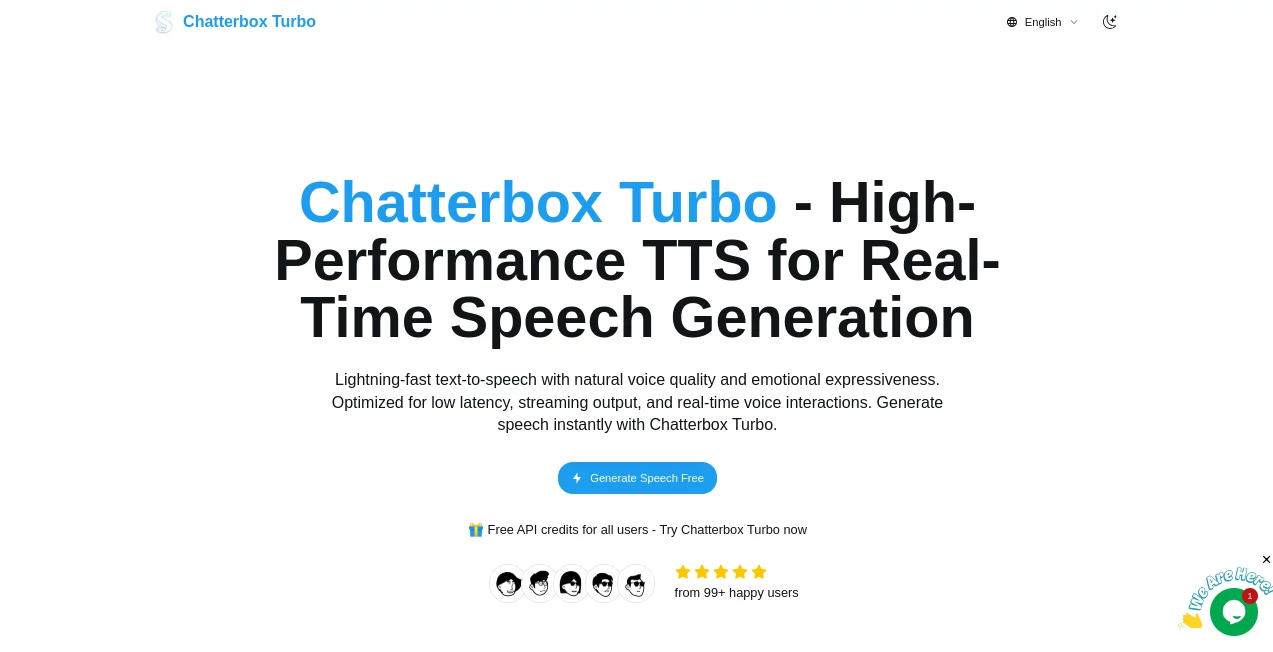
What is Chatterbox Turbo?
There's something truly satisfying about typing a line of dialogue and hearing it come back in a voice that sounds alive—full of nuance, quick as a heartbeat, and ready to drop into whatever project you're chasing. This tool nails that experience, turning plain text into speech that's not just clear, but expressive and instant, perfect for those moments when you need voice that feels human without the wait. I've tinkered with it for quick narrations, and the way it handles little laughs or sighs just pulls you in, making dry scripts pop with personality.
Introduction
Built on a lean, open-source foundation from Resemble AI, this turbo-charged version strips away the lag that plagues so many voice tools, delivering audio that streams out almost as fast as you can think it. It's geared for real-time magic—think chatty agents that respond without awkward pauses or games where characters banter naturally. What stands out is the emotional depth: slip in tags for chuckles or breaths, and it weaves them in seamlessly, keeping the flow authentic. Free to try with samples that showcase everything from dramatic monologues to quirky ads, it's a playground for anyone wanting voice that reacts, not just recites.
Key Features
User Interface
It keeps things delightfully straightforward—a text box for your words, spots to tweak voices or upload references, and a gallery of ready-made examples that play with one click. No overwhelming panels or hidden settings; just input, generate, and listen as the audio builds chunk by chunk. My first spin was with a classic movie line, and hearing it exaggerated just right had me grinning—it's that immediate feedback loop that makes experimenting addictive.
Accuracy & Performance
Latency dips below 150 milliseconds to the first sound, meaning playback kicks off instantly, even mid-sentence, without the full wait. It holds onto natural rhythm and emotion, cloning voices from short clips with fidelity that surprises, all while running smooth on standard setups. In practice, it rarely stumbles on prosody, turning tagged prompts into speech that feels spontaneous and spot-on.
Capabilities
Zero-shot cloning grabs a voice from seconds of audio, layering in paralinguistic flair like coughs or laughs through simple tags. Streaming output means real-time flow for live apps, and it scales for busy workloads without breaking stride. Whether narrating stories, voicing agents, or spicing commercials, it brings expressiveness that elevates basic text to engaging audio.
Security & Privacy
Outputs carry subtle watermarks for traceability, baked in without touching quality, while your inputs stay handled securely for the task at hand. It's designed with production in mind, compliant and careful, giving peace when deploying for broader use.
Use Cases
Game makers breathe life into NPCs that quip back in real time, reacting with laughs that fit the moment. Voice assistant builders craft responsive bots for calls or chats, keeping conversations natural. Podcasters prototype intros with dramatic flair, or educators add narrated guides that pause for emphasis. Even ad creators mock up spots with exaggerated energy, testing tones before the studio booking.
Pros and Cons
Pros:
- Blistering speed that makes interactions feel alive and immediate.
- Emotional tags add that human spark missing from flatter voices.
- Easy cloning turns short samples into custom narrators.
- Streaming keeps things flowing for live or long-form needs.
Cons:
- Best with clear prompts—wild experiments might need tweaks.
- Free access has limits, nudging toward credits for heavier use.
Pricing Plans
Dive in free with credits that let you generate samples and test the waters generously—no card upfront. Scale up with API packs that fit your volume, keeping costs tied to actual use for everything from casual trials to full deployments. It's approachable pricing that grows with you, rewarding explorers without heavy commitments early on.
How to Use Chatterbox Turbo
Head to the editor, paste your text—sprinkle tags like [chuckle] for flair—and pick a voice or upload a reference clip. Hit generate, and audio streams out, ready to play or download. Tweak exaggeration for drama, listen to gallery demos for inspiration, and loop refinements until it sings just right. Simple as that for quick clips or integrated setups.
Comparison with Similar Tools
Against bulkier options that drag on latency or skip the emotional nuances, this one surges ahead with real-time responsiveness and built-in expressiveness that feels more alive. It's lighter on resources yet punches with quality, ideal for interactive builds where others lag or lack the human touch in reactions.
Conclusion
This tool rekindles the joy of voice creation, blending speed and soul in a way that invites endless play. It turns scripted lines into conversations that captivate, opening doors for stories told aloud with genuine feeling. Whether prototyping ideas or powering products, it's a reliable companion that makes speech not just heard, but felt.
Frequently Asked Questions (FAQ)
How fast is the first sound?
Under 150ms typically—playback starts almost instantly.
What about adding emotions?
Tags like [laugh] or [sigh] weave them in naturally.
Voice cloning needs how much audio?
Just seconds for zero-shot captures that hold style.
Is streaming supported?
Yes, chunk-by-chunk for real-time flow.
Free to try?
Absolutely, with credits for generous testing.
AI Text to Speech , AI Voice & Audio Editing , AI Voice Cloning , AI Speech Synthesis .
These classifications represent its core capabilities and areas of application. For related tools, explore the linked categories above.
Chatterbox Turbo details
Pricing
- Free
Apps
- Web Tools
Categories

Chatterbox Turbo Alternatives Product

Adobe Podcast

Models by Ha…

Read PDF Alo…
Qwen3 TTS

PolyBuzz

ModelsLab

ElevenLabs

Krisp

vo4 ai