
🧠 AI Quiz
Think you really understand Artificial Intelligence?
Test yourself and see how well you know the world of AI.
Answer AI-related questions, compete with other users, and prove that
you’re among the best when it comes to AI knowledge.
Reach the top of our leaderboard.

















chibi art
What is chibi art?
There’s something instantly comforting about chibi art—the oversized heads, tiny bodies, and those huge sparkling eyes that somehow manage to look both adorable and expressive at the same time. This platform takes that charm and makes it ridiculously easy to bring your own ideas to life. You type a description, pick a style from an ever-growing library, and seconds later you’re staring at a finished piece that feels hand-drawn with love. I’ve lost count of how many times I’ve sat down intending to just “try one” and ended up with a whole batch of characters because the results were too cute to stop.
Introduction
Chibi and anime art have a special place in a lot of hearts—they’re playful, emotional, and instantly recognizable. What this tool does so well is remove every excuse for not creating them. No drawing tablet required, no years of practice, just your words and a few clicks. It’s tuned specifically for that sweet anime aesthetic, pulling from models like Flux and Stable Diffusion, and backed by a community that keeps adding fresh styles. People use it for everything from personal avatars to fan art gifts, and the shared gallery is full of examples that show just how versatile and heartwarming the output can be. It feels like a little creative playground that’s always open, always improving, and always surprising you with how good the next generation looks.
Key Features
User Interface
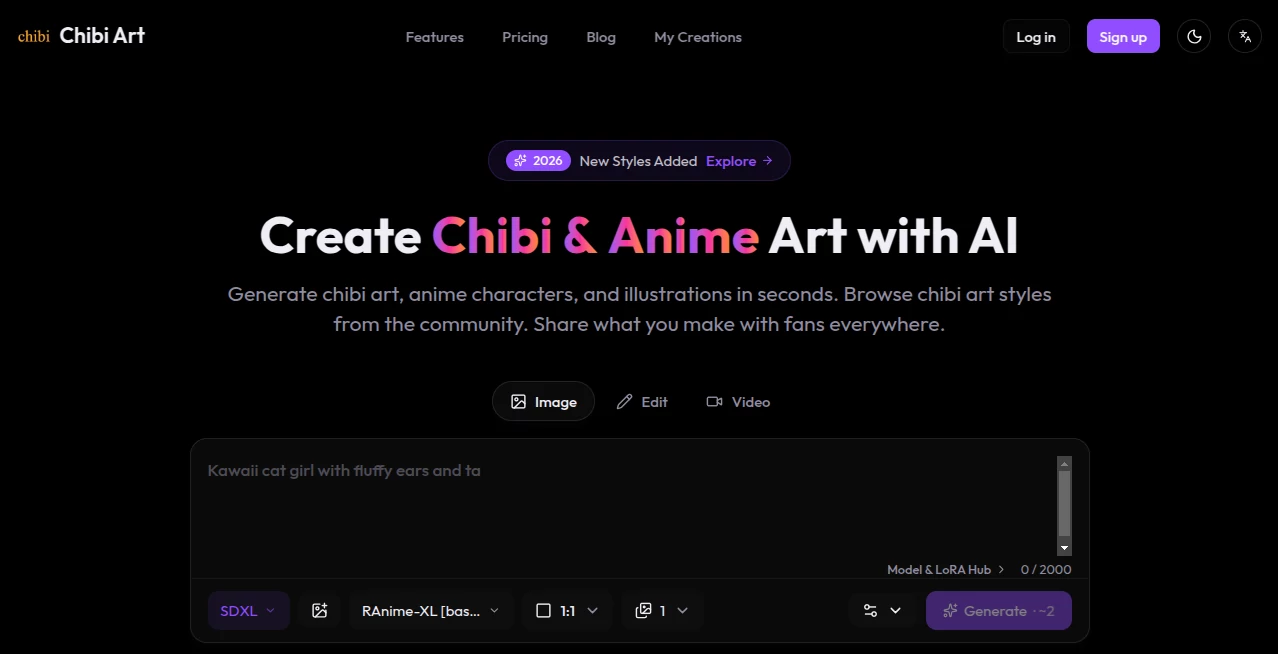
The screen is uncluttered and inviting: a big prompt box, a scrollable style library with previews that load fast, and a generate button that’s impossible to miss. You can favorite styles you love, batch-generate variations, and even turn still images into short animated clips. It’s designed so you spend more time smiling at the results than figuring out where to click. Even on my first try, I felt like I knew what I was doing within thirty seconds.
Accuracy & Performance
The generations come through quickly—often in under ten seconds—and the quality is consistently high. Characters stay on-model within the chosen style, proportions are reliably chibi-cute, and details like hair flow or outfit accents land exactly where you’d hope. When you use a strong reference style, the output feels like it belongs to the same artist. It’s rare to get something that needs heavy editing; most pieces are ready to share or use as-is.
Capabilities
You can generate static chibi portraits, full-body characters, scene illustrations, expression sheets, and even short animations from text or reference images. The style library is huge—hundreds of community-uploaded presets covering classic shonen, soft kawaii, pixel chibi, and niche fandom looks. Batch mode lets you crank out variations fast, and transparent backgrounds make it easy to drop characters into other projects. The video feature adds a playful bonus: turn your favorite still into a looping GIF or simple animated profile pic.
Security & Privacy
Your creations are yours. The platform doesn’t claim ownership, and you control whether to share anything publicly in the gallery. It’s built with creators in mind, so there’s no hidden catch or aggressive data collection. That freedom lets you experiment without second-guessing.
Use Cases
A cosplayer generates reference chibis of their next costume to share on socials. A writer creates adorable versions of their novel characters for chapter headers. Discord moderators commission custom emotes for their server using community styles. Someone makes a birthday card with a chibi version of their friend that gets instant tears and laughs. The possibilities keep unfolding because the tool stays out of the way and lets your imagination lead.
Pros and Cons
Pros:
- Style library is massive and growing—something for every mood and fandom.
- Results feel polished and intentional, rarely generic or off-model.
- Animation feature adds extra delight without extra effort.
- Community sharing inspires and lets you discover new looks constantly.
Cons:
- Free tier has limits that encourage upgrading for heavy use.
- Occasionally needs prompt tweaking for very specific details.
Pricing Plans
You can jump in for free and generate quite a bit before hitting any walls. Paid plans unlock unlimited generations, higher resolutions, faster queues, and full commercial rights when you need them. It’s structured so casual explorers stay comfortable and serious creators get the power they want without feeling gouged. The value keeps improving as the community adds more styles for everyone to use.
How to Use ToonComposer
Start with a description—“a chibi fox girl in a raincoat holding an umbrella, soft pastel colors”—then scroll the style library until one catches your eye. Click to apply it, adjust any extras like aspect ratio or batch count, and generate. If the first one’s close but not perfect, regenerate with a small prompt tweak. Download with transparent background if you want to composite later, or turn it into a short animation for fun. Save favorites so you can come back to styles you love.
Comparison with Similar Tools
Plenty of general image generators can make anime-style art, but few are tuned so precisely for chibi and anime aesthetics with such a rich, community-driven style library. Where others give you broad options and mixed results, this one feels curated for cuteness and consistency. The animation bonus is a cherry on top that most competitors don’t touch. It’s less about doing everything and more about doing this one thing exceptionally well.
Conclusion
Creating chibi and anime art should feel joyful, not frustrating—and this tool delivers exactly that feeling. It takes the barriers away and hands you a fast, reliable way to see your ideas come to life in the styles you adore. Whether you’re making avatars, gifts, content, or just doodling for fun, it keeps the spark alive and the results charming. Once you start playing, it’s hard to stop.
Frequently Asked Questions (FAQ)
Do I need to be good at prompts?
Not really—the style library does most of the heavy lifting. Simple descriptions work great.
Can I use the art commercially?
Yes, especially on paid plans—check the terms for your use case.
How good is the animation feature?
Smooth and cute for short loops and profile pics—perfect for socials.
Is there a way to save styles I like?
Favorite them in the library so they’re easy to find next time.
What resolutions can I get?
HD up to 4K depending on your plan—plenty sharp for most uses.
AI Photo & Image Generator , AI Image to Image , AI Art Generator , AI Design Generator .
These classifications represent its core capabilities and areas of application. For related tools, explore the linked categories above.
chibi art details
Pricing
- Free
Apps
- Web Tools
Categories

chibi art Alternatives Product

Nano Banana …

Nano Banana …

MakeMyOC

AIGAZOU

Picsart

Luma AI

AI Image Edi…
Nano Banana …

Touchpoint
