
🧠 AI Quiz
Think you really understand Artificial Intelligence?
Test yourself and see how well you know the world of AI.
Answer AI-related questions, compete with other users, and prove that
you’re among the best when it comes to AI knowledge.
Reach the top of our leaderboard.

















CleanMyPrompt

What is CleanMyPrompt?
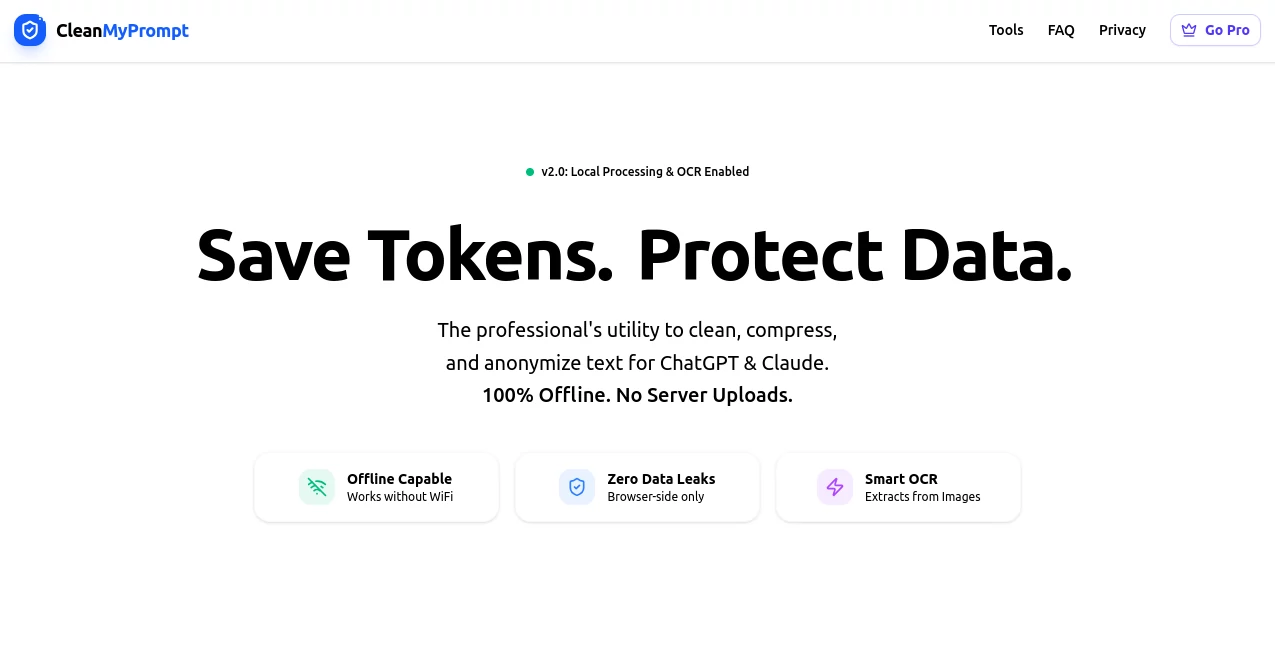
Ever pasted a chunk of text into an AI chat only to wince at the token count—or worse, realize you might've left sensitive bits in there? This little gem sweeps in to fix both headaches, scrubbing your inputs clean while shrinking them down without losing a whisper of meaning. I stumbled on it during a late-night project involving messy logs, and honestly, it felt like a lifeline—turning potential disasters into smooth sails. It's the kind of thoughtful utility that pros lean on quietly, saving cash on API calls and sleep over data slips.
Introduction
In the rush of feeding big language models, it's easy to overlook the hidden costs and risks lurking in raw text. This browser-based wonder tackles them head-on, running everything locally so nothing ever leaves your machine. Born from the real-world pains of handling scraped PDFs, server dumps, or scanned docs, it anonymizes the risky stuff and trims the fluff, often slashing token use by a solid chunk. What draws people in—and keeps them—is that offline assurance paired with clever smarts; no servers peeking, just pure client-side magic. Folks in dev, legal, or even health circles share quiet nods of approval, recounting how it turned paranoid pastes into confident ones.
Key Features
User Interface
It greets you with a straightforward drop zone that swallows files or pasted text without fuss, a big button to kick things off, and tips popping up like a helpful friend—try Cmd + Enter for speed. Everything unfolds right there, no logins or layers, just upload, process, and copy the polished result. My first run with a jumbled resume PDF felt almost too easy; drag, click, and out came a tidy version ready for the AI without a single sensitive detail left behind.
Accuracy & Performance
The redaction engine digs deep, catching sneaky patterns like API keys or wallet addresses that simpler tools miss, while the compression swaps wordy phrases for crisp ones without altering intent—up to 40% savings on tokens, from what I've seen. It hums along swiftly in the browser, handling decent-sized files without a hiccup, and the OCR pulls text from images reliably for those scanned relics. In practice, it rarely falters on the usual suspects, giving you outputs that feed cleanly into chats and come back with sharper responses.
Capabilities
Drop in PDFs, text files, JSON, or even images for smart text extraction, then watch it strip out PII, financials, and tech identifiers across multi-pass checks. It fixes wonky formatting from copies, squeezes verbosity thoughtfully, and spits out JSON-ready blocks if that's your jam. All offline, of course—perfect for layering an extra shield before hitting cloud AIs, whether you're summarizing contracts or debugging logs.
Security & Privacy
This is where it truly earns trust: zero-knowledge all the way, with processing locked to your browser tab—no uploads, no logs, nothing transmitted beyond the initial page grab. You can even disconnect Wi-Fi mid-run and it keeps going, a neat trick that proves the point. For anyone juggling compliant data or just valuing peace, it's a rare find that puts control squarely in your hands, no compromises.
Use Cases
Devs strip keys and IPs from error logs before querying for fixes, breathing easy over leaks. Legal teams scrub resumes or agreements of personal markers, prepping safe summaries without manual hunts. Healthcare pros add it as a belt-and-suspenders step for patient notes, aligning with strict rules offline. Prompt wranglers clean scraped web messes into structured feeds, cutting costs on long contexts and boosting response quality.
Pros and Cons
Pros:
- Rock-solid privacy that lets you handle anything without worry.
- Noticeable token trims that add up quick on heavy use.
- Thorough redaction catching the obscure stuff others skip.
- Handy OCR turning images into usable text on the spot.
Cons:
- Image OCR caps at smaller files to keep things snappy.
- Pro extras might lure for unlimited or advanced tweaks.
Pricing Plans
The core shines free right out of the gate, handling everyday cleans without a dime or account—ideal for most folks dipping in. A Pro nudge appears for those wanting more polish or volume, though the basics cover plenty without pressure. It's that generous free foundation that feels genuinely welcoming, scaling only when your needs do.
How to Use CleanMyPrompt
Drag your file—PDF, text, or snapshot—into the zone, or paste straight in. Hit the button or shortcut, let it crunch for a moment, and grab the cleaned output from the box below. Tweak as needed with reruns, then copy-paste into your AI of choice. I often chain it with scanned docs: upload image, extract, redact, compress, and feed—whole thing done before the kettle boils.
Comparison with Similar Tools
Plenty of online cleaners send your data flying to servers, but this one's staunch offline stance sets it apart, pairing robust redaction with meaningful compression that actually preserves nuance. Where others might skim surfaces or demand subscriptions upfront, it delivers deep protection and savings freely, feeling more like a trusted pocket tool than a gated service—hands down the pick for cautious creators.
Conclusion
This unassuming helper packs a serious punch for anyone serious about safe, efficient AI interactions, blending privacy paranoia with practical savings in a package that's hard to beat. It turns risky rushes into relaxed routines, letting you focus on the insights rather than the exposures. Give it a spin next time you're prepping a hefty paste—you'll wonder how you managed without that extra layer of calm.
Frequently Asked Questions (FAQ)
Does it really stay offline?
Yes—try unplugging after load; it keeps working, proof positive.
What sensitive stuff does it catch?
From cards and SSNs to keys and wallets, with smart checks beyond basics.
How much can it shrink text?
Often 40% or so, swapping long-winded bits for tight ones.
Works on scanned docs?
Upload as image for OCR pull, then clean as usual.
Free forever?
Core yes, with Pro for extras if you outgrow the basics.
AI Productivity Tools , AI Developer Tools , AI Writing Assistants .
These classifications represent its core capabilities and areas of application. For related tools, explore the linked categories above.
CleanMyPrompt details
This tool is no longer available on submitaitools.org; find alternatives on Alternative to CleanMyPrompt.
Pricing
- Free
Apps
- Web Tools
Categories

CleanMyPrompt Alternatives Product

RichlyAI

Kimi K2.5

photo to URL

Hands Off

KarmaGuy

CodeProt

Classroom Sc…

Sourcetable

Workik
