🧠 AI Quiz
Think you really understand Artificial Intelligence?
Test yourself and see how well you know the world of AI.
Answer AI-related questions, compete with other users, and prove that
you’re among the best when it comes to AI knowledge.
Reach the top of our leaderboard.


















The #1 Compare Lists Tool
What is The #1 Compare Lists Tool?
Have you ever stared at two long lists of names, emails, keywords, or inventory items wondering what’s missing from one and duplicated in the other? It’s the kind of tedious task that eats up hours and invites mistakes. This tool makes that frustration disappear in seconds. Paste your two lists, hit compare, and instantly get a clear breakdown: what’s only in the first, only in the second, what they share, and the full combined set. No sign-up, no limits, no nonsense—just clean, reliable results that save real time. I’ve used it for everything from cleaning contact lists to comparing SEO keywords, and it never fails to surface insights I would have missed manually.
Introduction
Comparing lists sounds simple until you’re dealing with hundreds or thousands of items. Manual checking is error-prone and exhausting. This platform turns that chore into a one-click operation. It’s completely free, works entirely in your browser, and delivers instant, accurate results without collecting any data. Whether you’re a marketer cleaning email lists, a researcher comparing datasets, a student organizing notes, or a business owner reconciling inventory, it quietly becomes one of those everyday tools you wonder how you lived without. The beauty is in its simplicity and speed—you get answers before you’ve even finished your coffee.
Key Features
User Interface
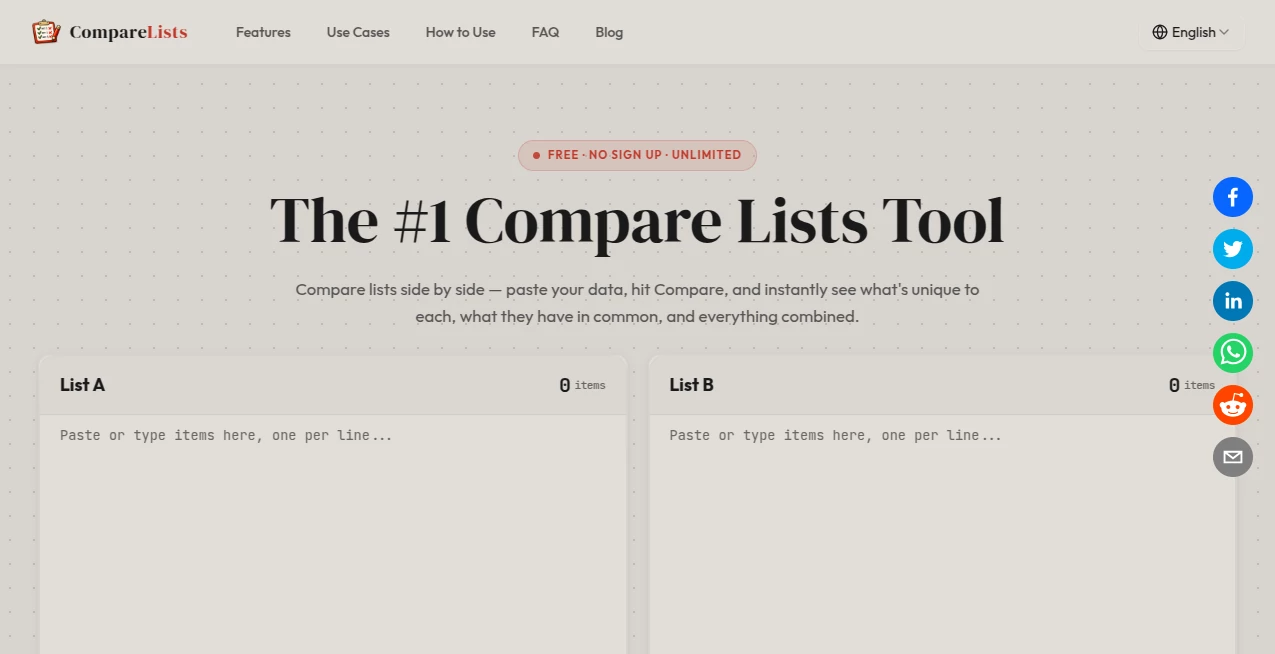
The design is wonderfully minimal. Two large text boxes sit side by side for your lists. Paste or type your items (one per line), click the big Compare button, and the results appear below in clearly labeled sections. No accounts, no menus to hunt through, no ads cluttering the screen. It feels fast and respectful of your time—exactly what you want when you’re trying to get something done quickly.
Accuracy & Performance
It handles large lists without slowing down or crashing. Duplicates are automatically managed, whitespace is cleaned intelligently, and the comparison logic is rock-solid. You get precise counts and separated results every time. In practice, it catches subtle differences (like extra spaces or case variations if you choose) that manual review almost always misses. The speed is impressive even with thousands of lines—results appear almost instantly.
Capabilities
It shows five useful views: items unique to List A, unique to List B, items in both, the full union of both lists, and symmetric difference. You can sort results, copy any section with one click, and even download the outputs. It works great with names, emails, keywords, numbers, domains—pretty much any text-based list. No file uploads required, though the simplicity makes it feel effortless either way.
Security & Privacy
Everything runs locally in your browser. Your lists are never sent to any server, never stored, and never shared. That standalone approach gives complete peace of mind, especially when working with sensitive data like customer emails or internal company lists.
Use Cases
Marketers compare old and new keyword lists to spot fresh opportunities. HR teams find duplicate entries when merging employee databases. Researchers quickly identify overlapping sources between two bibliographies. E-commerce owners reconcile inventory from different suppliers. Students compare reading lists or study notes to avoid duplication. It’s one of those tools that quietly solves small but frequent problems across almost every field.
Pros and Cons
Pros:
- Completely free with no usage limits or hidden catches.
- Lightning-fast performance even on very large lists.
- Privacy-first design—nothing leaves your browser.
- Clear, well-organized results that are easy to act on.
- No account or installation required—just open and use.
Cons:
- Focused purely on text lists (great for what it does, but not for complex data analysis).
- No built-in fuzzy matching for minor spelling variations (though manual review is easy).
Pricing Plans
It’s completely free and unlimited. No premium tiers, no paywalls, no “upgrade for more results.” The creators built it as a genuinely useful public tool rather than a funnel into subscriptions. That straightforward generosity is rare and refreshing.
How to Use Compare Lists
Open the site, paste your first list into the left box and your second list into the right box (one item per line works best). Click the Compare button. Scroll through the clear sections showing unique items, common items, and full combined results. Copy any section you need or download the outputs. For repeated tasks, you can keep the page open and swap lists as needed. The entire process usually takes under 30 seconds.
Comparison with Similar Tools
Many list comparison tools either require sign-ups, limit daily use, or bombard you with ads. Others are desktop apps that need installation. This one stands out by being instantly accessible, completely private, unlimited, and focused purely on delivering clean, actionable results without any extra noise. It’s lighter and more reliable than most alternatives for everyday list comparison needs.
Conclusion
Small tools that solve everyday frustrations often become the most valuable ones in your workflow. This is one of those tools. It takes a task that used to waste time and invite errors and turns it into something quick, accurate, and almost enjoyable. Whether you compare lists once a week or several times a day, it quietly makes your work smoother and more reliable. If you ever find yourself juggling two lists, give it a try—you’ll likely wonder why you didn’t discover it sooner.
Frequently Asked Questions (FAQ)
Is there really no limit on list size?
Yes—it handles thousands of items smoothly with no artificial caps.
Do I need to create an account?
No account is needed. Just open the page and start comparing.
Are my lists stored or shared?
No—everything runs locally in your browser and is never sent to any server.
Can I compare more than two lists?
Currently focused on two lists for maximum simplicity and speed. You can compare results from multiple runs manually if needed.
What file types can I use?
Direct paste works best. You can also copy from Excel, CSV, or text files.
AI Documents Assistant , AI Research Tool .
These classifications represent its core capabilities and areas of application. For related tools, explore the linked categories above.
The #1 Compare Lists Tool details
Pricing
- Free
Apps
- Web Tools
Categories

The #1 Compare Lists Tool Alternatives Product

MacroMicro

Robux Tax Ca…

Image Descri…

Kimi K2.5

JSON to TOON…

MiniValuator

UPDF AI

Toonifyit

RankPeak