
🧠 AI Quiz
Think you really understand Artificial Intelligence?
Test yourself and see how well you know the world of AI.
Answer AI-related questions, compete with other users, and prove that
you’re among the best when it comes to AI knowledge.
Reach the top of our leaderboard.


















ConceptViz

What is ConceptViz?
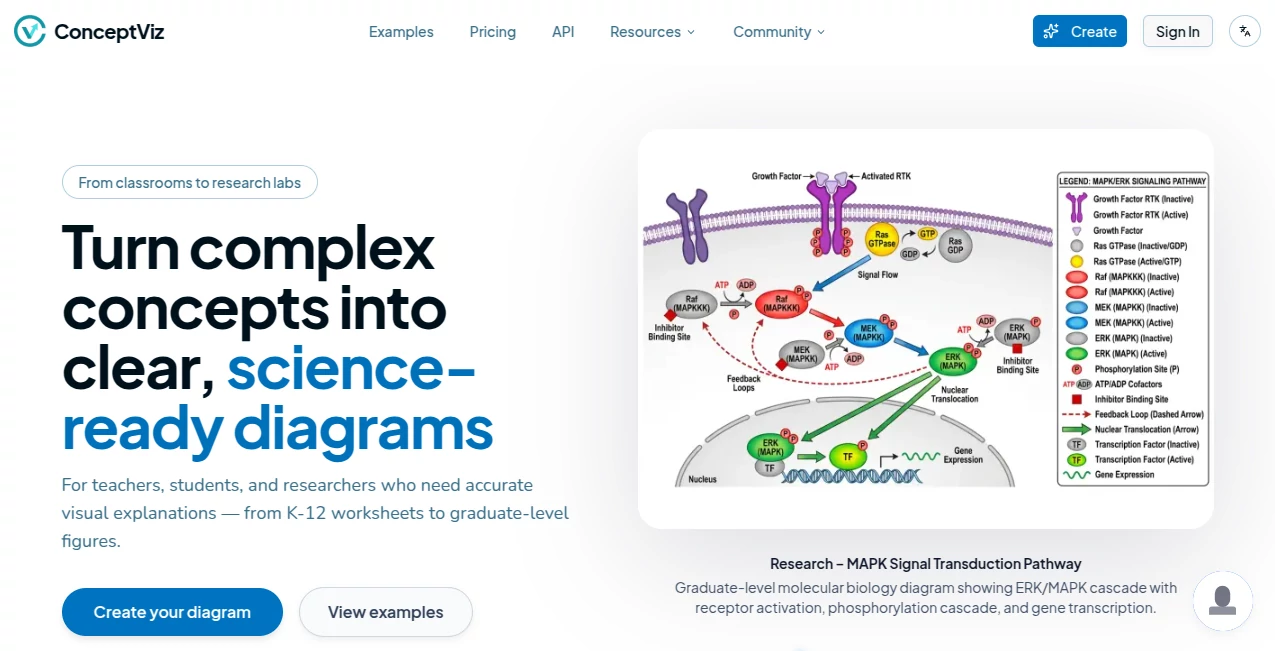
There's nothing quite like watching a tricky science concept click for a student, and clear visuals are often the key that unlocks it. This tool steps in as that perfect ally for educators, taking plain descriptions and turning them into crisp, classroom-ready diagrams that look straight out of a textbook. I've chatted with teachers who've slashed their prep time in half, swapping frantic searches for images with quick generations that fit their lessons just right—it's the kind of practical help that feels like a co-teacher in your corner.
Introduction
Built from the ground up for STEM folks, this platform tackles the everyday frustration of hunting down or sketching accurate diagrams for lessons on everything from cell structures to geometric proofs. It uses smart prompting behind the scenes to churn out high-contrast visuals optimized for projectors, slides, or printouts, always prioritizing clarity over flashy effects. Teachers share how it transformed messy whiteboard scribbles into polished aids that help kids grasp abstract ideas faster—one biology instructor told me it made her Earth layers explanation finally "stick" without endless redrawing. It's indie-made with educators in mind, augmenting your expertise so you spend less time on visuals and more on what you do best: inspiring curiosity.
Key Features
User Interface
It keeps things delightfully simple—a straightforward prompt box where you describe what you need in everyday language, perhaps with subject presets to guide the style. Outputs appear clean and ready, sized perfectly for dropping into PowerPoint or worksheets without extra fiddling. No overwhelming options; just enough tweaks to nail the look, making it welcoming even on a busy school night.
Accuracy & Performance
Diagrams come back aligned with curriculum standards, capturing details like lab setups or phase cycles with impressive fidelity, often on the first try. Generations are swift, delivering projector-friendly results in seconds that hold up under classroom scrutiny. From feedback I've heard, it consistently outperforms generic searches, avoiding wonky proportions or outdated styles that sneak into free stock images.
Capabilities
It excels at STEM staples: physics ray paths, chemistry apparatus, biology anatomies, math coordinates, and earth science models, all with consistent labeling and scalable elements. Exports fit seamlessly into teaching tools, and the focus on textbook-like aesthetics ensures they enhance learning without distracting flair.
Security & Privacy
As an educator-focused tool, it handles your prompts discreetly, with no unnecessary data retention—ideal for school environments where privacy matters. You own your creations fully, ready for lessons or sharing with colleagues.
Use Cases
High school physics teachers craft precise optics diagrams for lectures, saving hours previously lost to manual drawing. Math instructors generate clean geometry figures for quizzes that look professional every time. Biology classes get layered cell views or ecosystem cycles that make discussions pop, while researchers mock up quick visuals for presentations without derailing their focus.
Pros and Cons
Pros:
- Dramatically cuts prep time, freeing you for actual teaching.
- Curriculum-accurate outputs that students grasp quicker.
- Projector-optimized clarity that works in real classrooms.
- Indie spirit with genuine educator insight baked in.
Cons:
- Best for STEM specifics—less suited for general graphics.
- Relies on well-phrased prompts for peak results.
Pricing Plans
It offers accessible entry with options that grow with your needs, likely including a free tier for trying core generations and paid upgrades for unlimited access or advanced tweaks—designed to fit tight education budgets without skimping on quality.
How to Use ConceptViz
Type a natural description like "ray diagram for refraction through a convex lens," select any subject guides if available, and generate. Review the clean result, regenerate with refinements if needed, then download or copy straight into your slides. It's that loop—describe, create, insert—that turns lesson planning into something smoother and more enjoyable.
Comparison with Similar Tools
General AI drawers often veer into artistic territory, missing the precise, no-frills accuracy educators crave, while stock libraries leave gaps in specifics. This one carves its niche with textbook fidelity and classroom practicality, emerging as the thoughtful choice for STEM pros who need reliability over razzle-dazzle.
Conclusion
This tool quietly empowers the frontline of education, handing teachers visuals that elevate lessons and engage minds without the usual hassle. It's a testament to thoughtful tech that serves rather than shows off, helping bridge those tough concepts with clarity that lasts. For anyone shaping young scientists or mathematicians, it's worth a spot in your toolkit—the difference in student "aha" moments speaks for itself.
Frequently Asked Questions (FAQ)
What subjects does it cover best?
Physics, chemistry, biology, math, and earth sciences—anything needing precise scientific illustration.
How accurate are the diagrams?
Curriculum-tuned for reliability, with clean labels and proportions that match teaching standards.
Can I edit the outputs?
They're ready-to-use but editable in your favorite slide tools for final touches.
Is it free to try?
Generous starting access lets you generate and test without commitment.
Projector-friendly?
Absolutely—high-contrast designs built for classroom visibility.
AI Diagram Generator , AI Productivity Tools , AI Education Assistant , AI Design Generator .
These classifications represent its core capabilities and areas of application. For related tools, explore the linked categories above.
ConceptViz details
This tool is no longer available on submitaitools.org; find alternatives on Alternative to ConceptViz.
Pricing
- Free
Apps
- Web Tools
Categories

ConceptViz Alternatives Product

NanoBanana P…

Normal Map G…

Image By Qwen

Nano Banana …

Alloy

Nano Banana …

Uni-1

Seedream 5.0

Fiddl.art
