
🧠 AI Quiz
Think you really understand Artificial Intelligence?
Test yourself and see how well you know the world of AI.
Answer AI-related questions, compete with other users, and prove that
you’re among the best when it comes to AI knowledge.
Reach the top of our leaderboard.


















CookieGuard

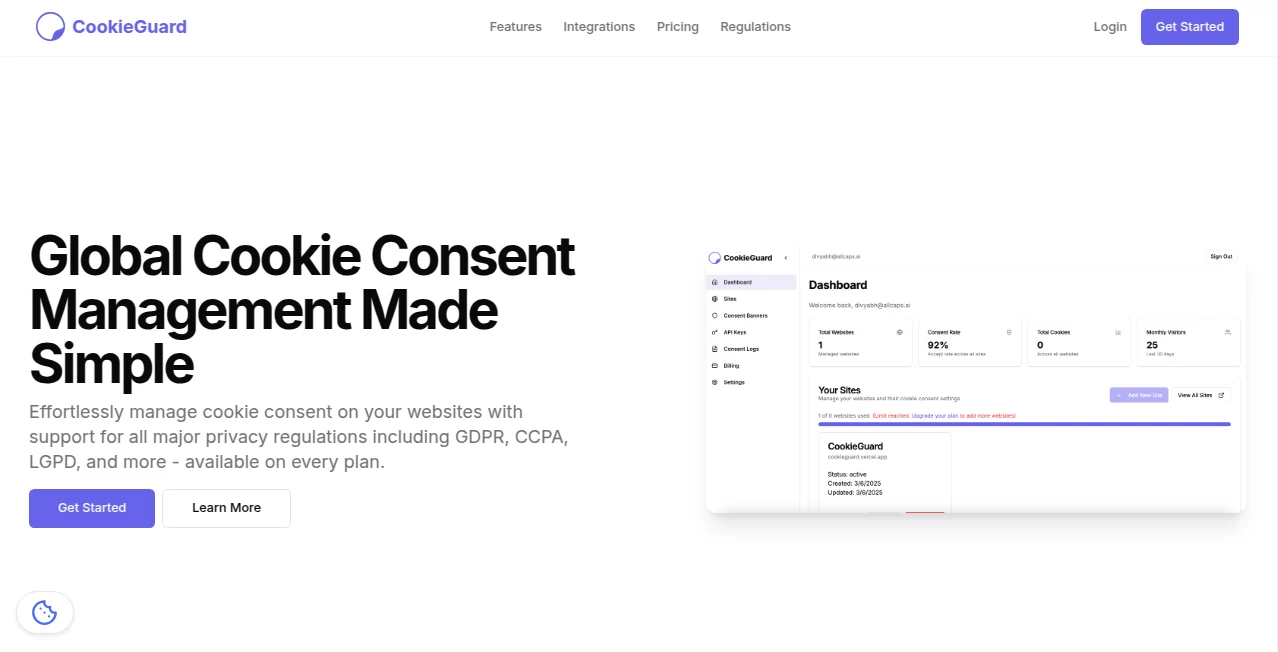
What is CookieGuard?
Nothing kills a visitor's first impression faster than a giant, ugly cookie banner that blocks half the screen and forces them to make choices they don’t understand. This tool fixes that problem quietly and elegantly. It gives your site a clean, non-intrusive consent experience that respects both the user and the law—without turning your beautiful design into a legal disclaimer nightmare. I’ve seen sites go from “ugh, another cookie popup” to “that was actually nice and quick,” and bounce rates drop noticeably. It’s the kind of thoughtful detail that makes people trust you more, not less.
Introduction
GDPR, CCPA, ePrivacy—cookie consent is no longer optional, but most solutions still feel like they were designed by lawyers, not people who care about UX. This one was clearly built by someone who hates bad banners as much as the rest of us. It focuses on minimalism, transparency, and genuine user choice while keeping compliance tight. No forced “accept all” dark patterns, no endless category trees—just clear language, elegant design, and everything you need (and nothing you don’t) to stay legal and keep visitors happy. For indie makers, agencies, and small-to-mid businesses, it’s become the go-to when they want consent done right without the headache.
Key Features
User Interface
The banner is small, modern, and respectful—sits at the bottom or as a subtle floating pill, never covering content. Customization is deep but approachable: choose colors, fonts, corner radius, position, language, and wording from a clean editor. Preview is live so you see exactly what visitors will see. The consent modal (when needed) is equally restrained—clear explanations, no manipulative nudges. It blends into your site instead of fighting it.
Accuracy & Performance
It blocks scripts, trackers, and analytics until consent is given—zero leakage before the user clicks. Lightweight script (under 10 KB gzipped) loads fast and doesn’t slow your site. Compliance is kept up-to-date automatically (GDPR, CCPA, LGPD, etc.), and the geo-detection respects Do Not Track signals and regional laws. In real-world tests it reliably prevents Google Analytics, Meta Pixel, Hotjar, etc., from firing early, while still allowing essential cookies to keep the site functional.
Capabilities
Granular consent categories (necessary, analytics, marketing, preferences), auto-blocking for popular tools (Google, Meta, YouTube embeds, etc.), custom script blocking via URL patterns, multi-language support (auto-detect or manual), IAB TCF v2 compatibility, revocation link in footer, consent log export for audits, dark mode support, and full styling control via CSS variables. It integrates smoothly with Tag Manager, WordPress, Shopify, Webflow, Framer—basically anywhere you can add a script.
Security & Privacy
No data is sent to third-party servers unless the user consents to a specific category. Consent records are stored locally or on your server (your choice), never on theirs. Open-source core means the blocking logic is transparent and auditable. For privacy-conscious teams, that level of control and zero telemetry is rare and very welcome.
Use Cases
A freelance designer launches a portfolio site and wants analytics without risking a fine—gets compliant tracking with one clean banner. An e-commerce store adds marketing pixels but lets users opt out easily, improving trust and reducing complaints. A SaaS company serving EU customers swaps their old intrusive banner for this sleek one and sees form submissions rise because visitors feel respected. A blogger who uses affiliate links and embeds keeps everything legal without sacrificing UX. Wherever compliance meets user experience, it quietly solves the tension.
Pros and Cons
Pros:
- Beautiful, non-intrusive design that actually improves perceived professionalism.
- Rock-solid blocking—no early script leaks.
- Deep customization without needing to write code.
- Lightweight and fast—won’t hurt Core Web Vitals.
- Free plan covers most small sites with full compliance features.
Cons:
- Advanced features (custom integrations, audit logs, white-label) require paid plans.
- Learning curve for very complex blocking rules (though most sites never need them).
Pricing Plans
Free plan includes unlimited pageviews, basic styling, essential + analytics categories, and standard integrations—more than enough for personal sites, portfolios, and small businesses. Paid plans add marketing/preferences categories, custom script blocking, multi-language support, consent logs, priority support, and white-label options. Pricing is reasonable—many say it’s cheaper than the fines or lost trust from a bad banner.
How to Use CookieGuard
Sign up (free tier is instant), copy the single script tag, paste it in your site’s . Back in the dashboard, customize appearance and categories, add any extra scripts you want blocked, then publish. Test in incognito mode—load your site, interact, check network tab to confirm blocking works. Embed the revocation link in your footer. Done. Most sites are fully set up in under 10 minutes.
Comparison with Similar Tools
Many consent tools are either too basic (miss edge cases) or too heavy (slow your site, ugly banners). This one hits the sweet spot: lightweight, beautiful, powerful blocking, and genuinely user-respecting design. Where others push dark patterns or require constant maintenance, this stays clean, compliant, and low-maintenance. It’s the rare tool that makes compliance feel like an upgrade instead of a chore.
Conclusion
Privacy matters, but so does user experience—and most consent solutions force you to choose one over the other. This platform proves you can have both. It turns a legal requirement into a trust signal: “We respect you enough to ask clearly and block properly.” When visitors see a small, thoughtful banner instead of a full-screen wall, they stay longer, engage more, and trust you more. In 2025, that’s not just nice—it’s smart business.
Frequently Asked Questions (FAQ)
Does it slow down my site?
No—under 10 KB gzipped, async loading, no render-blocking.
Will it block Google Analytics?
Yes—by default until analytics consent is given.
Do I need coding knowledge?
No—copy-paste script + visual editor handles 95% of sites.
Is it GDPR/CCPA compliant?
Yes—granular consent, easy withdrawal, no forced “accept all.”
Can I customize the look completely?
Yes—CSS variables + visual editor let you match your brand perfectly.
Other .
These classifications represent its core capabilities and areas of application. For related tools, explore the linked categories above.
CookieGuard details
This tool is no longer available on submitaitools.org; find alternatives on Alternative to CookieGuard.
Pricing
- Free
Apps
- Web Tools
Categories

CookieGuard Alternatives Product

Mp3tag

Suno top

Grow A Garde…

Discord ID L…

ZoraInsights

Astrologer B…

Hunty Zombie…

Hall Of Tarot

grow a garde…
