
🧠 AI Quiz
Think you really understand Artificial Intelligence?
Test yourself and see how well you know the world of AI.
Answer AI-related questions, compete with other users, and prove that
you’re among the best when it comes to AI knowledge.
Reach the top of our leaderboard.


















Cranston
AI-Powered Accounting That Works Smarter

What is Cranston?
Cranston steps in as a reliable partner for handling the nitty-gritty of financial tasks, blending sharp tech with seasoned pros to keep books balanced without the usual headaches. This setup takes the drudgery out of daily number-crunching, letting teams focus on what drives the business forward. Founders and finance folks who've tried it often share how it freed up weekends once lost to spreadsheets, turning a chore into a seamless backdrop that just hums along.
Introduction
Cranston came together from the shared gripes of startup leaders buried under paperwork, who craved a way to automate without risking slip-ups that could sting. A small team of number nerds and policy wonks launched it a few years ago, starting with basic ledger links and growing into a full-fledged helper that chats with your existing setups. It's picked up steam in circles where every hour counts, with users swapping notes on how it shaved days off close cycles and caught quirks humans might miss. At its core, it's about making the backend reliable so the front end can shine, all while keeping a human eye on the big calls.
Key Features
User Interface
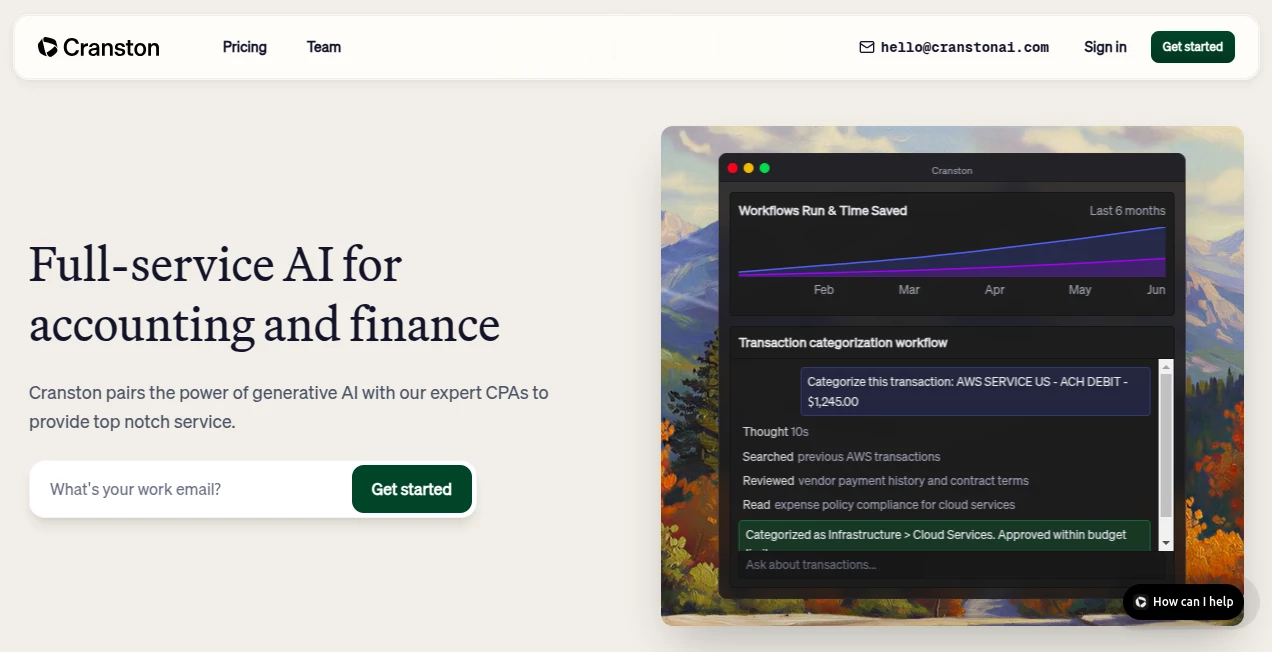
The main screen lays everything out in a straightforward dashboard, with live snapshots of profits, cash runs, and task flows that update as you watch. Tables list vendors and amounts side by side, charts break down spends, and progress bars show how close you are to wrapped reconciliations—all clickable for deeper peeks without digging through folders. It's built for quick glances during coffee breaks, with clean lines that don't overwhelm even on smaller screens.
Accuracy & Performance
It hits high marks on matching entries right off the bat, often nailing over 99% without a second look, and flags the odd ones for a fast fix. Tasks like sorting receipts or pairing statements wrap in seconds where they used to drag minutes, keeping the whole month-end down to hours instead of days. Users point to how it spots odd patterns or doubles that slip by, ensuring the books tell a true tale without the usual second-guessing.
Capabilities
From pulling details off scanned bills to routing them for nods and slotting into ledgers, it covers the full loop of incoming cash and outgoings. It juggles payroll runs, tax setups, and even year-end wraps, all while syncing with your go-to banks and systems. Add in checks for budgets or weird jumps, and you've got a watchdog that learns your patterns, making each cycle smoother than the last.
Security & Privacy
Data gets wrapped in heavy-duty locks from the get-go, with checks that meet the gold standards for handling sensitive figures. It sticks to your setups without pulling everything into a new silo, and pros give every close a once-over to keep things square. Backups run constant, and access stays tight, so you sleep easy knowing the numbers are safe from slips or snoops.
Use Cases
Startup heads use it to auto-sort daily deposits and payouts, freeing time for pitches over paperwork. Controllers lean on it for invoice flows that hit approvals and entries without the back-and-forth. Teams in growth mode tap it for payroll that syncs seamless with benefits, while tax seasons turn from marathons to sprints with prepped packs ready to roll.
Pros and Cons
Pros:
- Cuts chase times dramatically, from days to hours on routine closes.
- Blends machine speed with human checks for rock-solid results.
- Plays nice with your current tools, no big overhauls needed.
- Spotlights insights in real time, spotting trends before they trend.
Cons:
- Setup ties into your systems, so first links take a bit of tinkering.
- Best for structured flows; wild-card entries might need extra eyes.
- Relies on steady connections for those live pulls and pushes.
Pricing Plans
It scales with your needs, starting with basics for small outfits that cover core automations without breaking the bank. Mid-tier adds team shares and deeper dives for growing shops, while top plans bring custom tweaks and priority hands for the heavy hitters. Trials let you test the full flow risk-free, with flexible months or years to match your stride.
How to Use Cranston
Link it to your ledgers and banks first, then watch it grab incoming slips and sort them into slots based on past patterns. Route bills for quick yeses, let it pair statements against books, and review the handful of holdouts in the flagged queue. Peek at the overview for cash health, tweak rules as your ops evolve, and let it handle the monthly wrap with a pro sign-off.
Comparison with Similar Tools
Unlike broad bots that skim surfaces, Cranston digs into the rules of the road with built-in know-how and oversight, though those might flex quicker for one-offs. Against full-suite swaps, it layers on without the rip-out, saving the switch hassle but perhaps missing some flashy extras. It stands out for shops wanting depth without the drama.
Conclusion
Cranston quiets the financial noise, handing back hours once lost to ledgers so teams can chase bigger wins. It proves that smart hands can tame the tedium, blending tech's hustle with trust's touch for books that balance true. As businesses keep scaling fast, this quiet force keeps the foundation firm, one automated entry at a time.
Frequently Asked Questions (FAQ)
What setups does it link to?
It hooks into popular ledgers like QuickBooks or NetSuite, plus banks from Chase to AmEx.
How does it keep things spot-on?
High match rates from the start, with pros reviewing closes to catch any curveballs.
Can it handle my payroll too?
Yep, syncs runs and benefits smooth, keeping everyone paid on point.
Is my data locked down?
Top-tier encryption and certs ensure it stays where it belongs—yours.
Good for small teams?
Absolutely, starts simple and grows as you do, no overkill.
AI Accounting Assistant , AI Productivity Tools , AI Task Management , AI Workflow Management .
These classifications represent its core capabilities and areas of application. For related tools, explore the linked categories above.
Cranston details
This tool is no longer available on submitaitools.org; find alternatives on Alternative to Cranston.
Pricing
- Free
Apps
- Web Tools
Categories

Cranston Alternatives Product

VisualGPT

Sourcetable

FINIITE AI

Skywork Supe…

ClearWork

Instantly Id…

Markdown to …

KwaKwa Cours…

4ga Boards
