
🧠 AI Quiz
Think you really understand Artificial Intelligence?
Test yourself and see how well you know the world of AI.
Answer AI-related questions, compete with other users, and prove that
you’re among the best when it comes to AI knowledge.
Reach the top of our leaderboard.


















Briefly

What is Briefly?
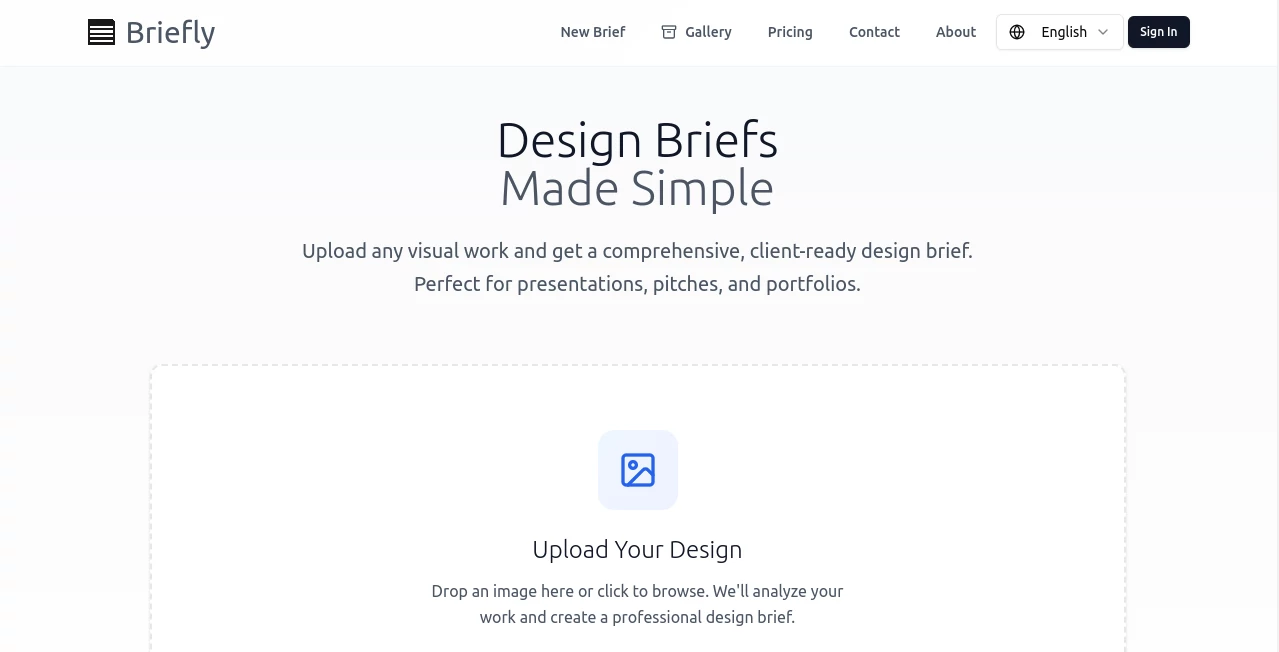
Ever finished a stunning piece and struggled to explain the thinking behind it in a way that wows clients or beefs up your portfolio? This clever tool takes the hassle out of that, analyzing your uploaded visuals and crafting eloquent, professional briefs that highlight your process and decisions. It's a lifesaver for designers who pour heart into the work but stumble on the words—suddenly, your projects speak for themselves with polish and depth that feels authentically yours.
Introduction
In the rush of deadlines and revisions, articulating the 'why' behind a design often falls by the wayside, leaving portfolios flat or pitches lacking punch. This platform flips that script by letting AI dive into your images—be it screenshots, mockups, or finals—and pull out insightful narratives on objectives, challenges, solutions, and outcomes. I tried it with an old branding project that had gathered dust; uploaded a few key visuals, and out came a brief so sharp it made the work shine anew, ready for Behance or client decks. It's tailored for creatives who want to showcase not just the pretty pictures, but the smart thinking that got them there, all without spending hours writing from scratch.
Key Features
User Interface
The whole thing unfolds on a single, uncluttered page—drop your image in the upload zone, watch the preview load, and hit generate for the magic to unfold. Results appear neatly formatted below, with options to regenerate or copy in one click, no distracting sidebars or logins required for basics. It's refreshingly direct, like jotting notes that suddenly organize themselves into something presentation-ready.
Accuracy & Performance
It reads the visuals with impressive insight, picking up on layout choices, color stories, and user flows to weave narratives that ring true to what you intended. Generations happen swiftly, often in seconds, delivering coherent briefs that capture nuances without hallucinating wild details. From my plays, it consistently elevated simple uploads into thoughtful explanations, spotting elements I'd almost forgotten myself.
Capabilities
Handles a range of design types—UI screens, logos, illustrations—crafting sections on project goals, target audience, creative approach, and results that feel client-facing. It structures the output professionally, ready for portfolios, case studies, or pitch docs, turning raw visuals into compelling stories that highlight your expertise.
Security & Privacy
Uploads process on the spot without long-term storage mentioned, keeping your work transient and focused on the task—ideal for sharing concepts without lingering traces. It's the thoughtful minimalism that lets you experiment freely.
Use Cases
Freelancers prep client presentations, transforming screenshots into detailed case studies that justify rates and win trust. Portfolio builders flesh out older projects, adding depth to entries that previously felt thin. Agencies document internal wins for team reviews, or students articulate assignments for critiques that impress professors. It's those moments when you need to sell the story behind the screen that it truly delivers.
Pros and Cons
Pros:
- Turns visual work into articulate write-ups effortlessly, saving precious time.
- Captures design intent with surprising depth and professionalism.
- Simple, no-fuss access that fits into any workflow.
- Elevates portfolios and pitches with ready-to-use narratives.
Cons:
- Relies on clear uploads—busy or low-res images might yield softer insights.
- Outputs benefit from a quick personal edit for that final touch.
Pricing Plans
It's open and free for core use, letting you generate briefs without barriers or sign-ups, perfect for trying on multiple projects. Any premium layers, if added, would likely keep the spirit of accessibility, focusing on volume or extras for heavy users.
How to Use Briefly
Head straight to the page, drag or select your design image—multiple if needed for context—and let it analyze. Review the generated brief, tweak your upload for variations if the first doesn't quite hit, then copy or export for your docs. I often run a couple iterations with different key visuals to build a fuller story, blending outputs for the perfect fit.
Comparison with Similar Tools
Unlike text-heavy brief generators that start from scratch, this one roots everything in your actual visuals, producing grounded, specific narratives rather than generic templates. It's less about inventing projects and more about illuminating existing ones, standing out for creators with work in hand who need the words to match the wow.
Conclusion
This tool quietly bridges the gap many designers face—mastering the make but stumbling on the tell. It empowers your visuals to carry their own story, polished and persuasive, freeing you to focus on the next creation. For anyone building a body of work worth sharing, it's a subtle yet powerful ally that turns good designs into great presentations.
Frequently Asked Questions (FAQ)
What kinds of images work best?
Clear screenshots, mockups, or finals that showcase key elements— the more representative, the richer the brief.
Can I upload multiple files?
Start with one strong visual; experiment with others for varied angles.
Is it free to use?
Yes, fully open for generating as many as you need.
How customizable are the briefs?
Regenerate or edit the output to fine-tune your voice.
Suitable for non-design fields?
Absolutely—any visual project benefits from articulated insights.
AI Creative Writing , AI Design Assistant , AI Content Generator , AI Productivity Tools .
These classifications represent its core capabilities and areas of application. For related tools, explore the linked categories above.
Briefly details
This tool is no longer available on submitaitools.org; find alternatives on Alternative to Briefly.
Pricing
- Free
Apps
- Web Tools
Categories

Briefly Alternatives Product

Sourcetable

Perchance AI…
promptcat

GameClick.io

InPage AI

poseup

LyricStudio

Banana Promp…

TypingFirst
