
🧠 AI Quiz
Think you really understand Artificial Intelligence?
Test yourself and see how well you know the world of AI.
Answer AI-related questions, compete with other users, and prove that
you’re among the best when it comes to AI knowledge.
Reach the top of our leaderboard.


















Doodle AI Studio

What is Doodle AI Studio?
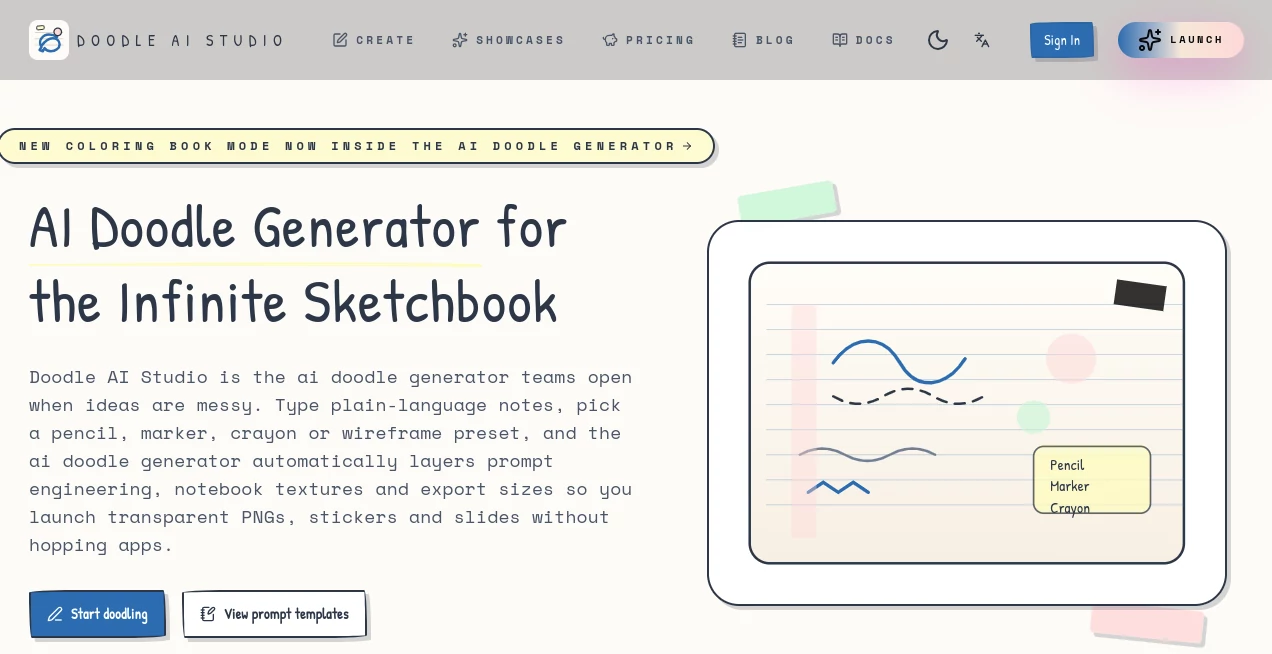
Picture this: you're in the middle of a brainstorming session, scribbling wild ideas on a napkin, but instead of the usual smudges and half-formed thoughts, everything snaps into focus—playful sketches with just the right wobble, annotations that pop, and a texture that feels like your favorite notebook come alive. That's the everyday magic this tool brings to life, turning those fleeting "aha" moments into shareable, professional gems without ever leaving your screen. I've seen teams go from scattered notes to polished wireframes in under an hour, and honestly, it's the kind of effortless creativity that makes you wonder how you ever managed without it.
Introduction
Ever felt that rush when a doodle captures exactly what words can't? This tool taps right into that joy, serving as an endless canvas where rough ideas bloom into tactile, hand-drawn wonders—think stickers for your slides, quick wireframes for design huddles, or even coloring pages that spark classroom conversations. It's crafted for the folks who live in the messy beauty of sketches: teachers dreaming up visual lessons, UX pros mapping user flows on the fly, and anyone who misses the warmth of pen on paper but craves the speed of digital. What hooked me first was how it nails that imperfect charm—no sterile vectors here, just the cozy grit of graphite and ink bleeds. Over time, it's become my go-to for those late-night epiphanies, saving hours while keeping the soul of spontaneous creation intact.
Key Features
User Interface
The canvas greets you like an old friend—swap between dotted grids, lined pages, or blank sheets with a flick, complete with those little tape corners and desk shadows that make it feel lived-in. A sticky note timeline lets you stack iterations side by side, flipping through versions like flipping notebook pages, and one-tap exports whisk your work into PNGs for Notion or PDFs for print. It's so intuitive that even my non-techy collaborator jumped in without a tutorial, raving about how the previews mock up your doodles on a full desk or slide deck, blurring the line between sketchpad and studio.
Accuracy & Performance
Trained on real-world scribbles—from meeting margins to zine zaps—it captures the quirks like ink pooling or pencil pressure with uncanny fidelity, ensuring your outputs look authentically human, not machine-polished. Generations zip by in seconds, layering textures and hatches without a hitch, and the context smarts mean it "gets" your vibe, avoiding those off-base tangents that kill momentum. In my tests, a rambling prompt about "a quirky robot brainstorming session" came back with spot-on hatching and bleeds that rivaled my own hurried sketches—fast, reliable, and full of personality.
Capabilities
From graphite roughs that hatch shadows just so, to bold marker outlines for sticker sheets, or even blueprint grids for lo-fi wireframes, the pen styles adapt to your story—add arrows, callouts, or sticky tags, and it all layers naturally. Natural-language prompts get a boost from auto-injected details, while shared workspaces track credits and metadata for teams, plus an open API lets you hook it into slide builders or lesson platforms. It's versatile enough for mind maps that branch like real thoughts or coloring books that export clean for laser cuts, making complex ideas feel deceptively simple to visualize and share.
Security & Privacy
Your sketches stay snug in invite-only workspaces, with metadata tied to prompts for easy tracking but no sneaky shares—white-label options mean agencies or schools can brand it their own, and everything's wiped clean post-export unless you choose to archive. It's that thoughtful setup that lets you doodle freely, even on sensitive client concepts, without the nagging "what if" about data drifts. In a field full of leaky tools, this one's a breath of fresh air, earning trust from educators handling student work to pros guarding IP.
Use Cases
For educators, it's a lifesaver—whip up crayon-pop lesson visuals with clean borders for handouts, or export line art for interactive coloring that keeps kids engaged during tough topics. UX teams love it for rapid wireframing on dotted paper, annotating flows with blue-ink arrows that mimic real meeting notes, turning abstract ideas into tangible mocks. Workshop facilitators build branching mind maps with sticky timelines, reusable for repeat sessions, while notebook enthusiasts craft personal sticker packs from daily ramblings, blending nostalgia with pro-grade polish. I've used it to visualize a product roadmap for a client pitch, and the "aha" reactions made the whole process feel like cheating—in the best way.
Pros and Cons
Pros:
- That authentic, wobbly charm in every output—feels hand-drawn, not factory-fresh.
- Team-ready with credit tracking and shares that keep collaborations smooth and budgeted.
- Export magic tailored for real workflows, from slide-ready PNGs to print-safe PDFs.
- API openness that lets it play nice with your favorite tools, no silos here.
Cons:
- Credit-based metering might surprise heavy users at first, though it's fair and flexible.
- Preset styles shine brightest; custom sliders could add even more wiggle room.
- Best with clear prompts—vague ones need a nudge, like any creative partner.
Pricing Plans
It's refreshingly straightforward: metered by credits per workspace or project, with each doodle sipping just two—perfect for budgeting like a pro without surprise bills. Start light for solo sketches, scale up for class packs or agency whitespaces, and the shared tracking ensures everyone pulls their weight. No bloated tiers; just value that grows with you, making it easy to dip in for a workshop or commit for a semester without the usual lock-in headaches.
How to Use Doodle AI
Start by spilling your raw idea into the prompt box—something messy like "a team ideating app features on a sticky note wall"—and let it autocomplete the textures. Pick your pen vibe, say ballpoint for that office scribble feel, then layer in arrows or tags right on the canvas. Stack versions in the timeline, preview on a desk mockup, and export as a transparent sticker sheet or slide insert. Rinse and repeat for branches, sharing the link for feedback—it's that fluid, turning "what if" into "watch this" in minutes flat.
Comparison with Similar Tools
Stack it against quick-sketch apps like AutoDraw, and it wins hands-down with those notebook grains and ink quirks that make outputs feel alive, not icon-flat—plus exports that actually fit your tools, not just basic PNGs. Scribble Diffusion demands your own wobbly input for magic, but here prompts do the heavy lifting, delivering intentional results with team credits to boot. Even big names like Canva's doodle bits mix in stock clutter; this keeps it pure paper poetry, with API hooks that embed seamlessly where others just spit files. It's the thoughtful underdog that punches way above, especially for collaborative, tactile workflows.
Conclusion
In a digital world that often feels too slick, this tool is a heartfelt reminder of why we sketch in the first place—to capture the raw spark before it fades. It doesn't just generate; it nurtures those imperfect ideas into something warm, workable, and wonderfully yours, whether for a classroom breakthrough or a boardroom brainstorm. If you've ever mourned the loss of a napkin epiphany to a blank screen, give it a whirl—it's the infinite sketchbook you didn't know you needed, turning doodles into delights that stick long after the session ends.
Frequently Asked Questions (FAQ)
Can I tweak styles beyond the presets?
Presets like crayon or marker give that instant vibe, but prompts let you nudge details—think "add more ink bleeds" for extra grit. It's flexible without overwhelming.
How does team sharing work?
Invite via link, track credits per person or project, and metadata logs who doodled what—ideal for workshops where everyone's input counts equally.
What's the output quality like for print?
High-res with bleed-safe edges, exporting clean SVGs or PDFs that laser-cut beautifully—I've printed sticker sheets that looked shop-bought.
Is it newbie-friendly for non-designers?
Absolutely—messy prompts get polished automatically, and the canvas feels like paper. Teachers use it daily without a design degree.
Any limits on file sizes or exports?
Generations cap at credit costs, but exports are unlimited once made—PNG for digital, PDF for print, all sized just right.
AI Content Generator , AI Text to Image , AI Photo & Image Generator , AI Art Generator .
These classifications represent its core capabilities and areas of application. For related tools, explore the linked categories above.
Doodle AI Studio details
This tool is no longer available on submitaitools.org; find alternatives on Alternative to Doodle AI Studio.
Pricing
- Free
Apps
- Web Tools
Categories

Doodle AI Studio Alternatives Product
Ghibli Image…

Z-Image

ImageKontext…

ChromaPeel
promptcat
Nano Banana 2

AIGAZOU
Album Cover …

MDZ.AI
