🧠 AI Quiz
Think you really understand Artificial Intelligence?
Test yourself and see how well you know the world of AI.
Answer AI-related questions, compete with other users, and prove that
you’re among the best when it comes to AI knowledge.
Reach the top of our leaderboard.

















Drawjo

What is Drawjo?
Imagine sketching a rough idea on a napkin during lunch, then watching it bloom into a stunning, lifelike scene or even a short cinematic clip—all before your coffee goes cold. That's the everyday magic this tool brings to life, blending your wildest visions with cutting-edge smarts to produce artwork that feels personal yet polished. I've seen friends, usually stuck staring at blank canvases, light up as their doodles transform into something gallery-worthy, and it's hard not to get hooked on that rush myself.
Introduction
In a creative world crammed with endless options, standing out means having a reliable spark that turns fleeting thoughts into tangible triumphs. This platform does just that, harnessing advanced models to let anyone—from weekend hobbyists to full-time designers—craft visuals that captivate. What grabbed me first was how it democratizes high-end creation; no more shelling out for pro software or waiting days for renders. Users often share how it saved their latest project deadline, pulling together hyper-real details or fluid motion from a simple prompt, and suddenly, that nagging block feels like a distant memory. It's not about replacing your touch—it's about amplifying it, making every stroke count toward something extraordinary.
Key Features
User Interface
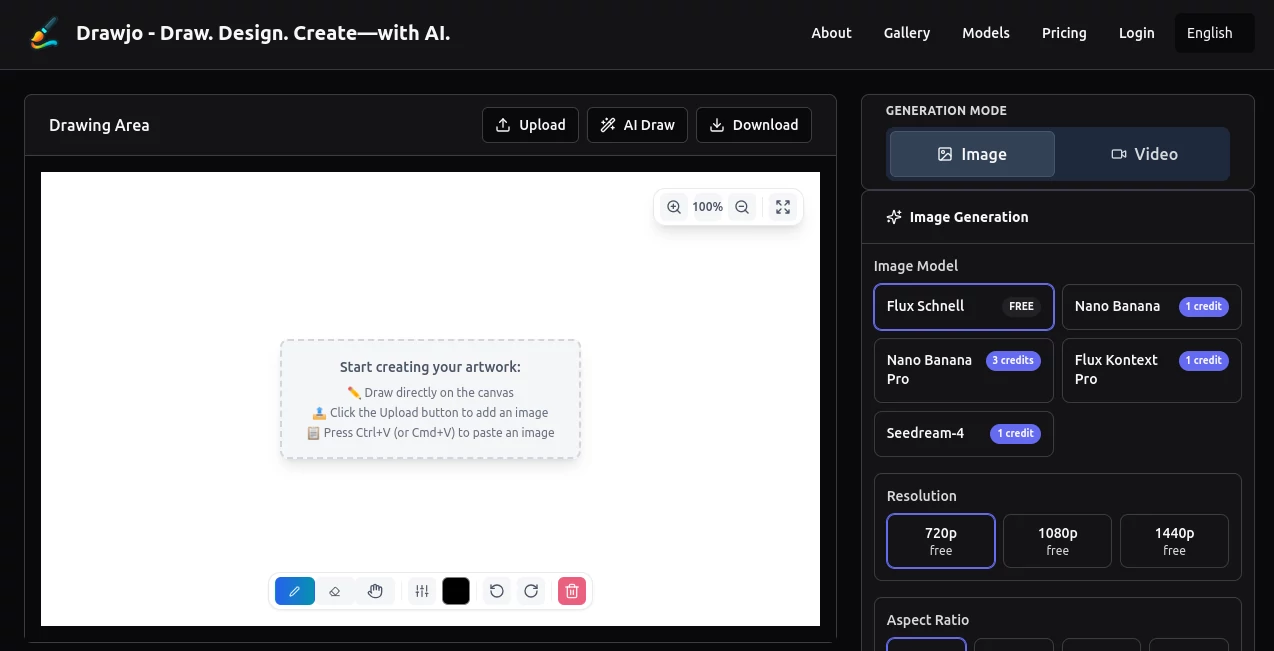
The dashboard hits you with a welcoming simplicity: a clean prompt bar front and center, flanked by style previews that tempt without overwhelming. Drag in a sketch if you like, or just type away—everything responds fluidly, with real-time thumbnails popping up to guide your tweaks. I remember fumbling through a similar app once, buried in menus; here, it's like chatting with an old pal who gets your shorthand, keeping the focus on fun rather than fiddling.
Accuracy & Performance
When you describe a sunset over jagged peaks, expect the hues to bleed just right, shadows falling true to the light source without a hint of guesswork. It chews through complex requests in moments, spitting out high-res gems that hold up under zoom, and even on a sluggish connection, it rarely stutters. One designer I know tested it against her usual workflow and shaved hours off her routine, all because the outputs nailed the brief on the first try—pure reliability that builds confidence with every use.
Capabilities
From breathing depth into static drawings with ultra-real textures to animating them into smooth, story-like sequences, the range feels boundless yet approachable. Layer in specifics like mood or medium, and it adapts seamlessly, whether you're aiming for a gritty urban sketch or a dreamy abstract swirl. The real standout? That effortless jump from image to motion, turning a portrait into a subtle narrative clip—I've used it to mock up client pitches, and the wow factor alone sealed the deal more than once.
Security & Privacy
Your sketches and prompts stay yours alone, processed in a secure bubble that doesn't hoard or share without your nod. It's the kind of thoughtful setup that lets you experiment freely, knowing sensitive ideas won't leak into the ether. In an age where data feels like fair game, this quiet commitment to keeping things locked down earns real trust—I've recommended it to collaborators precisely because I don't have to second-guess the safeguards.
Use Cases
Graphic novelists sketch panel ideas, watching them evolve into vivid spreads that speed up the inking phase. Social media creators whip up eye-catching reels from mood boards, blending stills with clips to keep followers scrolling. Even educators craft custom visuals for lessons, like animating historical scenes to make timelines pop. Or picture a small business owner prototyping packaging designs—suddenly, flat concepts leap off the page, helping nail that perfect vibe without endless revisions.
Pros and Cons
Pros:
- Blends raw creativity with pro-level polish in a snap, saving precious time.
- Intuitive enough for beginners, yet deep for those who dig in.
- Versatile outputs that work across projects, from static art to dynamic shorts.
- Affordable entry that scales without surprises.
Cons:
- Credit limits on the free plan might cramp marathon sessions.
- Occasional need for prompt tweaks to hit the exact nuance.
Pricing Plans
Kicking off with a generous free tier—ten credits monthly to dip your toes without commitment—it's ideal for casual explorers. Upgrade to premium at twenty bucks a month for unlimited access, letting you chase ideas endlessly, or go yearly for even sweeter savings. No hidden fees, just straightforward value that grows with you, making it easier than ever to invest in your craft without breaking the bank.
How to Use Drawjo
Start by jotting a vivid description or uploading a quick sketch, then select your style—realistic render or animated flow—and let it work its wonder. Preview the results, refine with a word or two if needed, and download in your preferred format. I usually chain a few iterations for the best take, but even solo runs yield keepers that inspire the next round.
Comparison with Similar Tools
While some rivals flood you with flashy extras that slow things down, this one keeps the spotlight on speed and spot-on results, outpacing the pack for quick-turnaround needs. Others might boast broader libraries, but few match the seamless image-to-video pivot here—it's like having a dedicated studio assistant who anticipates your moves, not just follows orders.
Conclusion
This isn't merely a generator; it's a gateway to unleashing the artist in all of us, turning half-baked hunches into heartfelt creations that resonate. Whether you're doodling for joy or designing for deadlines, it delivers that elusive blend of ease and excellence, reminding us why we fell for making things in the first place. Dive in, and watch how it reshapes not just your output, but the sheer delight of the doing.
Frequently Asked Questions (FAQ)
Can beginners jump right in without tutorials?
Absolutely— the setup's so intuitive, you'll be crafting in minutes, no hand-holding required.
What file formats come out the other end?
High-res images in PNG or JPG, plus MP4 for clips, ready for any platform.
How does it handle custom styles?
Feed it your vibe in the prompt, and it adapts beautifully, pulling from premium models for that tailored touch.
Is there support if I hit a snag?
Quick community forums and responsive help keep you moving, no long waits.
Worth the upgrade from free?
If you're hooked on the possibilities, yes—the unlimited flow unlocks a whole new level of freedom.
AI Text to Image , AI Image to Video , AI Video Generator , AI Art Generator .
These classifications represent its core capabilities and areas of application. For related tools, explore the linked categories above.
Drawjo details
This tool is no longer available on submitaitools.org; find alternatives on Alternative to Drawjo.
Pricing
- Free
Apps
- Web Tools
Categories

Drawjo Alternatives Product
seedream 5

GPT Image 1.5

FLUX 2

Grok Imagine

soro2
GoViralTrend
imagen 5

seedance 3.0
kling 4.0