
Dromo
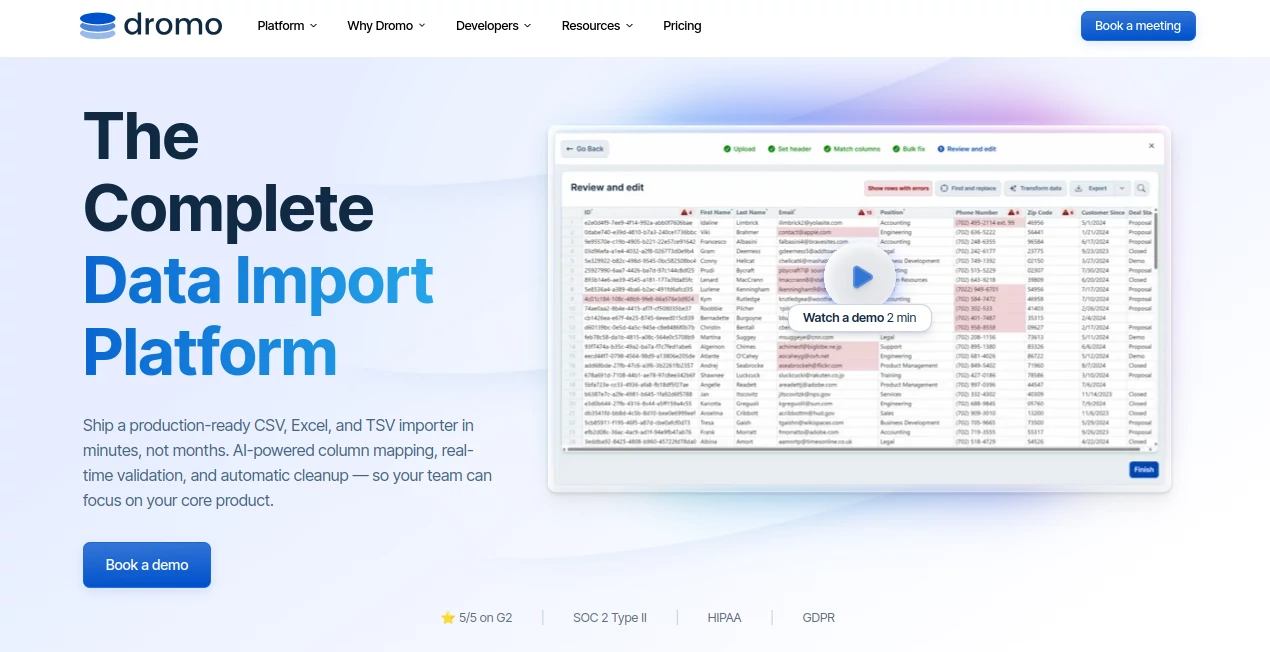
What is Dromo?
Dromo is a practical data import platform built for businesses that need to move spreadsheet and file-based information into their applications without forcing users through a frustrating manual cleanup process. Instead of simply accepting an uploaded file, it guides users through column mapping, validation, corrections, and transformation before delivering structured data to the next stage of a workflow.
For product teams, developers, operations staff, and customer success teams, this solves a surprisingly common problem: customers rarely provide data in exactly the format an application expects. A spreadsheet may have different column names, inconsistent values, missing fields, or formatting issues. The platform is designed to handle those situations inside a guided import experience.
One particularly useful aspect is that the importer can be embedded directly into an application and customized to match the surrounding product. The company says integration can typically be completed in a few lines of code, while its no-code Schema Studio provides another way to define expected fields and validation rules.
Key Features
- AI-powered column mapping that can automatically match imported fields with the expected schema.
- AI-assisted data cleanup for common transformation and correction tasks.
- Real-time validation with required fields, data types, regular expressions, uniqueness rules, and custom validation logic.
- Support for CSV, XLS, XLSX, and TSV files, along with numerous legacy spreadsheet formats.
- Embeddable importing that works with modern JavaScript frameworks and vanilla JavaScript.
- White-label customization across paid plans, allowing the importer to fit an existing brand and interface.
- No-code Schema Studio for teams that prefer configuring import rules without building everything from scratch.
- Lifecycle hooks, webhooks, APIs, and integrations for connecting imports with existing backend workflows.
- Annotated Excel error reports that allow users to continue correcting problematic files outside the application and upload them again.
- Headless importing for automated workflows where users do not need to participate in every import.
User Interface
The interface is designed around a familiar spreadsheet-style experience rather than presenting users with a complicated technical data pipeline. After uploading a file, users can review how columns have been mapped, identify validation problems, make corrections, and inspect the resulting dataset before completing the import.
This approach matters because data importing is often performed by people who are not developers. A customer importing a list of employees, an operations specialist migrating historical records, or a sales team uploading customer information should not need to understand database schemas to fix a missing or incorrectly formatted value.
Accuracy & Performance
Accuracy comes from combining automated mapping with explicit validation rules. The system can suggest column matches using AI, while developers retain control over the schema and constraints that determine whether the final data is acceptable.
The platform is also designed for large imports. Browser-based importing uses streaming and chunked parsing, while the headless API is intended for much larger files and automated pipelines. The Professional plan currently supports files up to 100,000 rows, while Enterprise deployments can support files containing more than 10 million rows.
That combination is useful in real-world situations where a file looks fine at first glance but contains hundreds of small inconsistencies. Instead of discovering those problems after the data reaches a database, users can identify and resolve them during the import process.
Capabilities
The platform goes beyond basic file uploading. Teams can define schemas, specify required fields, establish validation rules, perform bulk transformations, and send the cleaned result into another system as structured data.
For example, an application could ask a new customer to upload an employee spreadsheet. The importer can identify likely column matches, check required fields, flag invalid values, help correct the data, and return a cleaned JSON result to the application. The same concept can be used for customer onboarding, historical data migration, marketplace imports, and operational workflows.
There is also a strong automation layer. Headless API importing and SFTP support allow larger organizations to build import processes that run without requiring someone to manually open an importer every time a file arrives.
Security & Privacy
Security is one of the stronger points of the platform. The service states that it is SOC 2 Type II certified and supports HIPAA and GDPR requirements. More importantly for applications handling sensitive customer information, private mode is designed so that file contents do not need to pass through the provider's servers.
The private architecture can operate inside the user's browser, while bring-your-own-storage options allow organizations to connect their own cloud storage. Enterprise customers can also choose self-hosted deployments through Kubernetes and configure additional data retention and deployment controls.
Use Cases
Customer onboarding: Businesses can let customers import existing records instead of asking them to manually enter hundreds or thousands of entries. The validation process helps reduce onboarding problems before information reaches the application's database.
Legacy data migration: Companies moving away from older systems can use the importer to clean historical spreadsheets and transform them into the structure required by a modern application.
Bulk uploads: SaaS products can add professional spreadsheet importing without spending months developing their own parser, mapper, validation system, and error-handling interface.
Automated workflows: Operations teams can connect incoming files with downstream services through integrations, webhooks, APIs, or automated pipelines.
HR and employee data: HR platforms can use structured imports for employee records while checking fields and highlighting problems before the information is processed.
Developer-built applications: Product teams can embed the importer into React, Angular, Vue, Next.js, Svelte, or vanilla JavaScript applications and control the expected schema from their own product environment.
Pros and Cons
- Pros: AI-assisted column mapping makes messy spreadsheets easier to import.
- Pros: Real-time validation catches problems before data enters the next system.
- Pros: CSV, Excel, and TSV support covers the formats most business users already work with.
- Pros: White labeling is included with paid plans rather than being treated as a separate premium feature.
- Pros: Private mode and self-hosting options are valuable for sensitive business data.
- Pros: Developers can choose between embedded, API, and automated importing approaches.
- Cons: The Professional plan starts at $599 per month, making it more suitable for businesses than casual individual users.
- Cons: Teams wanting advanced headless workflows, very large files, or self-hosted deployment may need Enterprise.
- Cons: Building a custom schema and validation strategy still requires some planning, particularly for complex business data.
Pricing Plans
A free sandbox is available for testing and development, allowing teams to build and evaluate an integration without a credit card or sales call.
The Professional plan is currently priced at $599 per month and includes 250 production imports each month, with additional imports charged at $3 per import. It supports files up to 100,000 rows and includes AI-powered mapping, AI-assisted cleanup, real-time validation, white labeling, private mode, integrations, frontend SDK access, webhooks, and API capabilities.
The Enterprise plan uses custom pricing and adds features intended for larger deployments. These include unlimited production imports, unlimited saved schemas, support for files with more than 10 million rows, headless API and SFTP importing, bring-your-own storage, on-premise and multi-region deployments, custom retention policies, localization, dedicated customer success, and stronger support commitments.
The pricing structure makes the product easier to evaluate than services that hide all pricing behind a sales conversation. For a company that processes significant amounts of customer data, the included security and white-label features can also reduce the need to purchase or configure several separate components.
How to Use It
- Define the schema that describes the data your application expects.
- Configure required fields, validation rules, data types, and other constraints.
- Embed the importer into your application or choose an automated API-based workflow.
- Have the user upload a CSV, Excel, TSV, or supported spreadsheet file.
- Allow the system to suggest column mappings and identify potential data problems.
- Review validation errors, warnings, and suggested corrections.
- Apply transformations or make manual changes where necessary.
- Complete the import and pass the cleaned data into your application's next workflow.
Comparison with Similar Tools
The biggest distinction between this platform and a basic CSV upload component is the amount of work handled after the file reaches the application. Simple importers generally focus on accepting a file, while this solution combines parsing, mapping, validation, cleanup, and error correction into one experience.
It is also positioned strongly around developer control and privacy. Teams can use a no-code schema builder or define their configuration in code, customize the interface, and connect the result to their own systems. Private mode and self-hosting options further separate it from services that require customer files to be processed entirely through a third-party infrastructure.
Compared with larger enterprise-oriented data import platforms, transparent pricing and a free sandbox can make initial evaluation easier. The trade-off is that the $599 monthly Professional plan is aimed at serious business use rather than occasional spreadsheet uploads.
Conclusion
For companies building software that depends on customer-provided spreadsheets, data importing can become a much bigger engineering problem than expected. File formats vary, column names rarely match perfectly, and even a correctly structured spreadsheet can contain values that fail application requirements.
This platform tackles those issues at the point where they happen. AI-assisted mapping reduces manual setup, validation rules provide control over data quality, and the spreadsheet-style review experience gives users a practical way to correct mistakes before completing an import.
The strongest fit is likely a SaaS company, marketplace, HR platform, operations product, or enterprise application where reliable data onboarding is part of the customer experience. For those teams, replacing a homegrown importer with a polished, customizable system can save substantial development time while giving end users a considerably smoother way to bring their data into a product.
Frequently Asked Questions (FAQ)
What types of files can be imported?
The platform supports CSV, XLS, XLSX, and TSV files out of the box. It also supports a range of legacy spreadsheet formats, including older Excel versions, Lotus 1-2-3, Quattro Pro, Works, OpenDocument, Uniform Office Format, Numbers, DIF files, HTML tables, and RTF tables.
Can it automatically match spreadsheet columns?
Yes. AI-powered column mapping can recommend matches between the columns in an uploaded file and the schema defined by the application.
Does it validate imported data?
Yes. Developers can configure required fields, data types, regular expressions, uniqueness constraints, and custom validation rules. Problems are highlighted during the import process so users can correct them before the data is submitted.
Can the importer be customized to match a product's design?
Yes. White-label customization is included with the paid plans, allowing teams to adapt branding, fonts, colors, and other visual details to their existing product.
Is there a free option?
Yes. A free sandbox is available for development and testing before moving to a production plan.
Is customer data stored on third-party servers?
Private mode is designed so that file contents can remain in the user's browser instead of being sent to the platform's servers. Organizations can also use their own storage or choose self-hosted deployment options depending on their requirements.
Can it handle very large files?
Yes. Browser-based importing uses streaming and chunked parsing for large files, while the headless API is designed for higher-volume automated imports. Enterprise plans support files with more than 10 million rows.
Is it suitable for developers?
Yes. Developers can use SDKs, schemas, lifecycle hooks, webhooks, APIs, and framework integrations to make importing part of an existing application rather than treating it as a separate external process.
AI Workflow Management , AI Productivity Tools , AI Files Assistant , AI Spreadsheet .
These classifications represent its core capabilities and areas of application. For related tools, explore the linked categories above.

Dromo Alternatives Product

CtrlOps

Claude and C…

Nimbalyst

Skywork Supe…

Khuram Youraj

ekstrakt

Tooladda

Online White…

Caspian