🧠 AI Quiz
Think you really understand Artificial Intelligence?
Test yourself and see how well you know the world of AI.
Answer AI-related questions, compete with other users, and prove that
you’re among the best when it comes to AI knowledge.
Reach the top of our leaderboard.

















Edit Stamp
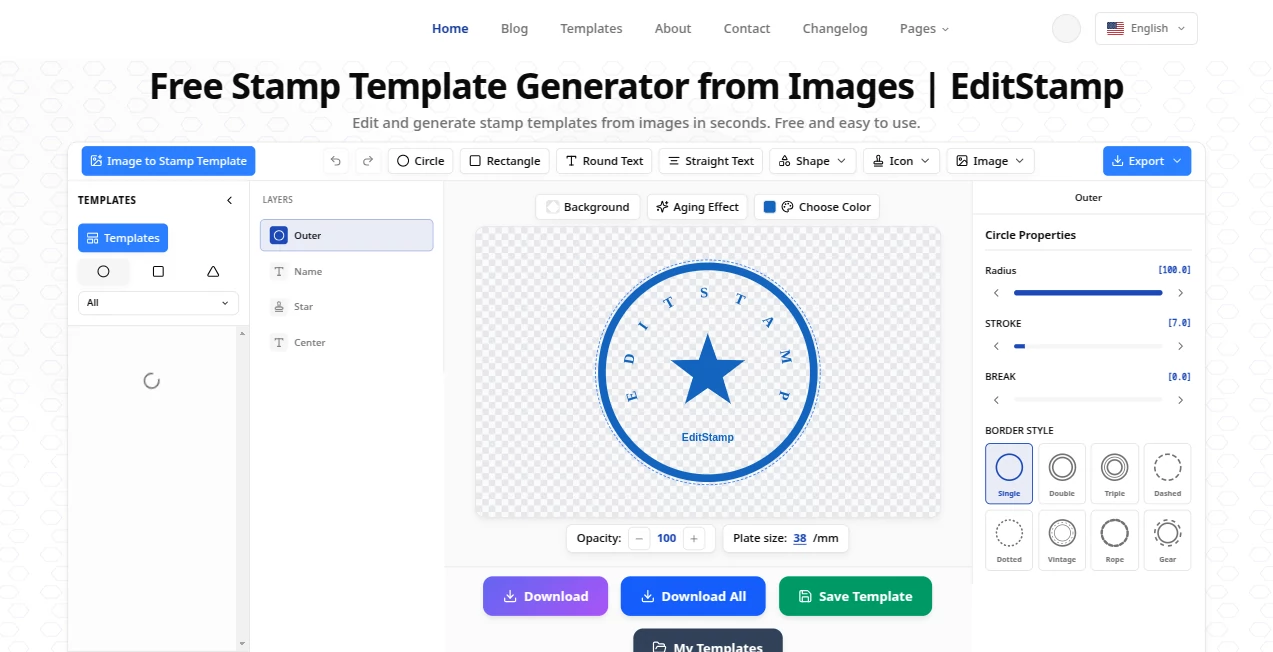
What is Edit Stamp?
Protecting your photos, designs, or client work with a clean, professional stamp used to mean opening Photoshop, fiddling with layers, and hoping it looked good. This tool makes that entire process feel almost too easy. You upload an image, choose or create a stamp, position it exactly where you want, and get a polished result in seconds. I’ve used it to watermark batches of client photos before delivery and watched how much more professional the files look compared to plain text overlays. It’s the kind of simple solution that makes you wonder why you ever struggled with it before.
Introduction
In a world where images travel fast across social media and client inboxes, protecting your work without ruining its aesthetic is more important than ever. EditStamp solves this by letting you add custom watermarks, logos, signatures, or date stamps with precision and style. Whether you’re a photographer safeguarding your portfolio, a designer marking mockups, or a small business adding branding to product shots, it turns a tedious task into a quick, satisfying step. The best part? It keeps your original image quality intact while giving you full control over transparency, size, rotation, and placement. It’s practical, fast, and surprisingly flexible.
Key Features
User Interface
The interface is clean and intuitive. You drag your image into the main area, then either upload your own logo/stamp or create a text-based one on the spot. Sliders and drag handles let you adjust size, opacity, position, and rotation in real time. A live preview shows exactly how it will look, so there are no surprises after download. It feels more like a thoughtful design tool than a clunky utility—everything you need is right there without extra clicks or hidden menus.
Accuracy & Performance
Placement is precise; you can nudge the stamp pixel by pixel until it sits perfectly. Opacity control is smooth, so you can make watermarks subtle or bold depending on the need. Processing is quick even with higher-resolution images, and the output retains the original quality without compression artifacts. It handles both simple text stamps and complex logo files gracefully, delivering consistent results every time.
Capabilities
You can add text stamps with custom fonts and colors, upload image-based watermarks (PNG with transparency works best), batch process multiple photos, adjust angle and position freely, and choose from different blend modes. It supports common image formats and lets you download in high quality. Whether you need a discreet copyright notice or a prominent brand logo on every product shot, it gives you the tools to do it right without overcomplicating things.
Security & Privacy
Your uploaded images are processed temporarily and not stored on servers after you download the result. There’s no forced account creation for basic use, which keeps things private and low-commitment. For photographers and designers handling client work, that respectful approach to data is genuinely appreciated.
Use Cases
A wedding photographer adds a subtle signature watermark to preview galleries before sending them to couples. An Etsy seller stamps their brand logo on product photos to prevent unauthorized use. A graphic designer quickly marks client mockups with “Draft – For Review Only” to avoid mix-ups. A content creator batch-watermarks a week’s worth of social media images in one go. It’s useful anywhere you need to claim ownership or add branding without spending hours in editing software.
Pros and Cons
Pros:
- Extremely fast and easy—most watermarks take under 30 seconds.
- Precise control over placement, size, opacity, and rotation.
- Supports both text and image-based stamps with transparency.
- Batch processing saves huge amounts of time on large sets.
- Free tier is generous for occasional or light use.
Cons:
- Advanced batch features and unlimited use require a paid plan.
- Very complex multi-layer designs may still need traditional editing software.
Pricing Plans
The free version lets you create and download several watermarked images per day—perfect for testing or occasional needs. Paid plans remove limits, unlock batch processing, higher quality options, and priority support. Pricing is reasonable and scales with how often you use it; many small businesses and creators find the paid tier pays for itself quickly through time saved.
How to Use EditStamp
Upload your image by dragging it into the box or clicking to browse. Choose to add text (type your message, pick font and color) or upload your logo/stamp image. Drag the stamp to the desired position, adjust size, opacity, and angle using the controls. Preview in real time until it looks right. Click download to get your watermarked image. For multiple photos, use the batch option on paid plans to process them all at once. The whole workflow is straightforward and fast.
Comparison with Similar Tools
Many watermark tools are either too basic (ugly text overlays) or overly complicated (requiring subscriptions and steep learning curves). This one hits a sweet spot: powerful enough for professional results, simple enough for quick daily use. The real-time preview and fine control over placement set it apart from free alternatives, while the pricing stays much more accessible than heavy design suites.
Conclusion
Protecting and branding your images shouldn’t be a chore that eats into your creative time. EditStamp makes it quick, precise, and even a little enjoyable. It gives photographers, designers, and business owners an easy way to add professional touches without sacrificing quality or spending hours in complex software. When your photos look polished and protected with minimal effort, you get to focus on what really matters—creating more great work. It’s one of those practical tools that quietly makes your workflow better every single day.
Frequently Asked Questions (FAQ)
Can I use my own logo as a stamp?
Yes—upload any PNG with transparency for best results.
Does it support batch processing?
Yes, available on paid plans for handling multiple images at once.
Will the watermark affect image quality?
No—it preserves the original resolution and adds the stamp cleanly.
Is an account required?
No account is needed for basic use; you can start immediately.
Can I adjust the transparency of the stamp?
Yes—full control over opacity, size, position, and rotation.
Photo & Image Editor , AI Design Generator , AI Image to Image .
These classifications represent its core capabilities and areas of application. For related tools, explore the linked categories above.
Edit Stamp details
Pricing
- Free
Apps
- Web Tools
Categories

Edit Stamp Alternatives Product

Image to STL

Nano Banana …

Seedream 5.0

Paper Animat…

ShinePhoto

Remove text …

Freepik

Kirkify Al

AIImageEdit