
🧠 AI Quiz
Think you really understand Artificial Intelligence?
Test yourself and see how well you know the world of AI.
Answer AI-related questions, compete with other users, and prove that
you’re among the best when it comes to AI knowledge.
Reach the top of our leaderboard.


















EduBrain

What is EduBrain?
Stuck on a tricky problem late at night, with textbooks staring back blankly? This tool swoops in like a patient tutor who's always available, taking your scribbled notes or snapped photos and turning them into clear, thoughtful breakdowns that actually make sense. I've seen it pull students out of panic mode more than once—upload a messy quadratic equation pic, and out comes a neat step-by-step guide that doesn't just give the answer but shows the why behind it. It's the kind of support that feels genuinely helpful, easing the stress without cutting corners on learning.
Introduction
Built for those moments when homework piles up and deadlines loom, this platform handles everything from elementary basics to college-level challenges across dozens of subjects. Snap a photo of your worksheet, drop in a PDF, or even record a question— it digs in and delivers explanations tailored to your level, whether you want quick fixes or deep dives with graphics. What stands out is the focus on understanding over rote answers; it encourages checking the work, reminding you that it's a guide, not a cheat sheet. With no sign-up hassles and unlimited free access at the core, it's opened doors for countless learners who juggle busy lives, turning frustration into those satisfying "aha" moments that stick.
Key Features
User Interface
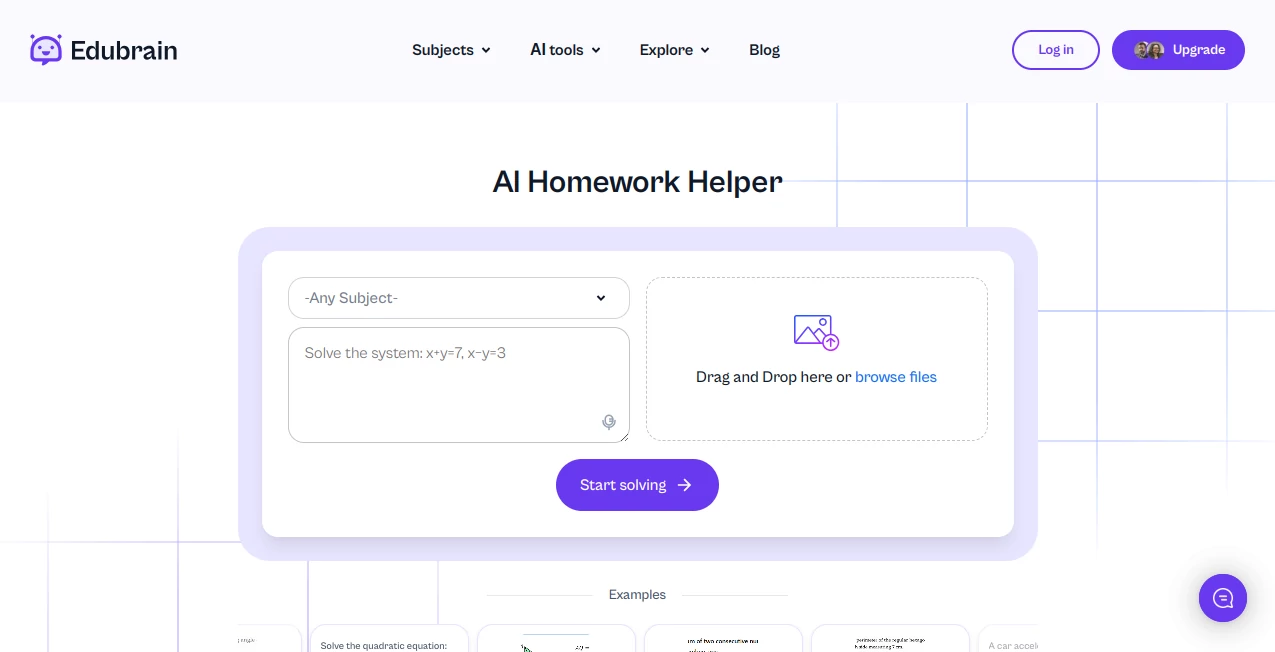
Everything sits right there on one welcoming page: a big upload spot for photos, PDFs, or recordings, plus a text box if you prefer typing. Pick your style—simple, detailed, or with visuals—and hit start; a progress bar keeps you in the loop while it thinks. Follow-ups are a breeze, just add questions to refine, and it remembers the context. My favorite part? No cluttered menus or forced accounts; it jumps straight into helping, feeling like a straightforward conversation with someone who gets academics.
Accuracy & Performance
Drawing from a massive academic backdrop, it tackles tough STEM puzzles or humanities queries with reliable steps that hold up well, often nailing nuances that trip up lesser aids. Responses roll out quick, even for scanned notes or audio clips, and the multilingual touch helps non-native speakers without missing a beat. In practice, it's caught errors I'd overlooked and explained concepts clearer than some textbooks, building confidence without the guesswork.
Capabilities
Beyond basic solves, it crafts diagrams, flashcards, notes, or even slides on demand, covering math proofs, chemistry reactions, history timelines, and more. Refine with follow-ups for deeper clarity, or switch to expert humans for bigger lifts. It's versatile enough for daily drills or exam crams, always aiming to spotlight key ideas so you walk away smarter.
Security & Privacy
Files get processed securely and wiped clean afterward, no lingering traces or data grabs—perfect for sharing sensitive assignments without worry. Compliance checks keep things above board, and the no-sign-up entry adds that extra layer of ease. It's reassuring knowing your late-night study sessions stay just between you and the tool.
Use Cases
A high schooler snaps a geometry proof, gets a visual breakdown that clicks where the teacher rushed. College STEM folks upload lab notes for reaction mechanisms explained bond by bond. Language learners record questions in their native tongue and receive tailored English helps. Teachers pull quick examples for class, or parents guide kids through basics without fumbling explanations—these everyday wins add up to real progress.
Pros and Cons
Pros:
- Truly free core with no sneaky limits, open to all who need it.
- Flexible inputs make it fit real-life messes like handwritten notes.
- Step-by-step focus builds actual understanding, not just answers.
- Broad subject net catches everything from arts to advanced sciences.
Cons:
- Occasional slips like any AI, best paired with your own review.
- Heavier extras like unlimited experts sit behind paid gates.
Pricing Plans
The heart stays free forever—unlimited basic solves to keep barriers low. Dip into plus for a few bucks weekly to ditch ads and unlock generators for diagrams, slides, flashcards, and more advanced reasoning. Expert human touches start similar, scaling for custom writing or proofs. Cancel anytime, with reminders to keep it fair—it's priced to support without squeezing, growing with your needs.
How to Use EduBrain
Land on the page, snap or upload your problem—photo, file, or recording—pick detailed or graphic if it fits, and tap solve. Read the breakdown, add follow-ups for clarity, and refine till it clicks. For extras like notes or presentations, nudge toward those in your prompt. A friend once turned a confusing physics PDF into a clear guide this way, iterating questions until the concept stuck solid.
Comparison with Similar Tools
While some lock basics behind walls or slap watermarks, this one keeps core help wide open with thoughtful steps that prioritize learning. It edges out on flexible uploads and refinements, feeling more like a dedicated tutor than a quick calculator. For anyone wanting support that respects the process, it's the warmer, more reliable choice in a crowded field.
Conclusion
This tool quietly reshapes study struggles into manageable steps, offering a hand up when the going gets tough without ever feeling like a shortcut. It's the companion that turns overwhelm into ownership, helping ideas sink in deeper and grades climb naturally. If homework's been a battle, give it a whirl—those clear explanations might just be the turning point you've needed.
Frequently Asked Questions (FAQ)
What subjects does it cover?
Over 90, from math and sciences to humanities, history, and languages—pretty much anything academic.
Is the free version really unlimited?
Yes, core homework solves with no caps, though extras unlock with plus.
Can it handle handwritten notes?
Absolutely, snap a clear photo and it reads through the scrawl.
What about privacy?
Files processed and deleted post-task, no accounts needed for basics.
Does it support non-English?
Multilingual inputs and outputs, great for international learners.
AI Homework Helper , AI Education Assistant , AI Documents Assistant , AI Files Assistant .
These classifications represent its core capabilities and areas of application. For related tools, explore the linked categories above.
EduBrain details
This tool is no longer available on submitaitools.org; find alternatives on Alternative to EduBrain.
Pricing
- Free
Apps
- Web Tools
Categories

EduBrain Alternatives Product

Sourcetable

Image to URL…

SuperAI

Course Hero

Gochu

UPDF AI

Gauth Math

Ryne AI

Watermark in…
