🧠 AI Quiz
Think you really understand Artificial Intelligence?
Test yourself and see how well you know the world of AI.
Answer AI-related questions, compete with other users, and prove that
you’re among the best when it comes to AI knowledge.
Reach the top of our leaderboard.


















Divi AI

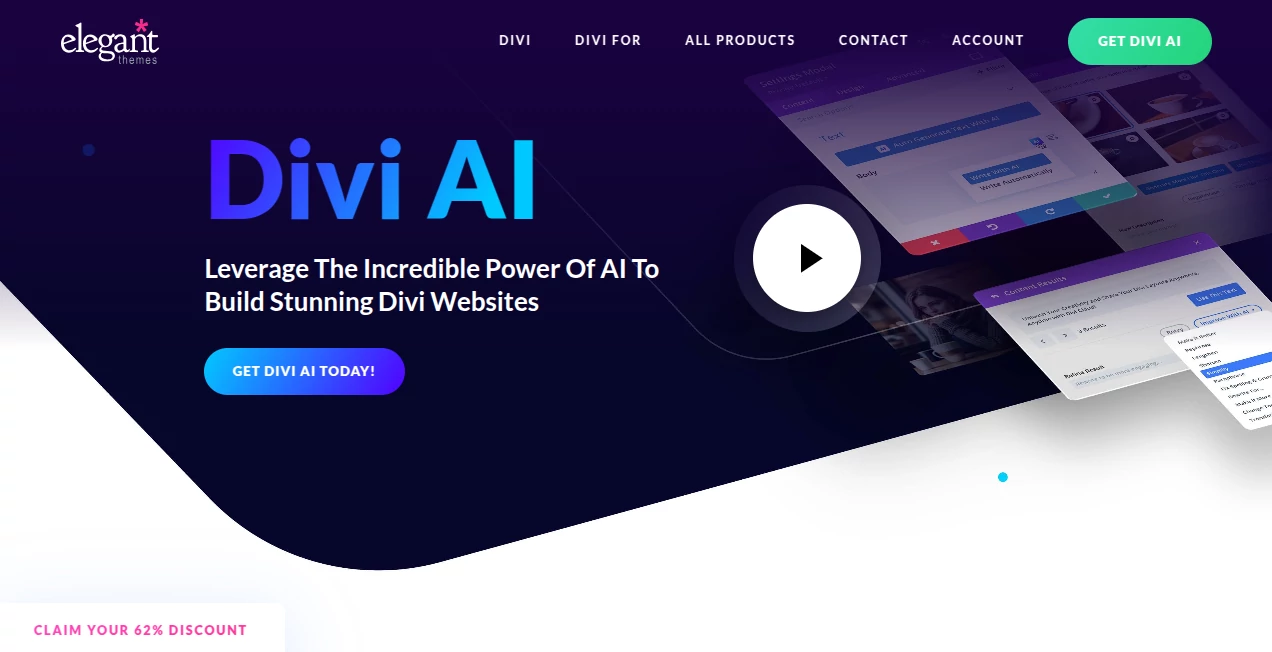
What is Divi AI?
Imagine sitting down to build a new site, typing a quick description of what you need, and watching full pages come together—complete with tailored text, custom images, and layouts that fit your brand like a glove. That's the everyday thrill this built-in feature delivers, tucked right into one of the most beloved WordPress builders. I've seen freelancers knock out client sites in a fraction of the time, and small business owners finally tackle their own updates without calling in favors. It's not just convenient; it's genuinely empowering, turning "I can't do that" into "done before dinner."
Introduction
Nestled deep in the visual builder that so many designers swear by, this AI companion reads your site's vibe—title, description, existing pages—and spins out content that feels like it was crafted by someone who knows your business inside out. From whipping up blog posts that sound professional to conjuring images in styles from photorealistic to illustrative, or even writing clean code for those tricky custom touches, it handles the heavy lifting. What stands out is how it learns from your work as you go, suggesting ideas when you're stuck or refining drafts until they shine. For anyone who's stared at a blank section wondering where to start, it's like having a tireless creative partner who never bills by the hour.
Key Features
User Interface
The magic happens without leaving your canvas—little AI buttons pop up in text fields, image spots, or code areas, ready for a prompt or one-click generation. Type a few words about tone or style, and results slide in seamlessly, uploaded to your media library or applied directly. It's so woven into the flow that after a couple tries, it feels like the builder was always this smart, no switching tabs or copying from elsewhere.
Accuracy & Performance
Because it's tuned specifically on the builder's own codebase and your site's details, outputs land with impressive relevance—text that matches your voice, images that fit the context, code that works without debugging marathons. Generations fly fast, often in seconds, and you can iterate endlessly on unlimited plans, refining until it's perfect. In practice, it rarely misses the mark on brand consistency, saving those awkward rewrites that eat up afternoons.
Capabilities
Write full posts or punchy headlines, improve existing copy for clarity or flair, generate photos or artwork in dozens of styles, edit images by changing elements or extending frames, even craft CSS for hover effects or custom modules. It builds entire pages or sites from prompts, pulling in your colors and fonts for on-brand results you can tweak visually. The depth here—from suggesting when you're blank to handling multilingual text—makes it a true all-rounder for modern sites.
Security & Privacy
Everything stays within your WordPress setup, with generations processed securely and images licensed royalty-free for commercial use. No worries about data wandering off; it's designed to respect your ownership, giving peace of mind for client work or personal projects alike.
Use Cases
A boutique owner refreshes product pages with fresh descriptions and matching photos that boost conversions without a photoshoot. Agencies prototype client sites in minutes, impressing with full mockups that include real copy. Bloggers overcome writer's block by generating drafts that spark ideas, then polishing to their style. Developers add unique interactions via quick code snippets, skipping hours of trial and error.
Pros and Cons
Pros:
- Deep integration means everything applies instantly, no import hassles.
- Unlimited generations let you experiment freely.
- Context-aware results that save endless revisions.
- Bundles with the full builder ecosystem for massive value.
Cons:
- Best when paired with the parent builder—standalone users miss the synergy.
- Image prompts work best in English, though text handles any language.
Pricing Plans
Add it to an existing membership for around twenty bucks a month billed yearly, or grab the full pro package that includes everything—builder, cloud storage, VIP support—for a bit more, with steep discounts on annual commits. Unlimited across sites and team members, plus a solid money-back window to test the waters.
How to Use Divi AI
Dive into the visual builder on any page, spot the AI spark in a module, and type your request—maybe "engaging about section for a coffee shop" or "vibrant hero image of mountains at dawn." Choose from suggestions, refine with follow-ups like "make it warmer tone," and watch it slot in perfectly. For whole pages, start with a prompt describing the goal, then customize the layout drag-and-drop style. It's addictive how quickly rough ideas turn polished.
Comparison with Similar Tools
Standalone generators require copying back and forth, losing context along the way, while this one lives inside your workflow, understanding the page and site for smarter, faster results. It's more affordable than piecing together separate subscriptions, with unlimited use that encourages bold experimentation where others nickel-and-dime credits.
Conclusion
This isn't just another add-on; it's the evolution that makes building sites feel joyful again, blending brains with beauty in a way that respects your time and vision. Whether refreshing an old site or launching fresh ones, it delivers that rare mix of power and ease. Give it a spin—you'll wonder how you ever built without it.
Frequently Asked Questions (FAQ)
Does it work on any language?
Text yes, fully—input and output whatever suits; images prefer English prompts for best results.
Are generated images mine to use?
Royalty-free, commercial okay, no attribution needed.
How many can I make?
Unlimited on subscribed plans, across all your sites.
What if I'm stuck on ideas?
It suggests prompts or content based on your page—great for breaking blocks.
Team friendly?
Everyone on the membership gets full access, no extras.
AI Photo & Image Generator , AI Website Builder , AI Content Generator , AI Code Generator .
These classifications represent its core capabilities and areas of application. For related tools, explore the linked categories above.
Divi AI details
This tool is no longer available on submitaitools.org; find alternatives on Alternative to Divi AI.
Pricing
- Free
Apps
- Web Tools
Categories

Divi AI Alternatives Product
chibi art

NepVox

Grok Imagine

Sovibe AI

Humanize AI …
Noir Prompt

Consistent C…

Nano Banana …

Scillus