🧠 AI Quiz
Think you really understand Artificial Intelligence?
Test yourself and see how well you know the world of AI.
Answer AI-related questions, compete with other users, and prove that
you’re among the best when it comes to AI knowledge.
Reach the top of our leaderboard.


















Fast Image AI

What is Fast Image AI?
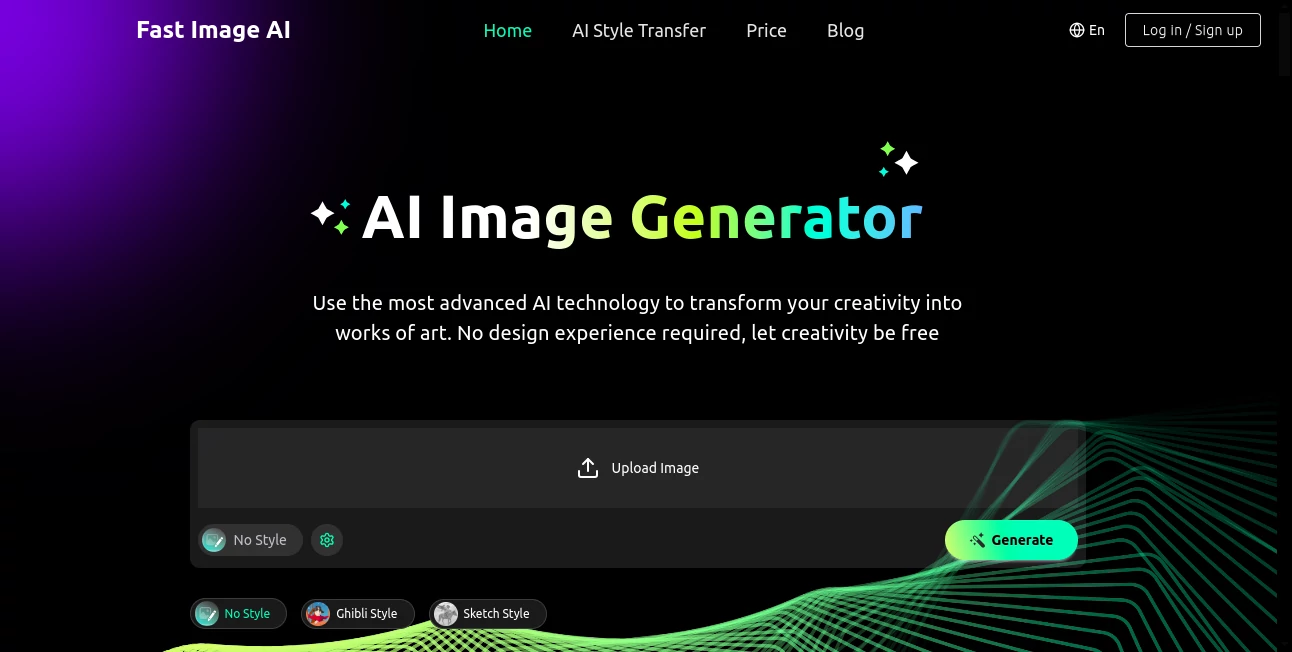
FastImage opens a doorway to effortless creativity, where a simple description or snapshot can blossom into striking visuals that capture your imagination. This browser-based wonder lets anyone, from curious beginners to seasoned creators, experiment with artistic twists without the need for fancy setups or steep learning curves. Those who've dipped in often come back with tales of unexpected delights, like turning a fleeting thought into a frame-worthy piece that sparks conversations over coffee.
Introduction
FastImage arrived quietly a short while ago, sparked by a desire to make artistic expression as straightforward as jotting a note. It grew from the frustrations of folks who wanted to play with styles but got bogged down by bulky software or endless tutorials. Word spread through creative corners online, where users shared screenshots of dreamy watercolors born from quick uploads, drawing in a crowd that appreciated its no-fuss charm. What started as a handy side tool has become a daily go-to for injecting flair into projects, proving that a bit of clever tech can turn ordinary moments into something shareable and special.
Key Features
User Interface
The layout greets you with a welcoming simplicity, a central spot for your uploads or ideas that feels intuitive from the first glance. Choices for styles and tweaks appear right there, with sliders for counts and shapes that slide smooth without overwhelming the screen. It adapts neatly to phones or tablets, keeping the flow uninterrupted whether you're brainstorming on the bus or polishing at a desk, making the whole process feel like a casual sketch session rather than a tech workout.
Accuracy & Performance
When you lay out a vivid scene, it captures the essence with a precision that surprises, blending elements just so without the common blurs or odd shifts. Results land in a handful of seconds, steady and swift even for busier requests, letting you chain ideas without losing steam. Creators note how it holds true to the details you describe, delivering outputs that stand up to closer looks and inspire tweaks rather than total restarts.
Capabilities
It shines at reimagining uploads or words into a spectrum of looks, from whimsical animations to thoughtful sketches, with room to describe your own twists for something truly one-of-a-kind. You can dial in multiples or adjust frames to fit your vision, and an inspiration spot showcases fresh examples to nudge your next move. The shared pool for various functions means your efforts stretch further, opening doors to everything from quick mood setters to layered concepts that build on each other.
Security & Privacy
Your files get a gentle touch—used just for the task at hand and then quietly released, with no lingering copies or shares to fret over. It puts the reins in your hands for what stays or goes, fostering that easy trust for personal experiments. That thoughtful handling lets you pour in private inspirations without a whisper of concern, keeping the focus on the joy of creation.
Use Cases
A blogger might feed in a travel snap to wrap it in a nostalgic haze, pulling readers deeper into the story. Crafters envision product mocks in playful tones, testing appeals before the first stitch. Teachers craft scene aids that lighten lessons, turning abstract ideas into visuals kids can grasp and giggle over. Even journal keepers jot moods into gentle illustrations, turning daily reflections into a private gallery of whims.
Pros and Cons
Pros:
- Whisks concepts to completion in moments, keeping the spark alive.
- Welcomes all levels, no prior tricks needed to shine.
- Varied vibes from presets to personal pitches, endless exploration.
- Runs smooth in any browser, no downloads to drag you down.
Cons:
- Free spins are limited, teasing more for steady seekers.
- Custom dreams might need honing to hit just right.
- Peak times could queue up waits for the full rush.
Pricing Plans
A daily free allowance lets you taste the magic without a dime, perfect for occasional dips. For deeper dives, entry steps in around seven bucks monthly for a solid stack of uses, scaling to mid-teens for popular picks with quicker lines, and twenties for the fullest flow. Yearly choices trim the tab nicely, and upgrades unlock extras like pro rights for wider shares, all while keeping the core open and approachable.
How to Use FastImage
Start by slipping in your picture or phrasing your fancy, then pick a flavor from the ready roster or spell out your spin. Fine-tune the tally and trim, give it the go, and watch the wonders weave in under half a minute. Snag the standouts for your stash, loop back to refine, and soon you've got a collection that captures your current muse.
Comparison with Similar Tools
Where some demand downloads or deep dives into settings, FastImage keeps it light and lively, trading bells for that browser bliss—though those might suit if you crave custom controls. Against broader brushes, it hones in on style shifts with a personal touch, perhaps lighter on layers but quicker on the draw. It fits folks after swift, satisfying switches over sprawling studios.
Conclusion
FastImage wraps the wonder of artistic alchemy in an accessible bow, turning whispers of what-if into walls of wow without the wait. It reminds us that creation needn't be confined to canvases or classes, inviting everyone to dabble and discover. As ideas keep bubbling up, this gem stands ready to shape them, one swift stroke at a time.
Frequently Asked Questions (FAQ)
What sorts of starting points work?
Snaps or sentences, clear and crisp for the best blooms.
How long till I see results?
A quick dozen to thirty ticks, depending on the depth.
Can I share my makes?
For fun yes, and paid paths open pro playgrounds.
Any limits on styles?
From ready reels to your own recipes, the sky's open.
What if it misses my mark?
Tweak the terms and try again—small shifts spark big changes.
AI Text to Image , Photo & Image Editor , AI Photo Enhancer , AI Art Generator .
These classifications represent its core capabilities and areas of application. For related tools, explore the linked categories above.
Fast Image AI details
This tool is no longer available on submitaitools.org; find alternatives on Alternative to Fast Image AI.
Pricing
- Free
Apps
- Web Tools
Categories

Fast Image AI Alternatives Product

Z-Image

TextSharp | …

Yodayo AI

FLUX 2

NanoBanana2F…

Picnana

Freepik

Z-Image Gene…
Album Cover …