
🧠 AI Quiz
Think you really understand Artificial Intelligence?
Test yourself and see how well you know the world of AI.
Answer AI-related questions, compete with other users, and prove that
you’re among the best when it comes to AI knowledge.
Reach the top of our leaderboard.


















Flarelight

What is Flarelight?
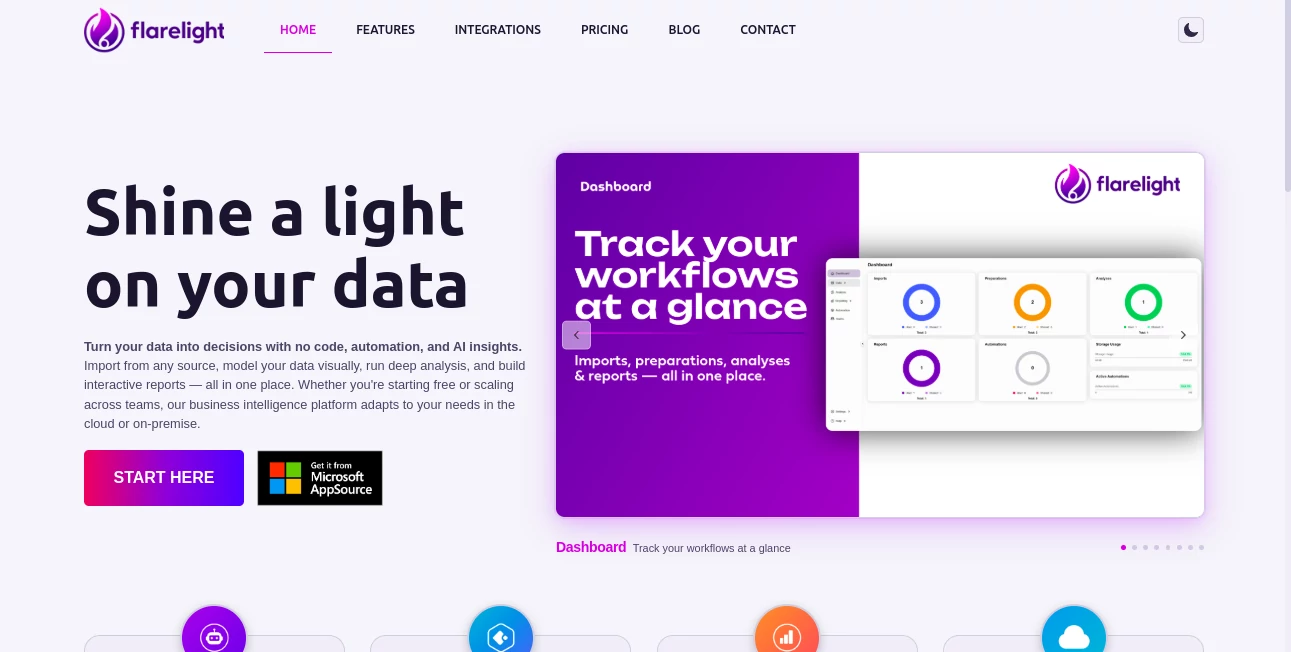
Flarelight steps in as a reliable partner for teams drowning in data, turning scattered spreadsheets into clear paths forward with smart, hands-off guidance. This setup lets users pull in info from anywhere, shape it without a single line of code, and uncover patterns that point to real moves. Those who've switched over often talk about the relief of seeing the big picture emerge without endless tweaks, making it a quiet staple for folks who need results without the runaround.
Introduction
Flarelight came together from the grind of data wranglers who'd spent too long wrestling numbers into shape, dreaming of a spot where the heavy thinking happened on its own. It rolled out aiming to blend everyday ease with sharp smarts, and soon enough, small outfits and bigger crews started sharing wins like spotting trends that shifted their quarterly plays. What kicked it off was the push for something that handled the full loop—from grabbing raw feeds to polishing reports—without forcing users to juggle apps. Over time, it's settled into a groove for those mid-hustle moments, proving that a dash of built-in cleverness can cut through the clutter and light up the next step.
Key Features
User Interface
The main view hits you with a tidy overview that lays out your flows at a glance, no digging through drawers for updates. Drag pieces around to build models that make sense right away, and the screen shifts smooth as you go, keeping things light even when you're knee-deep in details. It's the sort of dash that feels like a well-worn desk, with spots for everything but none of the mess, drawing in users who want to focus on the find rather than the fiddling.
Accuracy & Performance
When you feed it a fresh batch, it sifts through without skipping beats, highlighting hits that line up with what you know deep down, often pulling threads that surprise in the best way. Runs wrap up steady, even on bigger pulls, delivering breakdowns that hold water under a second look. Teams note how it keeps pace during crunches, turning what could drag days into a morning's work without a single slip.
Capabilities
Pull from any corner you can think of, shape the streams with visual nudges, and let it dig for the gems that matter, all while spinning out dashboards that tell the tale at a glance. It loops in the smart bits to flag what's off or on track, and even sets up repeats so the watch never sleeps. From solo scans to group guides, it covers the spread, making it handy for everything from quick checks to full strategy sketches.
Security & Privacy
Your streams stay wrapped tight, with options to keep it all in-house or let the cloud carry the load, giving you the pick based on what feels right. It follows the usual guards for access and holds, so sensitive spots don't spill without a nod. Users lean on that steady backdrop, knowing their numbers stay put while the insights flow free.
Use Cases
Marketing leads track campaign lifts by blending sales feeds with click trails, spotting what sticks without manual math. Ops managers set alerts for supply dips, keeping shelves steady before calls flood in. Finance folks build quarterly overviews that flag outliers early, easing the end-of-month rush. Even small shops use it to gauge customer vibes from order logs, tweaking stock to match the mood.
Pros and Cons
Pros:
- Handles the whole chain in one spot, cutting the app-hop hassle.
- Smart nudges save hours on the hunt for hidden patterns.
- Visual builds make it welcoming for non-tech types.
- Scales smooth from lone wolves to full crews.
Cons:
- Shines on structured stuff; wild data might need a tidy first.
- Deeper dives lean on the paid side for endless runs.
- Setup takes a session to sync with quirky sources.
Pricing Plans
It opens with a no-cost entry for light lifts, perfect for testing toes or solo swings. From there, team tiers likely step in around the low twenties monthly for fuller flows, with enterprise bumps for custom carries and bigger bands. The free base keeps it approachable, letting you grow without a hard gate from day one.
How to Use Flarelight
Sign on and link your first feed, watching it map the basics in a quick scan. Drag to shape the view, set the smart watch for flags, and pull a first report to see the story unfold. Tweak as you go, share the boards with the group, and let the repeats handle the rest, building a rhythm that runs itself over time.
Comparison with Similar Tools
Where some setups split the steps across screens, Flarelight folds it all in tight, trading a bit of raw power for that seamless stride, though those might muscle more for mega datasets. Against code-heavy rivals, it lightens the load for quick starters, skipping the scripts but perhaps skimping on super tweaks. It fits folks after all-around ease, edging out the piecemeal with polished paths.
Conclusion
Flarelight lights the way through data's dim corners, handing teams the tools to turn numbers into nods of yes or no without the sweat. It bridges the busy from bury to breakthrough, proving that smart stands can steady the ship in stormy stats. As info keeps piling up, this one's primed to keep the glow going, guiding good calls one clear chart at a time.
Frequently Asked Questions (FAQ)
What spots can I pull data from?
Pretty much anywhere—files, feeds, or databases, as long as it streams steady.
Do I need code chops to kick it off?
Not a bit; the drags and drops handle the how, you just point the why.
How does the smart side work?
It flags the finds and flags the fixes, learning your lean as you go.
Cloud or keep it close?
Your call—hosted ease or home-base hold, both run right.
Good for big groups?
Scales like a charm, from one to many without missing a step.
AI No-Code & Low-Code , AI Data Mining , AI Research Tool , AI Analytics Assistant .
These classifications represent its core capabilities and areas of application. For related tools, explore the linked categories above.
Flarelight details
This tool is no longer available on submitaitools.org; find alternatives on Alternative to Flarelight.
Pricing
- Free
Apps
- Web Tools
Categories

Flarelight Alternatives Product

AISEOMate

Ecom Tool AI

Manus

Tate-A-Tate

Surmado

Goodnotes

JSON to Excel

LocalRAG!

Read
