
🧠 AI Quiz
Think you really understand Artificial Intelligence?
Test yourself and see how well you know the world of AI.
Answer AI-related questions, compete with other users, and prove that
you’re among the best when it comes to AI knowledge.
Reach the top of our leaderboard.


















Flowith AI

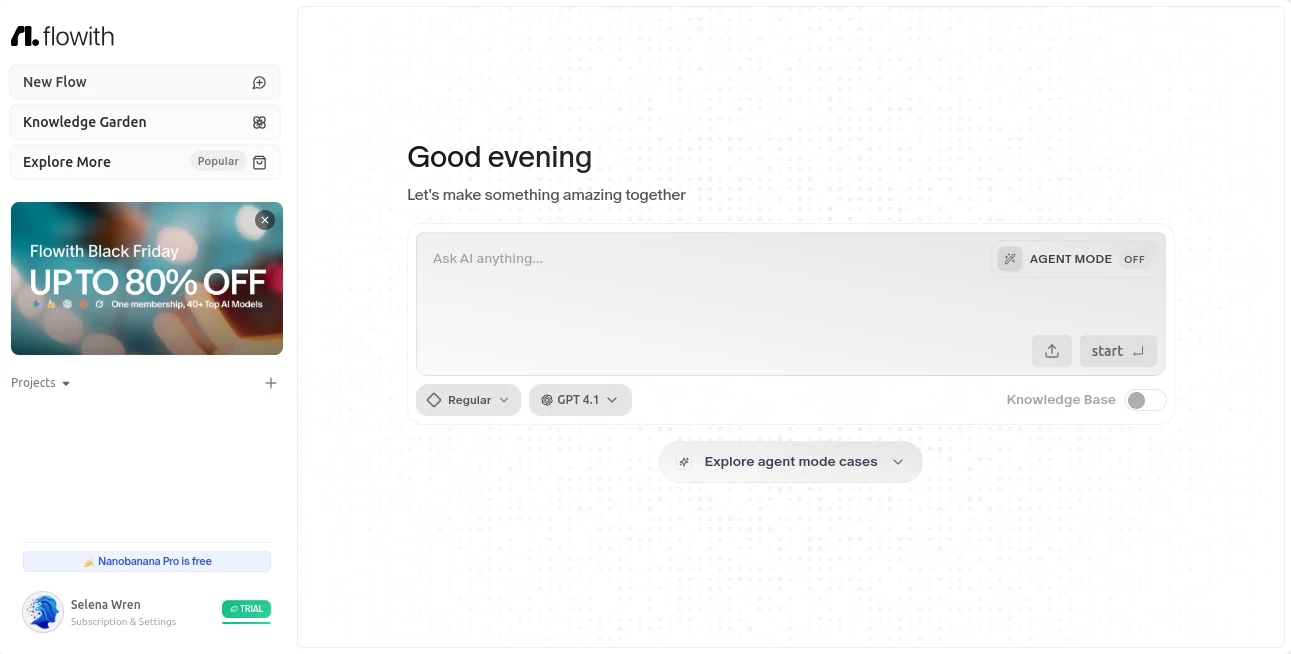
What is Flowith AI?
Imagine a space where your thoughts don't just sit static—they branch, connect, and evolve with a clever partner that anticipates your next move. That's the quiet thrill this platform delivers, blending a vast canvas with powerful agents that turn brainstorming into something almost alive. I've watched friends dive in for a quick idea session and emerge hours later with fully fleshed projects, grinning about how it kept the momentum going without the usual scatter. It's the kind of tool that feels like an extension of your own curiosity, making deep work not just possible, but downright enjoyable.
Introduction
Born from a desire to move beyond linear chats, this workspace reimagines how we collaborate with smart systems, offering an infinite canvas where threads weave together effortlessly. It started gaining traction among creators frustrated with boxed-in interfaces, and now it's a haven for writers, designers, and thinkers who crave that seamless flow. Picture starting with a vague spark about a new project, and watching it bloom into structured outlines, connected notes, and even automated tasks—all without switching apps or losing context. Users often share how it transformed their scattered notes into cohesive knowledge gardens, proving it's more than software; it's a catalyst for clearer thinking and bolder output.
Key Features
User Interface
The canvas unfolds like a boundless whiteboard, where you drag ideas around, link threads with a flick, and watch the layout adapt intuitively to your rhythm. Multi-thread views let you juggle streams side by side, while subtle suggestions pop up just when needed, never overwhelming the view. I recall jumping in for a simple mind map and ending up with a web of interconnected plans that felt organic, like doodling with a friend who finishes your sentences brilliantly.
Accuracy & Performance
Drawing from top-tier models, it grasps nuances in your prompts with impressive fidelity, breaking down complex asks into steps that align perfectly with your intent. Responses roll in swift and steady, even on intricate multi-step operations, keeping you immersed rather than interrupted. In practice, it's handled everything from dense research breakdowns to creative remixes without a misstep, earning nods for that reliable edge that turns good sessions into great ones.
Capabilities
At its core, advanced agents tackle everything from autonomous planning to tool integrations, while a knowledge garden links your past work for context-rich suggestions. Multi-threaded flows support parallel explorations, and features like Oracle agents optimize paths on their own, handling loops that would bog down simpler setups. It's this layered intelligence—combined with seamless model access—that lets you build from casual chats to full-fledged creations, all in one fluid space.
Security & Privacy
Your creations stay sheltered in private realms, with clear controls over sharing and standard safeguards that respect the sensitivity of personal ideas. It prioritizes that trusted environment, processing without unnecessary exposure, so you can pour in raw thoughts freely. For anyone guarding intellectual sparks, this thoughtful approach feels reassuring, like a locked studio where inspiration runs wild but safe.
Use Cases
Writers map novel arcs with branching threads that track characters and plots without losing strands, emerging with outlines that practically write themselves. Designers brainstorm visuals on the canvas, pulling in references that agents refine into mood boards. Teams coordinate projects by linking flows, watching ideas cross-pollinate in real time. Even solo researchers build knowledge webs from scattered sources, with agents filling gaps autonomously—it's these everyday transformations that make it a staple for focused, flowing work.
Pros and Cons
Pros:
- Infinite canvas that mirrors natural thought patterns, banishing rigid boxes.
- Agents that adapt and optimize, saving hours on repetitive lifts.
- Context-aware connections that make old work feel fresh and relevant.
- Smooth integration of multiple models for the best fit per task.
Cons:
- Rich features might overwhelm absolute beginners at first glance.
- Advanced agent runs can chew credits quicker on heavy projects.
Pricing Plans
It welcomes explorers with accessible entry points, scaling through tiers that unlock more threads, agents, and storage as your needs grow. Free tastes give a solid feel for the basics, while paid paths open unlimited flows and priority models without breaking the bank. The structure rewards consistent use with perks that accumulate, feeling fair and flexible for hobbyists dipping in or teams diving deep.
How to Use Flowith
Hop in with a simple sign-up, then claim a fresh canvas to jot your starting prompt—maybe a project brief or wild concept. Branch out with new threads as ideas split, summon agents for deeper dives, and link nodes to build connections. Preview suggestions, refine on the fly, and save gardens for later pulls. One user I know started with a vague business idea and ended with a full roadmap, agents handling research legs while they steered the vision—it's that hands-on yet hands-off balance that clicks.
Comparison with Similar Tools
While linear chat apps confine you to one track, this one's expansive canvas and agent orchestration open wide horizons, outpacing them in handling parallel thoughts and long-term context. Against rigid boards, it infuses living intelligence that evolves with you, trading static pins for dynamic flows. For those seeking a true partner in creation, it pulls ahead with that blend of freedom and foresight, making others feel like stepping back in time.
Conclusion
This workspace doesn't just host your ideas—it nurtures them, turning solitary sparks into collaborative symphonies with an ease that's genuinely refreshing. It's the bridge to that elusive state where work feels like play, productivity surges, and creativity runs unbound. If you've ever wished for a space that keeps up with your mind's wanderings, this is it—inviting, intelligent, and utterly inspiring.
Frequently Asked Questions (FAQ)
What models does it tap into?
Top ones like GPT variants, Claude, and more, with quick adds for fresh releases.
Can teams work together here?
Yes, shared canvases and threads make collaboration a breeze, syncing seamlessly.
How does the knowledge garden work?
It auto-links your past creations, surfacing relevant bits as you build new ones.
Is there a mobile experience?
Optimized for all devices, so ideas flow wherever you do.
What about complex tasks?
Agents like Oracle break them down autonomously, optimizing as they go.
AI Productivity Tools , AI Team Collaboration , AI Workflow Management , AI Mind Mapping .
These classifications represent its core capabilities and areas of application. For related tools, explore the linked categories above.
Flowith AI details
This tool is no longer available on submitaitools.org; find alternatives on Alternative to Flowith AI.
Pricing
- Free
Apps
- Web Tools
Categories

Flowith AI Alternatives Product

Jamy.ai | Au…

Slackactivity

Productivity…

Vurge

YouMind

Futurwise

AiZolo

Automaited

KarmaGuy
