
🧠 AI Quiz
Think you really understand Artificial Intelligence?
Test yourself and see how well you know the world of AI.
Answer AI-related questions, compete with other users, and prove that
you’re among the best when it comes to AI knowledge.
Reach the top of our leaderboard.


















Free AI Video Upscaler

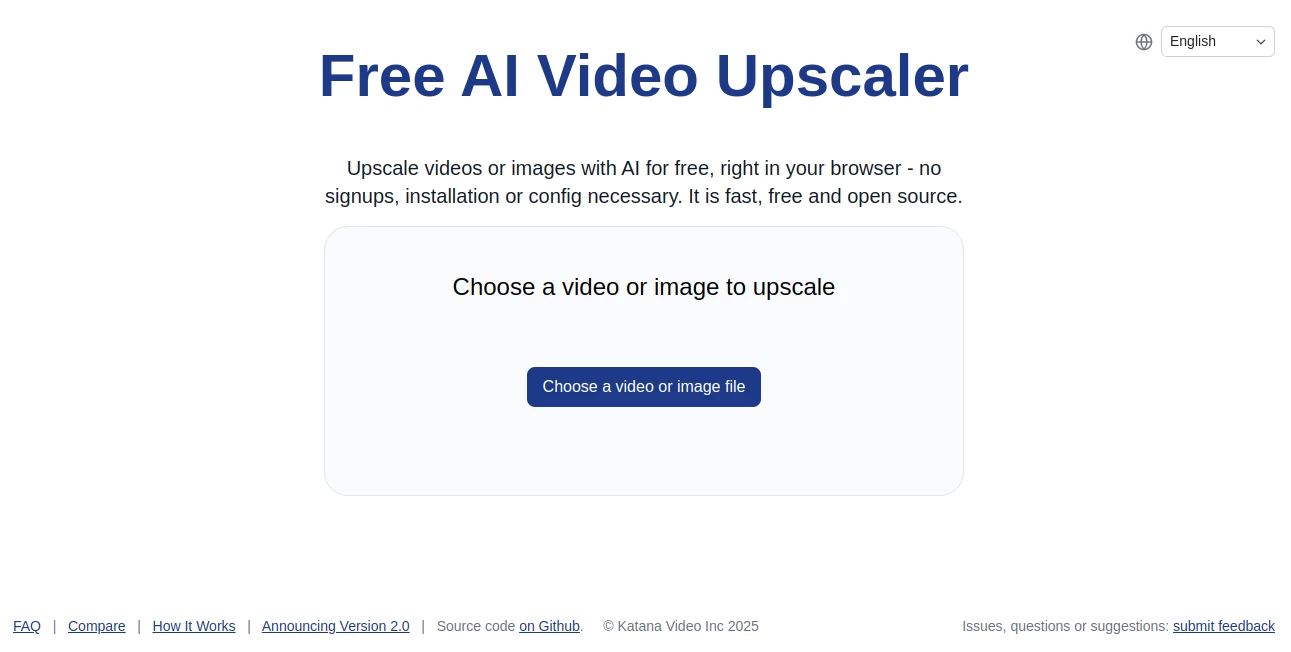
What is Free AI Video Upscaler?
Imagine digging out an old home video that's grainy and low-res, and with one simple upload, watching it transform into something crisp and vibrant—all without sending your file anywhere or signing up for anything. That's the quiet brilliance this tool delivers, running everything right in your browser like a personal magic wand for media. I've tossed in a few fuzzy clips myself, and the way it breathes new life into them, sharpening details without weird artifacts, feels genuinely refreshing in a world full of cloudy services.
Introduction
Born from a late-night hobby tinkering with cutting-edge browser tech, this upscaler started as a straightforward experiment and quickly won over folks frustrated with server-heavy alternatives that demand accounts or risk privacy. No bells and whistles here—just pure, effective enhancement for videos and images that puts control back in your hands. People share how it rescued forgotten footage or polished quick social clips, all while keeping things local and lightning-fast. It's that rare find where simplicity meets real power, proving you don't need fancy setups to get pro-looking results on everyday files.
Key Features
User Interface
The whole thing unfolds on one clean page, with a big, inviting button to pick your file and nothing else cluttering the view—no logins, no ads, no distractions. Drop in a clip or photo, and it gets to work instantly, showing progress without fuss. It's the kind of straightforward design that makes you smile; my first try felt like chatting with an old friend who just gets it done, no questions asked.
Accuracy & Performance
Powered by clever models running locally, it sharpens edges and boosts resolution with a natural touch, avoiding the overdone look that plagues some tools. Even on modest machines, it hums along efficiently, wrapping up jobs quicker than you'd expect for something this capable. Users often mention how it handles real-world messiness—like handheld shakes or compression blur—turning out files that play smooth and look alive.
Capabilities
It tackles both videos and stills with ease, upping clarity and detail while staying true to the original feel, all processed on your device for speed and safety. No limits on tries means you can experiment freely, tweaking inputs until it clicks just right. The open-source roots shine through in its reliable, no-nonsense approach, making it a solid pick for anything from family archives to quick content fixes.
Security & Privacy
Here's the standout: everything stays on your side, no uploads to distant servers, no data collection, just pure local magic that vanishes when you're done. In an era where privacy feels like a luxury, this commitment hits different—your personal clips remain exactly that, personal. It's a breath of relief, especially for sensitive or cherished media you wouldn't dream of sharing.
Use Cases
A parent revives grainy birthday videos into sharp memories that draw tears and laughs at family gatherings. Content makers polish phone footage for posts that pop, skipping the upload wait. Archivists breathe life into old scans without risking originals online. Even casual editors test enhancements on snippets, building confidence before bigger projects—all with that satisfying local crunch.
Pros and Cons
Pros:
- Truly private processing that keeps your files yours alone.
- No barriers to entry—dive in anytime, as often as you like.
- Surprisingly capable results from such a lightweight setup.
- Works offline once loaded, perfect for spotty connections.
Cons:
- Depends on your device's power for bigger files.
- Limited to what browser tech can handle right now.
Pricing Plans
It's all on the house—no tiers, no credits, no catches. Just pure, unrestricted access that invites endless tinkering without watching a meter. That generosity feels rare these days, like stumbling on a gem that asks nothing in return but your curiosity.
How to Use Free AI Video & Image Upscaler
Fire up your browser, head over, and click to select your video or image—simple as that. It loads the smarts locally, then gets cracking, with a bar tracking progress so you're never left wondering. Once done, grab the enhanced version straight away. I tried it with a shaky vacation clip; selected the file, waited a bit, and downloaded something that looked worlds better, all in under five minutes on a regular laptop.
Comparison with Similar Tools
While cloud-based options boast raw power, they often trade your privacy for convenience—this one flips that, delivering solid boosts without the data dance. It's lighter than downloadable heavyweights yet punches similar weight for everyday needs, and the zero-cost, no-strings model leaves paid rivals looking overpriced. For anyone valuing control and simplicity, it quietly outshines the crowd.
Conclusion
In a crowded field of enhancers, this one stands apart with its honest, user-first ethos—delivering real improvements while respecting your space and time. It's the kind of tool that reminds you tech can still feel empowering, not overwhelming. Whether reviving memories or refining creations, it earns its keep by just working well, inviting you back for more without a single demand.
Frequently Asked Questions (FAQ)
Does it really stay private?
Yes—nothing leaves your device, full stop.
What files work best?
Standard videos and images; keep them reasonable size for smooth runs.
Any hidden costs?
None at all—enjoy as much as you want.
How powerful a computer do I need?
A modern browser on most devices handles it fine.
Open source means what here?
You can peek at the code, trust it's clean, and even tweak if you're into that.
Photo & Image Editor , AI Photo Enhancer , AI Video Editor , AI Video Enhancer .
These classifications represent its core capabilities and areas of application. For related tools, explore the linked categories above.
Free AI Video Upscaler details
This tool is no longer available on submitaitools.org; find alternatives on Alternative to Free AI Video Upscaler.
Pricing
- Free
Apps
- Web Tools
Categories

Free AI Video Upscaler Alternatives Product
Seedream 4.5

Image Text E…

Ultra Face S…
Kirkify Al

Better Image

Image to Ima…

Brat Generat…

VIGGLE

Artguru
