🧠 AI Quiz
Think you really understand Artificial Intelligence?
Test yourself and see how well you know the world of AI.
Answer AI-related questions, compete with other users, and prove that
you’re among the best when it comes to AI knowledge.
Reach the top of our leaderboard.

















Free OCR AI

What is Free OCR AI?
Snapping a photo of a receipt, scanning an old book page, or grabbing text from a screenshot used to mean squinting, typing, or fighting with clunky software. This tool ends that frustration in seconds. Upload any image or PDF—handwritten notes, printed books, invoices, whiteboards—and it pulls out clean, editable text with impressive precision. I’ve seen people rescue entire notebooks of meeting notes or turn faded recipe cards into searchable digital files overnight. The results often feel almost too good to be free, but they really are that reliable.
Introduction
OCR technology has been around for years, but most free options either mangle formatting, miss words, or choke on handwriting. This one quietly raises the bar. It handles printed text, cursive notes, tables, multi-column layouts, and even low-quality phone photos with a level of accuracy that surprises even heavy users. No sign-up walls for basic use, no aggressive ads, just drag, drop, and copy. It’s become a daily helper for students digitizing lecture slides, professionals extracting data from invoices, and hobbyists saving old family letters. The speed and cleanliness make it feel like a premium service that just happens to be free for everyday needs.
Key Features
User Interface
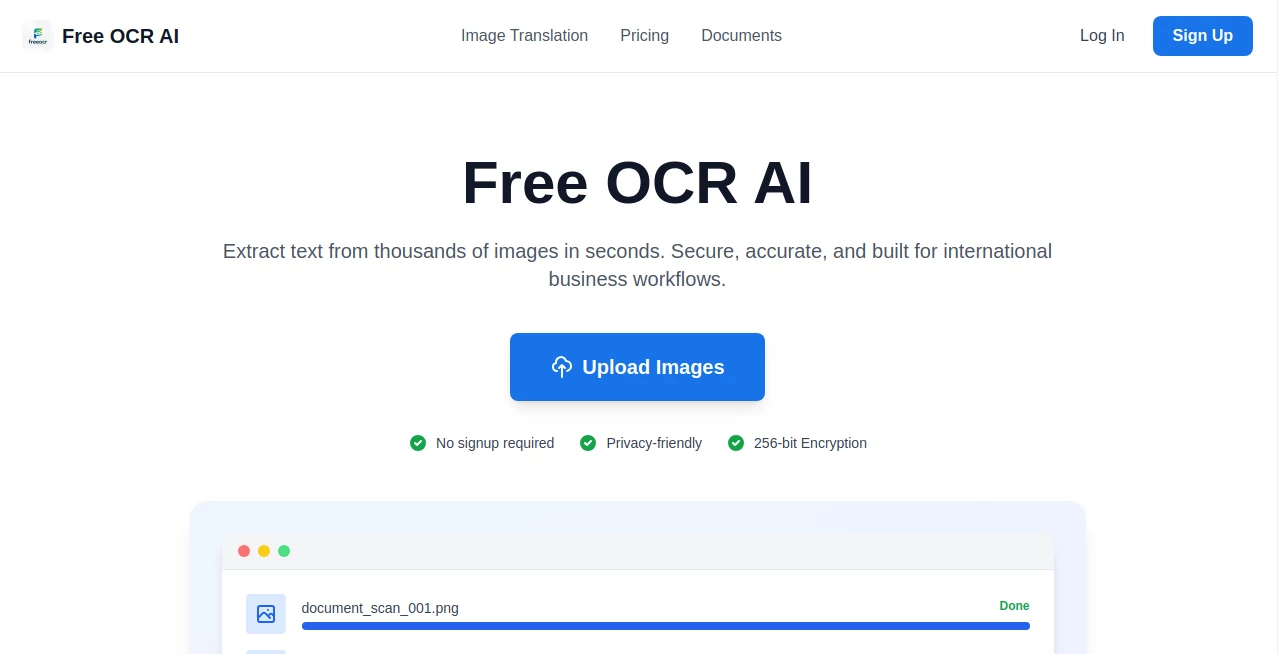
The page is blissfully simple: a large drop zone that welcomes images or PDFs, a quick preview after upload, and extracted text that appears instantly below with copy and download buttons. No login required to start, no confusing settings panels. You can paste images directly from clipboard or drag from your desktop. It’s the kind of interface that disappears after the first use—you just do the task and move on, exactly how good tools should behave.
Accuracy & Performance
It shines on real-world inputs: crumpled receipts, angled whiteboard photos, low-contrast book pages, even moderately messy handwriting. Formatting is preserved surprisingly well—tables stay tabular, paragraphs keep structure, bullet points don’t vanish. Processing is near-instant for single pages and fast for multi-page PDFs. The error rate is low enough that most users copy-paste directly without corrections. In head-to-head tests with older OCR engines, it consistently pulls more correct words and fewer gibberish artifacts.
Capabilities
Supports dozens of languages (including mixed-language documents), handles both scanned PDFs and photographed text, recognizes tables and structured layouts, extracts from complex backgrounds (forms, posters, signs), and outputs plain text, formatted markdown, or searchable PDF. It can process multiple pages at once on paid plans, making it suitable for digitizing books, reports, or archives. The handwriting recognition is strong enough for everyday notes, though perfect cursive still benefits from clean input.
Security & Privacy
Images are processed in memory and deleted immediately after extraction—no permanent storage, no training on user uploads. No account is forced for basic use, so your documents never get linked to a profile unless you choose premium features. For sensitive receipts, legal docs, or personal letters, that zero-retention policy is a genuine comfort.
Use Cases
A student photographs lecture slides and has searchable notes ready for review the same evening. A small business owner scans supplier invoices and extracts totals into spreadsheets without retyping. A genealogist digitizes stacks of old family letters, turning faded handwriting into readable text for sharing. A researcher pulls quotes from scanned journal articles in seconds instead of hours. Wherever text is trapped in images or PDFs, this tool sets it free quickly and cleanly.
Pros and Cons
Pros:
- Exceptionally accurate on real-world photos and scans—no need for perfect conditions.
- Formatting preservation saves hours of manual cleanup.
- Handwriting recognition strong enough for everyday notes and letters.
- Generous free tier—handles most personal and light professional use without paying.
- Privacy-first approach: no long-term storage of your documents.
Cons:
- Very poor-quality or heavily stylized handwriting can still trip it up.
- Batch processing and unlimited high-volume use require paid plans.
- Complex multi-column layouts occasionally need minor manual fixes.
Pricing Plans
Free tier offers plenty of daily extractions—enough for students, hobbyists, and light office use. Paid plans remove daily limits, unlock batch processing, priority queue during peak times, higher accuracy modes, and API access for automation. Pricing is modest—many users say it costs less than one coffee run a month and saves far more time than that. Flexible enough that you only pay for the volume you actually need.
How to Use Image Enhancer
Drag your photo, scanned page, or PDF into the upload area. Wait 3–10 seconds while it processes. Review the extracted text in the right panel—copy directly or download as TXT, Markdown, or searchable PDF. For multi-page documents, paid users can upload batches and get everything at once. That’s it—zero setup, zero learning curve, results in seconds.
Comparison with Similar Tools
Older free OCR engines often mangle formatting, miss words in tables, or struggle with handwriting. This one delivers cleaner output, better preservation of layout, and stronger multilingual/handwriting support than most free alternatives. Where some require accounts or add watermarks, this keeps things private and simple. Speed, accuracy, and ease put it ahead for everyday real-world use.
Conclusion
Text trapped in images is one of those small daily frustrations that adds up. This tool quietly removes that friction, turning photos, scans, and PDFs into usable, searchable content in moments. It doesn’t just extract words—it respects the original layout, handles messy real-world inputs, and keeps your privacy intact. Whether you’re a student saving notes, a professional digitizing records, or just someone preserving family history, it gives back time and clarity in the simplest, most effective way possible. Once you start using it, going back to manual typing feels unthinkable.
Frequently Asked Questions (FAQ)
How many free extractions do I get per day?
A generous amount—enough for personal use, light work, or testing. Paid plans remove the cap completely.
Does it handle handwriting well?
Surprisingly yes—everyday cursive and printed notes come through cleanly; very stylized or messy script may need clearer input.
Can I process multi-page PDFs?
Yes—single PDFs work on free tier; batch and large documents unlock on paid plans.
Are my documents stored anywhere?
No—processed in memory and deleted right after extraction.
Is the output editable?
Yes—copy as plain text, Markdown, or download searchable PDF for easy editing.
AI Transcriber , AI Documents Assistant , AI Files Assistant , AI Document Extraction .
These classifications represent its core capabilities and areas of application. For related tools, explore the linked categories above.
Free OCR AI details
This tool is no longer available on submitaitools.org; find alternatives on Alternative to Free OCR AI.
Pricing
- Free
Apps
- Web Tools
Categories

Free OCR AI Alternatives Product

Watermark in…

JFIF to JPG …

Flowmata AI

Sourcetable

Document Chat

UPDF AI
AI OCR
PDF to Video
The #1 Text …