
🧠 AI Quiz
Think you really understand Artificial Intelligence?
Test yourself and see how well you know the world of AI.
Answer AI-related questions, compete with other users, and prove that
you’re among the best when it comes to AI knowledge.
Reach the top of our leaderboard.


















Generatifyy.AI

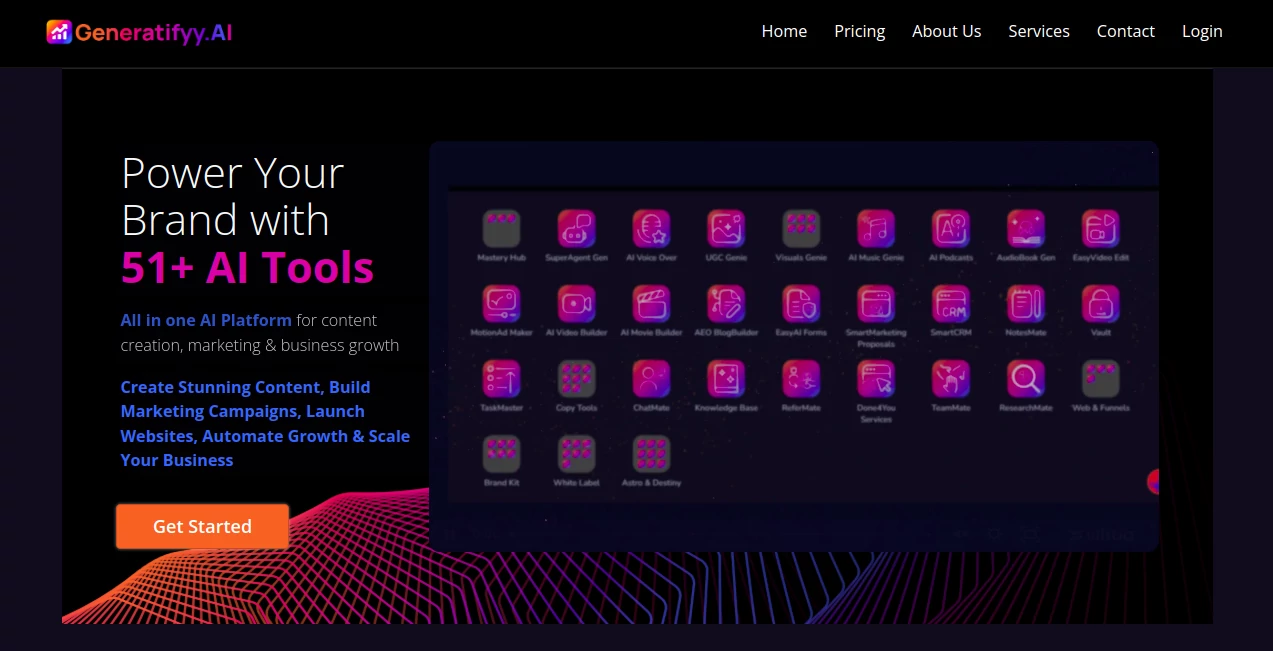
What is Generatifyy.AI?
Generatifyy pulls together a bunch of clever helpers into one spot, making it easier for folks to whip up videos, write posts, and handle business bits without jumping between apps. It's like having a full team tucked into your screen, ready to turn rough ideas into sharp pieces that draw eyes and spark chats. Users often mention how it cuts down the back-and-forth, letting them focus on the fun of building something that clicks with their crowd.
Introduction
Generatifyy got its start when a group of creators realized they were drowning in tabs and tools just to get a simple video or email out the door. They built it to bundle everything under one roof, starting small with a handful of basics and growing into a suite that covers the whole ride from brainstorming to sharing. Pretty soon, small shops and solo makers were trading tips on how it shaved days off their routines, like turning a quick note into a full promo clip overnight. What keeps people sticking around is that sense of flow—it feels like the platform gets where you're headed, nudging you along without stealing the show.
Key Features
User Interface
The dashboard hits you with a clean spread of options, each one just a click away, no digging through folders or confusing menus. You can drag files right in or type a few lines, and things start shaping up on the spot, with previews that let you tweak without starting over. It's set up so even if you're not glued to a desk, it works smooth on your phone, keeping the pace steady whether you're plotting a big campaign or jotting a quick post.
Accuracy & Performance
When you feed it a script or snapshot, the results come back feeling spot-on, with details like tones and timings that match what you had in mind, rarely needing a full redo. It handles the heavier lifts—like stitching clips or cloning sounds—without much wait, even when you're layering in extras, so you can keep rolling instead of staring at a spinner. Folks who've run it through real jobs say it holds up well, pulling together pieces that look and sound pro without the usual rough edges.
Capabilities
From spinning text into smooth clips with added flair to mimicking voices for that personal touch, it covers a wide stretch, even tossing in builders for pages and chat setups that pull in visitors on their own. You can mix languages or styles to fit your reach, and it ties in bits like lead trackers or task lists to keep the whole operation humming. The real draw is how it scales, from a single ad spot to a full setup for ongoing pushes, all without calling in outside help.
Security & Privacy
Your uploads and drafts stay locked down during the process, with options to wipe or share only what you pick, keeping things tidy and under your thumb. It runs on solid ground rules for handling info, so you don't have to second-guess when dropping in sensitive notes or client files. That peace lets you dive in bold, knowing the backend's got your back without making a fuss about it.
Use Cases
Small brands use it to crank out social clips that feel custom without hiring a crew, landing more likes and shares in a snap. Marketers set up email flows that nurture contacts automatically, turning one-off views into steady chats. Teams lean on the task runners to map out plans and research quick, freeing up heads for the big-picture stuff. Even podcasters repurpose notes into audio drops, reaching ears they couldn't touch before.
Pros and Cons
Pros:
- Bundles tons of functions so you skip the app shuffle.
- No-tech setup means anyone can jump in and get results.
- Trial lets you test the full kit without upfront risk.
Cons:
- Credit packs add up for heavy video runs.
- Best on clear inputs; fuzzy ones might need refining.
- Full team features shine more in paid tiers.
Pricing Plans
You can start with a seven-day spin on the basics, no card needed, to see if it fits your flow. From there, the entry level covers core writing and simple makes for a low monthly hit, stepping up to include video and voice tools in the mid pack. The top shelf throws in the works—agents, sites, and trackers—for growing outfits, with credit add-ons that flex as you go. Yearly shifts save a chunk, keeping it light for steady users.
How to Use Generatifyy
Log in to the main view and pick your starting point, like a clip builder or copy crafter, then drop in your notes or files. Choose extras like sounds or styles, hit go, and watch it shape up with a live peek. Adjust on the fly if needed, then pull the final in your format and slot it where it belongs. Build habits around it, like weekly batches, to keep your output steady and sharp.
Comparison with Similar Tools
Unlike single-focus apps that nail one thing but leave gaps, Generatifyy weaves them together for a smoother ride, though specialists might edge it on deep dives into say, just editing. Against bigger suites, it keeps the price friendlier and the learning curve gentle, trading some bells for broader reach. It suits well for all-rounders who want one hub over a handful of half-measures.
Conclusion
Generatifyy wraps up the scramble of scattered tools into a single stream that fuels fresh ideas and steady output. It hands creators and crews the means to move faster, turning scattered sparks into stories that stick. As more folks chase that edge in crowded feeds, this setup stands ready to lift them up, one smart step at a time.
Frequently Asked Questions (FAQ)
Do I need any special skills to get going?
Not really—just typing or uploading gets you far, with the rest handling itself.
What's with the credits for bigger jobs?
They cover the heavy stuff like videos, shown clear so you plan ahead.
Can I tweak things for my brand?
Yeah, from voices to layouts, it bends to fit your look and voice.
How about sharing with a team?
Higher plans open doors for group access and shared workflows.
What if I want to resell access?
There's a white-label path to brand it as your own and pass it on.
AI Copywriting , AI Content Generator , AI Video Generator , AI Website Designer .
These classifications represent its core capabilities and areas of application. For related tools, explore the linked categories above.
Generatifyy.AI details
This tool is no longer available on submitaitools.org; find alternatives on Alternative to Generatifyy.AI.
Pricing
- Free
Apps
- Web Tools
Categories

Generatifyy.AI Alternatives Product
Seedance 2.0

Fuser Studio

SocialRails

SupaTraffic

Kyncept

Publiq Studio

Veo4

Runway Gen-4…

Dolphinscribe
