🧠 AI Quiz
Think you really understand Artificial Intelligence?
Test yourself and see how well you know the world of AI.
Answer AI-related questions, compete with other users, and prove that
you’re among the best when it comes to AI knowledge.
Reach the top of our leaderboard.


















GenMusic Im

What is GenMusic Im?
One afternoon I sat down with a half-formed melody in my head, typed a quick description, picked a genre, and hit go. Thirty seconds later, a complete track was playing—vocals, drums, guitar, the whole thing—sounding like something I'd spent weeks crafting. That's when I knew this tool was special. It doesn't just make noise; it captures the feeling you were chasing and hands it back to you fully realized. For anyone who's ever hummed a tune in the shower and wished they could turn it into something real, this is the closest thing to magic I've found in a long time.
Introduction
Most of us have music ideas floating around in our heads, but turning them into something listenable usually means either learning an instrument, finding collaborators, or spending hours in a DAW. This platform changes all that by letting you describe what you want—mood, style, tempo, even specific instruments—and it builds a full song from scratch in under a minute. No loops, no samples, no royalty issues—just pure, original music you own completely. I've seen friends who never made a track before drop in a lyric snippet and walk away with something they'd proudly share. It's not about replacing musicians; it's about giving everyone the ability to hear their ideas out loud, instantly.
Key Features
User Interface
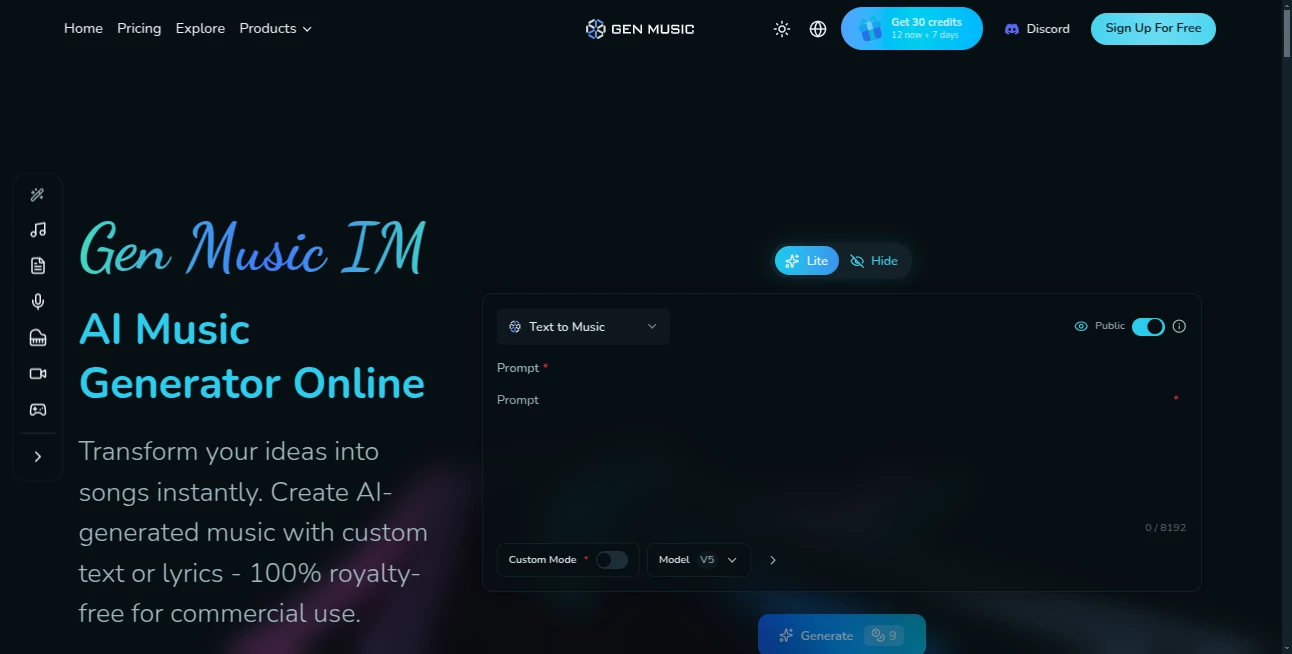
The moment you land on the page, it's clear someone thought hard about making this feel effortless. A single prompt box sits front and center, surrounded by friendly options for genre, mood, and length—no overwhelming menus. You can even upload a reference audio clip or add lyrics if you want to guide it. Everything flows naturally: type, tweak, listen, regenerate. It's the kind of design that disappears while you're using it, letting the music take center stage.
Accuracy & Performance
What really impresses is how well it understands intent. Ask for "melancholic lo-fi with soft female vocals and rainy window vibes," and it delivers something that feels exactly right—not just close, but emotionally spot-on. Generations are fast, rarely taking more than 45 seconds even for longer tracks. The audio quality is surprisingly rich for something generated this quickly—no tinny artifacts, no robotic feel—just music that sits comfortably next to human-made tracks.
Capabilities
It handles a huge range of styles—from hyperpop to ambient folk, trap beats to orchestral ballads—and lets you control everything from tempo to structure. You can generate instrumentals, full songs with vocals, or even extend existing clips. The real magic is in the consistency: characters stay in key, melodies evolve naturally, and arrangements feel thoughtful. Plus, you own 100% of what you create, no licensing headaches.
Security & Privacy
Your creations stay yours. No one else can access them, and there's no sneaky training on your prompts or outputs. The platform is clear about data handling: what you generate is private, and you can delete it anytime. For someone who's protective of rough ideas, that level of respect makes all the difference.
Use Cases
Songwriters use it to brainstorm quickly—throw in a chorus idea and get verses and bridges that spark new directions. Content creators make custom background tracks for videos without worrying about copyright. Teachers and therapists use gentle instrumentals for mood-setting. Even casual users have turned birthday messages into actual songs for friends, which always lands better than expected. It's versatile enough that it fits into whatever creative space you already have.
Pros and Cons
Pros:
- Incredibly fast—full songs in under a minute.
- Surprisingly good vocal quality and emotional depth.
- You own everything you create, no strings attached.
- Simple, distraction-free interface that just works.
Cons:
- Free tier has a daily limit (though generous).
- Longer tracks (over 3 minutes) require paid plans.
- Occasional need for 2–3 generations to nail a specific vibe.
Pricing Plans
You can start completely free with a generous daily quota—enough to play seriously without spending a cent. When you want unlimited generations, longer tracks, and commercial rights, the paid tiers are reasonable. Basic unlocks full ownership and removes limits, while Pro adds priority queue and higher quality. Annual plans save a chunk, and they offer a trial period so you can test everything before committing.
How to Use GenMusic
Sign up (takes seconds), then type your idea: "upbeat indie pop about summer road trips, male vocals, driving guitar riff." Pick a genre if you want to nudge it, add lyrics or a reference clip if you have one, and hit generate. Listen to the result, tweak the prompt if needed (e.g., "make the chorus bigger"), and regenerate. When you're happy, download in high quality or share directly. The whole process is so quick you can iterate five versions before your coffee gets cold.
Comparison with Similar Tools
Other music generators often feel like toy boxes—fun but limited in quality and control. This one stands out with its focus on full, coherent songs rather than just loops. The vocal performance is noticeably stronger, and the ability to extend or reference clips gives you real creative direction. It's less about raw experimentation and more about delivering finished, usable tracks that sound like they belong on a playlist.
Conclusion
This tool quietly removes the biggest barriers to making music: time, equipment, and technical know-how. It doesn't pretend to replace human artistry—it just gives everyone the chance to hear their ideas fully realized, fast. Whether you're a bedroom producer, a content creator, or just someone who loves music, it opens a door that used to stay locked. Give it a try; you might be surprised how quickly it becomes part of your creative routine.
Frequently Asked Questions (FAQ)
Do I own the songs I make?
Yes, 100% yours to use however you want, including commercial projects.
How long can the songs be?
Up to 4 minutes on paid plans; shorter on free.
Can I upload my own lyrics?
Absolutely—paste them in and it will sing them for you.
What if I don't like the first result?
Just tweak the prompt or hit regenerate—most people get it perfect in 2–3 tries.
Is it really free to start?
Yes, with a solid daily allowance—no card needed.
AI Text to Music , AI Lyrics Generator , AI Music Generator , AI Singing Generator .
These classifications represent its core capabilities and areas of application. For related tools, explore the linked categories above.
GenMusic Im details
This tool is no longer available on submitaitools.org; find alternatives on Alternative to GenMusic Im.
Pricing
- Free
Apps
- Web Tools
Categories

GenMusic Im Alternatives Product
AI Music Gen…

Lyria.run

Lyria3 AI

Custom Song
gemini music

AI Music API

Seedance

Lyrics to So…
Musikalis AI…