
🧠 AI Quiz
Think you really understand Artificial Intelligence?
Test yourself and see how well you know the world of AI.
Answer AI-related questions, compete with other users, and prove that
you’re among the best when it comes to AI knowledge.
Reach the top of our leaderboard.


















Kadabra
Automate Workflows with AI in Plain English

What is Kadabra?
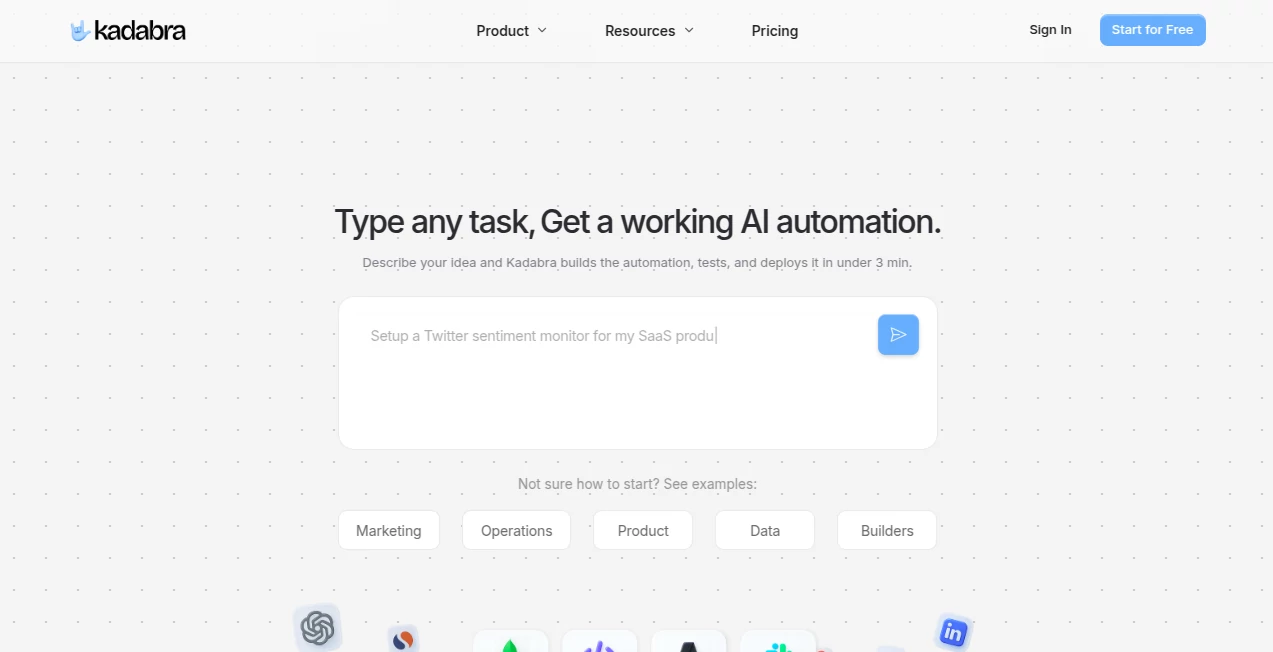
Kadabra slips into the chaos of daily operations like a trusty sidekick, letting teams describe what they need in everyday words and watching it spin up seamless processes that run themselves. This platform cuts through the tech jargon, turning vague ideas into reliable routines that save hours and headaches. Folks in fast-moving outfits rave about how it turns 'we should automate this' chats into actual tools that hum along, freeing up brains for the big-picture stuff.
Introduction
Kadabra showed up a bit back when a handful of workflow-weary pros decided enough was enough with clunky software that demanded coding chops just to get started. They built it to feel more like a conversation than a command line, and it caught on quick among marketing crews and data wranglers tired of manual drudgery. Now it's pulling in teams who once juggled spreadsheets and emails, sharing stories of how one simple prompt led to a system that handles leads or reports without a hitch. What grabs people is that effortless shift from brainstorm to build, making complex setups as straightforward as jotting a to-do list.
Key Features
User Interface
The dashboard hits you with a clean chat window right up front, where you type out your goal like you're briefing a colleague—no dropdowns or wizards to wade through. As you describe, it suggests tweaks or previews in plain view, with a sidebar for dragging in connections that snap into place. It's that rare setup where even the least techy team member can poke around and contribute, feeling more like a shared whiteboard than a stiff app.
Accuracy & Performance
When you lay out a task, it gets the nuances right off the bat, mapping out steps that align with your intent without wild guesses or extra rounds of fixes. It handles the heavy lifting fast, deploying flows that process batches in seconds rather than minutes, even when pulling from multiple sources. Users point to how it rarely drops the ball on edge cases, like quirky data formats, keeping things reliable for high-stakes runs without constant babysitting.
Capabilities
It weaves together over fifty connections to everyday tools, from email hubs to cloud storage, letting you craft everything from lead nurturing chains to inventory alerts. Turn a rough outline into a shareable dashboard that non-tech folks can use with a link, or layer in conditions that adapt on the fly. It's versatile enough for one-off experiments or ongoing ops, scaling from solo hustles to squad-wide systems without breaking a sweat.
Security & Privacy
Your setups stay buttoned up with role-based gates that let you dial in who sees or runs what, all backed by standard encryption for data zips in and out. It keeps audit trails light but thorough, so you can trace a flow's path without sifting logs. Teams in regulated spots appreciate how it folds in compliance nods, ensuring sensitive bits like customer info don't stray beyond your control.
Use Cases
Marketing teams pipe new sign-ups straight into nurture sequences, auto-tagging and emailing without the usual copy-paste frenzy. Data folks set up pulls that crunch numbers from scattered sheets into neat reports, flagging outliers before they bite. Operations squads build check-ins that route approvals across desks, shaving days off routine reviews. Product managers even mock up user flows for testing, sharing interactive prototypes that gather feedback on the spot.
Pros and Cons
Pros:
- Speaks your language, ditching code for casual chats that speed things up.
- Hooks into tons of apps, making it a glue for your existing stack.
- Shares easy as a link, pulling in collaborators without logins.
- Deploys quick, turning talks into tools before the meeting wraps.
Cons:
- Best with clear asks; fuzzy ones might need a sharpen or two.
- Advanced branches can tangle if you're not watching the preview.
- Free tier teases but tapers off for bigger builds.
Pricing Plans
Start free with core chats and a smattering of runs, enough to test a couple flows without dipping into pockets. Bump to starter at around twenty bucks monthly for unlimited builds and basic shares, then pro at fifty for team access and deeper integrations. Enterprise flexes custom for heavy hitters, with a trial week across the board to let you spin without strings. Yearly shifts save a slice, keeping the math friendly for steady users.
How to Use Kadabra
Log in and fire up a new chat, spilling your scenario in sentences like 'pull leads from the form and tag hot ones for follow-up.' Watch it outline the steps, tweak any hitches with follow-ups, and hit deploy to grab your link. Test it live, loop in a teammate for input, and set watches for any snags. Build on it over time, stacking new prompts to evolve simple saves into powerhouse pipelines.
Comparison with Similar Tools
Unlike rigid builders that box you into blocks, Kadabra's wordy approach frees the flow for quick iterations, though those might suit visual planners better. Against no-code giants, it trims the bloat with AI smarts, skipping the drag but perhaps pinching on pre-built templates. It lands strong for chatty teams who want speed over sprawl, edging out the button-heavy with that natural nudge.
Conclusion
Kadabra quiets the workflow wars by making automation feel like an extension of thought, not a tech takeover. It hands back time to the doers, turning tangled tasks into tidy triumphs that let creativity breathe. In a world wired for more, this one unwires the unnecessary, proving plain words can power profound change—one prompt at a time.
Frequently Asked Questions (FAQ)
Do I need coding skills to start?
Not a bit—just talk it through like you're explaining to a sharp intern.
How many tools can I connect?
Over fifty out of the gate, with room to plug in more via APIs.
Can teams collaborate on builds?
Yep, share links for joint tweaks or run rights without full access.
What if a flow breaks?
Built-in alerts ping you, with easy edits to get back on track.
Is it scalable for big ops?
From solo spins to enterprise engines, it grows with your grind.
AI Productivity Tools , AI Task Management , AI Workflow Management , AI Project Management .
These classifications represent its core capabilities and areas of application. For related tools, explore the linked categories above.
Kadabra details
This tool is no longer available on submitaitools.org; find alternatives on Alternative to Kadabra.
Pricing
- Free
Apps
- Web Tools
Categories

Kadabra Alternatives Product

Flow Veo 3

LaunchBoard

ClearWork

Zapier

Enji

Zivy
Devplan

AiZolo

MindSnapz
