🧠 AI Quiz
Think you really understand Artificial Intelligence?
Test yourself and see how well you know the world of AI.
Answer AI-related questions, compete with other users, and prove that
you’re among the best when it comes to AI knowledge.
Reach the top of our leaderboard.

















GoViralTrend
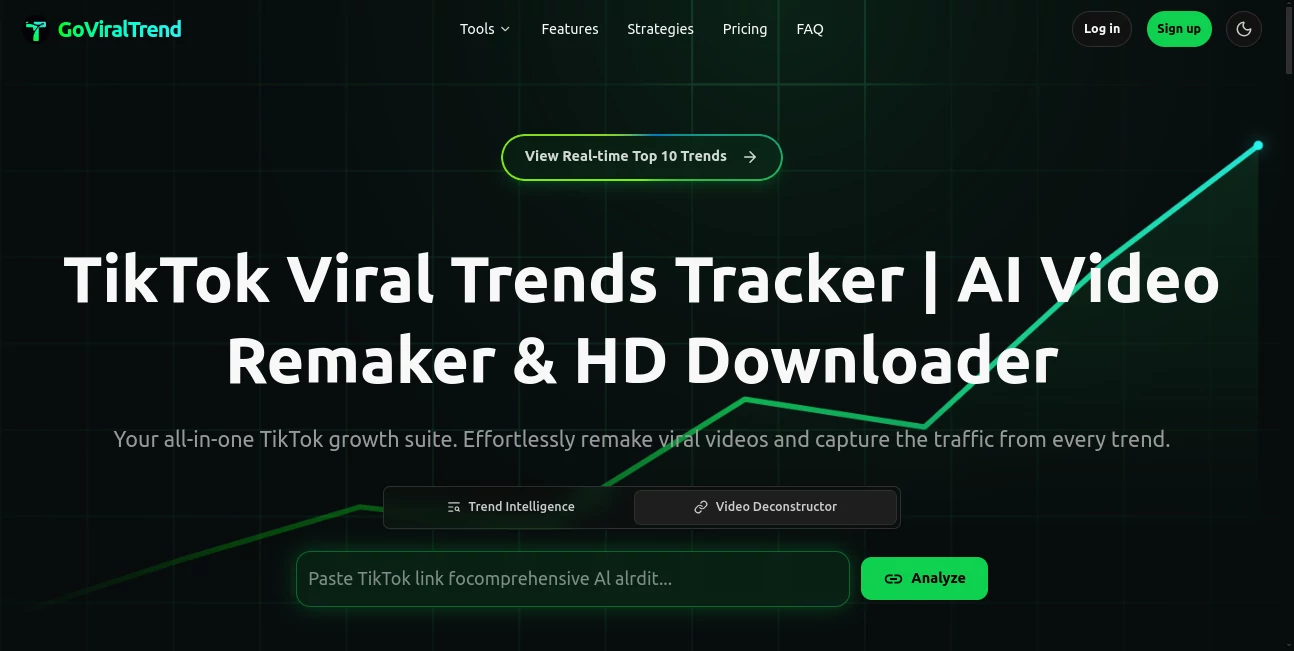
What is GoViralTrend?
There’s a moment when you realize the next viral clip on your feed didn’t take hours of filming and editing — it was born from a single idea typed into a box. That’s the feeling this tool delivers again and again. You write what you want to say, pick a style or voice, and within moments you have a ready-to-post short video that looks and sounds like it came from someone who’s been doing this for years. I’ve seen creators who used to spend full evenings scripting and shooting now finish three polished pieces before breakfast. The jump from “I wish I could make content like that” to actually doing it is surprisingly short here.
Introduction
Short-form video has become the fastest way to reach people, but the production side still feels intimidating for most. Scripting, recording, cutting, captions, music, effects — it piles up quickly. This platform quietly removes most of that pile. It takes your text (or even a rough voice note), understands the tone you’re going for, and builds a complete video with visuals, voiceover, subtitles, transitions, and background music that actually fits. No camera shyness, no expensive gear, no learning curve that lasts weeks. It’s especially refreshing for people who already have good ideas but never had the time or tools to bring them to life. The moment you see your own words turned into something shareable, the hesitation disappears.
Key Features
User Interface
The screen greets you with almost nothing — just a big box to type or paste your script and a few friendly dropdowns for style, voice, and length. No cluttered panels or confusing icons. You hit generate, the preview loads fast, and everything you need to tweak (voice speed, subtitle style, background vibe) is right there without digging through menus. It feels calm and focused, like the tool knows you just want to get to the fun part.
Accuracy & Performance
The voice matches the emotion you asked for — upbeat stays upbeat, serious stays serious — and the visuals sync surprisingly well with the spoken words. Generation usually takes under a minute, even for 60-second clips. Subtitles appear timed perfectly, and the pacing feels natural, not robotic. In real use, the first output is often good enough to post with only tiny adjustments, which is rare for AI video tools.
Capabilities
You can go from plain text to full video with AI narration, stock footage or generated visuals, auto-captions, background music, and basic transitions. It supports multiple languages and voice styles, so the same idea can be localized quickly. Want a different look? Change the template or tone and regenerate in seconds. It’s built for speed without sacrificing watchability — exactly what short-form content needs.
Security & Privacy
Your scripts and generated videos stay private. Nothing is automatically shared or stored in a public library. The process is end-to-end contained, and you control what gets downloaded or posted. For creators who value owning their content completely, that matters a lot.
Use Cases
A fitness coach types up a quick tip about morning stretches and gets a motivational clip ready to post on Instagram Reels. A small business owner creates weekly product highlights without ever turning on a camera. A meme page owner turns trending jokes into narrated skits that spread fast. Even non-creators — teachers, consultants, hobbyists — use it to share knowledge in a format people actually watch. It turns “I should make a video about this” into something finished and shareable before the idea fades.
Pros and Cons
Pros:
- From idea to finished video in under two minutes — speed is addictive.
- Voice and visuals feel surprisingly natural, not uncanny.
- Auto-captions and music sync save hours of manual work.
- No filming required — perfect for camera-shy creators.
Cons:
- Longer videos (over 60 seconds) can lose some polish.
- Very specific visual styles sometimes need prompt tweaking.
Pricing Plans
It starts with a free tier generous enough to create several clips and feel the quality. Paid plans unlock watermark-free exports, higher resolution, more monthly generations, and priority processing during busy times. The jump from free to paid feels worthwhile the moment you want to post consistently without branding on every video. It’s priced sensibly for creators who treat content as a serious part of their growth.
How to Use GoViralTrend
Type or paste your script into the main box — keep it conversational, like you’re talking to a friend. Choose your preferred voice style and video length. Hit generate and wait a short moment. Preview the result; if something feels off, tweak the prompt or voice and regenerate. Download when it feels right, or export directly to your social scheduler. The loop is so fast you’ll often make three versions before settling on the best one.
Comparison with Similar Tools
Many AI video tools either force heavy manual editing afterward or produce stiff, robotic results. This one strikes a sweet spot: fast enough for daily use, polished enough to post immediately, and flexible enough to match different tones and niches. Where others feel experimental, this feels production-ready — especially for short-form creators who need volume without burnout.
Conclusion
Content creation shouldn’t feel like punishment. This tool takes the friction out of short-form video so the only thing standing between your idea and the audience is the time it takes to type it. It’s not about replacing creativity — it’s about finally giving it the speed and polish it deserves. Once you experience how quickly “I should post about this” turns into something people actually watch and share, it’s hard to go back.
Frequently Asked Questions (FAQ)
How long can the videos be?
Most users get the best results between 15–60 seconds — perfect for Reels, Shorts, and TikTok.
Do I need to record my own voice?
No — the AI generates natural-sounding narration in multiple styles and languages.
Can I customize the visuals?
Yes — choose templates, adjust tone, or guide specific scenes with extra instructions.
Are there watermarks on free videos?
Free tier includes a small watermark; paid plans remove it completely.
Is it good for non-English content?
Very — strong multilingual support with natural accents across many languages.
AI Animated Video , AI Text to Video , AI Video Generator , AI Short Clips Generator .
These classifications represent its core capabilities and areas of application. For related tools, explore the linked categories above.
GoViralTrend details
Pricing
- Free
Apps
- Web Tools
Categories

GoViralTrend Alternatives Product
JoyFlix AI

AI Animate I…

Veo 3.1

sora video
AI Best

Seedance 2.0

Seedance 2.0…

Seedance 2 V…

HypeClip